
4 Best Printers For Printing Art Prints in 2026
This post contains affiliate links. As an Amazon Associate, we earn from qualifying purchases.
For artists who need to reproduce their work with gallery-quality accuracy, the Canon imagePROGRAF PRO-310 Printer delivers the best overall balance of color depth and scratch resistance. That’s thanks to its 9-color Lucia PRO II ink system with a dedicated Chroma Optimizer. For faster production of vibrant portfolio pieces, the Canon PIXMA PRO-200S is our Best Fast Photo Printer, while the Epson EcoTank Photo ET-8550 earns the Best Budget Pick for drastically reducing per-print costs.
Printing art at home means matching the color, detail, and texture of your original work, something consumer all-in-ones rarely manage. You need a printer built for fine-art reproduction, one that handles heavy media, uses archival-quality ink, and delivers consistent results from the first print to the hundredth.
This guide evaluates four dedicated photo printers based on their ink technology, print size capability, media handling, and real-world owner feedback. We focus on what matters most for art reproduction: color accuracy, black density, archival longevity, and ease of use over time.
Top 4 Printers For Printing Art Prints in the Market
Certain content that appears on this site comes from Amazon. This content is provided "as is" and is subject to change or removal at any time.
The Best Printers For Printing Art Prints, Reviewed
Canon imagePROGRAF PRO-310 Printer

What We Like
- 9-color + Chroma Optimizer for gallery-quality prints
- Lucia PRO II ink for enhanced gloss uniformity
- Matte Black ink for deeper black density
- Anti-Clogging System and Skew Correction for ease
Trade-offs
- At 31.6 lb, it needs a sturdy desk or stand
- 13-inch width limits large-format art prints
A nine-color pigment ink system plus a dedicated Chroma Optimizer produces gallery-quality prints with deep blacks from the Matte Black ink, smooth gradations, and scratch resistance. The 13-inch print width works well for standard fine-art paper sizes like 13×19, so you can create portfolio-ready pieces without needing a larger machine. Artists who value rich black density and scratch resistance in every print will find this printer a strong option.
At 31.6 pounds, this printer needs a sturdy desk or stand, it’s not something you move around casually. Reviewers note it requires a dedicated workspace, unlike the lighter Epson XP-15000 at 18.7 pounds. But if print quality matters more than portability, the pigment-based system delivers enhanced black density and scratch resistance that make a real difference on fine-art papers.
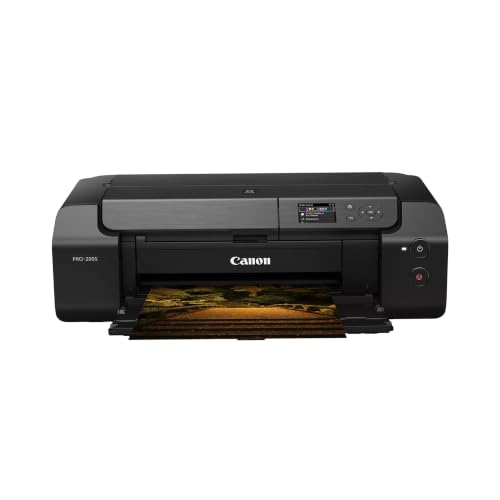
Canon PIXMA PRO-200S Printer
What We Like
- 8-color dye ink for vibrant prints
- Borderless printing up to 13" x 19"
- A3+ print in 90 seconds
- 3.0" color LCD for status checks
Trade-offs
- At 32.0 lbs, it's heavy to move
- No built-in scanner or copier
A bordered A3+ print in just 90 seconds means this printer keeps up when you’re running a batch of art prints for a show or a client. The 8-color dye-based ink system delivers vibrant, punchy colors that make your digital paintings or photo reproductions pop on paper up to 13″ x 19″ borderless. It’s built for speed without sacrificing the rich tonal range that matters most to artists who need consistent, gallery-ready output fast.
Epson EcoTank Photo ET-8550 Printer

What We Like
- Lab-quality 6-color photo prints
- Ink bottles cut photo cost drastically
- Up to 2 years of ink included
- Reduces cartridge waste significantly
Trade-offs
- At 24.5 lb, it is heavy to move
- Wide footprint needs dedicated desk space
Up to 6,200 color pages per set and two years of ink in the box mean fewer interruptions and more time creating. For a home studio or small creative space, this printer delivers professional-looking results on paper up to 13×19 inches, all while keeping waste and hassle low.
The trade-off is weight and footprint. It needs a dedicated spot, and if you ever need to move it, you will notice the heft. Compared to the lighter Epson Expression Photo HD XP-15000, this machine is bulkier and heavier, but it also holds far more ink and prints more pages before refills. For the artist who prints often and values low running costs over portability, that trade is easy to accept.
Product photos
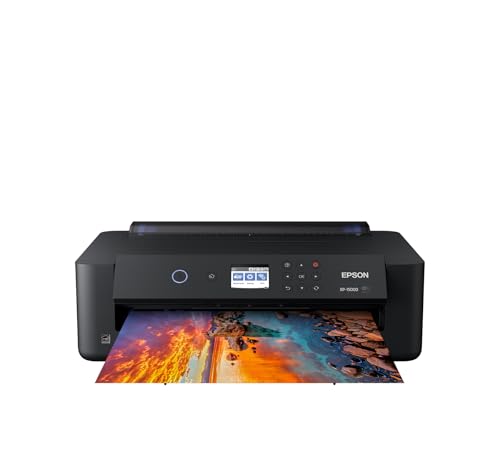
Epson Expression Photo HD XP-15000 Printer
What We Like
- Prints borderless up to 13×19 inches
- Six-color ink with red and gray
- Auto two-sided document printing
Trade-offs
- Uses only Epson Genuine Cartridges
- Rear tray holds only 50 sheets
- Print speed up to 9.2 ppm
A 13×19-inch print area in a desktop-sized body means you can produce gallery-ready art prints without dedicating a whole table to the printer. The six-color Claria Photo HD ink system includes red and gray cartridges, which the manufacturer says delivers an ultra wide color gamut and enhanced black-and-white prints. For photographers and home studio artists who want wide-format output but lack the floor space for a larger machine, this printer fits neatly on a desk. It still handles cardstock and specialty media through its rear tray.
The trade-off for that compact size is a slower print speed and a rear tray that holds only 50 sheets, so it is not built for high-volume runs. Compared to the Canon PIXMA PRO-200S, which uses eight-color dye ink and weighs 32 pounds, the XP-15000 is lighter and smaller but relies on a six-color setup. If your priority is a space-saving wide-format printer that delivers rich photo prints and can automatically order replacement ink, this is a practical fit.
Product photos
How We Evaluated Printers For Printing Art Prints
Our evaluation is research-based, drawing on manufacturer specifications, ink system documentation, expert round-ups from art and photography publications, and patterns in verified owner feedback. We compared ink chemistry, print resolution, media support, and reported reliability across the four finalists.
The three criteria that mattered most were ink technology (pigment versus dye, number of color channels, and presence of a gloss optimizer), maximum print size (13 inches wide was the cutoff for this round-up), and total cost of ownership including ink replacement frequency. We also considered weight and footprint. These printers are often placed in home studios with limited space.
An honest limitation of a research-led evaluation is that we cannot verify color accuracy or print longevity firsthand. We rely on documented ink fade-resistance ratings, manufacturer claims, and the consensus of professional users who have published long-term experiences.
What To Look For In Printers For Printing Art Prints
Choosing a printer for art prints means weighing ink chemistry, paper handling, and long-term costs. The right choice depends on whether you prioritize archival longevity, vibrant color, or upfront affordability.
Ink Technology: Pigment vs. Dye
Pigment inks sit on top of paper fibers, creating sharper detail and better resistance to fading, moisture, and scratching. They are the standard for fine-art prints meant to last decades. Dye inks soak into the paper and produce more vibrant, saturated colors but fade faster. The Canon imagePROGRAF PRO-310 uses all pigment inks with nine colors plus a Chroma Optimizer for even gloss, while the Canon PIXMA PRO-200S uses eight dye inks for maximum pop on glossy media.
Color Gamut and Black Density
More ink channels generally mean smoother gradations and a wider color gamut. Dedicated photo printers often include light cyan, light magenta, gray, or red inks to extend the range. For black-and-white prints, look for a separate matte black channel, the Canon PRO-310 has one, delivering deeper black density on fine-art papers. The Epson Expression Photo HD XP-15000 adds red and gray to its six-color set for better skin tones and neutral grays.
Print Size and Media Handling
All four printers in this guide print borderless up to 13 by 19 inches (A3+), which covers most portfolio and small edition prints. Check the rear feed path: a straight-through paper path handles thick fine-art papers without curling. The Epson EcoTank ET-8550 includes a front feed for heavy media, while the Canon PRO-310 has a dedicated manual feed for thick sheets.
- Confirm the printer supports your preferred paper brands (Hahnemühle, Canson, Epson Legacy, Canon Pro Platinum)
- Check whether the printer includes a roll feed if you plan to print panoramas or test strips
- Verify the maximum paper weight in gsm (grams per square meter) matches your media
- Look for a color LCD screen for on-printer status and maintenance checks
- Measure your desk depth, most printers in this class exceed two feet front to back
A dedicated photo printer is a long-term investment; plan for ink replacement costs that may exceed the printer purchase price within the first year of regular use.
Printers For Printing Art Prints Compared
The table below compares the four printers head-to-head on ink type, maximum print size, weight, and key features for art reproduction.
| Product | Ink System | Max Print Size | Weight |
|---|---|---|---|
| Canon imagePROGRAF PRO-310 Printer | 9-color + Chroma Optimizer pigment ink | 13 inches | 31.6 pounds |
| Canon PIXMA PRO-200S Printer | 8-color dye-based | 13" x 19" borderless | 32.0 pounds |
| Epson EcoTank Photo ET-8550 Printer | 6-color Claria ET Premium | 13 x 19 in. | 24.5 pounds |
| Epson Expression Photo HD XP-15000 Printer | 6-color Claria Photo HD | 13 x 19 in. | 18.7 pounds |
Frequently Asked Questions
What type of printer is best for art prints?
A professional photo printer with multiple pigment ink channels is best for fine-art prints because pigment inks resist fading and scratching better than dye inks. Look for at least six colors, a matte black channel for black-and-white work, and support for thick fine-art media through a straight paper path.
Do I need pigment or dye ink for art prints?
Pigment ink is the better choice if you want archival prints that last decades without significant fading. Dye ink produces more vibrant, saturated colors but is less resistant to UV light and moisture, making it better suited for short-run reproductions or glossy portfolio pieces that stay in a portfolio.
How much does it cost to print art prints at home?
The cost per print varies widely by printer and ink system. Inkjet photo printers that use individual cartridges or refillable ink tanks can produce a 13-by-19-inch print for a few dollars in ink. The Epson EcoTank ET-8550 uses high-capacity ink bottles that dramatically reduce per-print costs compared to cartridge-based models.
What size art prints can I make with a home printer?
All four printers in this guide print borderless up to 13 by 19 inches (A3+), which is large enough for most portfolio pieces, limited editions, and small wall art. For larger prints, you would need a wider-format model.
Can I print on watercolor or fine-art paper?
Yes, if the printer has a straight-through paper path that accepts thick media. Most dedicated photo printers support fine-art papers up to a certain thickness. Check the printer specifications for maximum paper weight in gsm and look for a front-loading or rear-sheet feed that avoids bending the paper.
The Bottom Line
The Canon imagePROGRAF PRO-310 is the best overall printer for artists who want gallery-quality pigment prints with deep blacks and scratch resistance. Its nine-color Lucia PRO II ink system and Chroma Optimizer deliver the color accuracy and gloss uniformity that fine-art reproduction demands. The 13-inch width limit and 31.6-pound weight mean it needs a dedicated studio space.
If speed matters more than archival ink, the Canon PIXMA PRO-200S prints a borderless A3+ in 90 seconds with vibrant dye inks, ideal for short-run reproductions and portfolio pieces. For artists on a budget, the Epson EcoTank ET-8550 drastically cuts per-print costs with its refillable ink system while still delivering lab-quality six-color prints.
The single most important factor in choosing an art print printer is ink technology. Prioritize pigment inks with multiple color channels and a matte black option if you want prints that match your original work and last for decades.
