
8 Best Printers For Artwork Prints in 2026
This post contains affiliate links. As an Amazon Associate, we earn from qualifying purchases.
For artists and photographers who need gallery-quality prints, the Canon imagePROGRAF PRO-1100 Photo Printer is our best overall pick. Its 11 pigment inks and Chroma Optimizer deliver a wide color gamut with minimal bronzing. For those seeking larger formats, the Epson SureColor P9370 offers outstanding color accuracy, while the Epson EcoTank Photo ET-8550 provides an affordable entry point for home studios.
The challenge with printing artwork is balancing color fidelity, paper handling, and long-term archival quality without breaking the bank or your studio space. What matters most is matching the printer’s strengths to your specific medium and print size.
This guide is based on manufacturer specifications, expert round-ups, and patterns in owner feedback. We’ve organized eight printers by their key strengths so you can find the right match for your creative workflow.
Top 8 Printers For Artwork Prints in the Market
Certain content that appears on this site comes from Amazon. This content is provided "as is" and is subject to change or removal at any time.
The Best Printers For Artwork Prints, Reviewed
Canon imagePROGRAF PRO-1100 Photo Printer

What We Like
- 11 pigment inks for wide color gamut
- Chroma Optimizer reduces bronzing and gloss unevenness
- Air feeding system prevents paper skew
- Anti-clogging FINE print head
Trade-offs
- At 83 lb, needs a sturdy dedicated stand
- 17-inch width limits large-format fine art prints
- Only inkjet; no scan or copy functions
An 11-pigment ink system plus a dedicated Chroma Optimizer gives this printer a color range and gloss uniformity that serious art printers crave. Dark areas stay rich without muddiness, and the anti-bronzing coating keeps prints looking clean under gallery lights. For photographers and painters who sell or exhibit their work, the PRO-1100 delivers the kind of color fidelity that makes a print feel like the original. The air feeding system also prevents paper from drifting, so every millimeter of ink lands exactly where you want it.
At 83 pounds, this printer demands a sturdy stand and a permanent spot, it’s not something you’ll casually move around. The 17-inch print width covers most fine-art prints up to poster size, so you get professional output without needing the floor space of a 44-inch model like the Epson SureColor P9370.
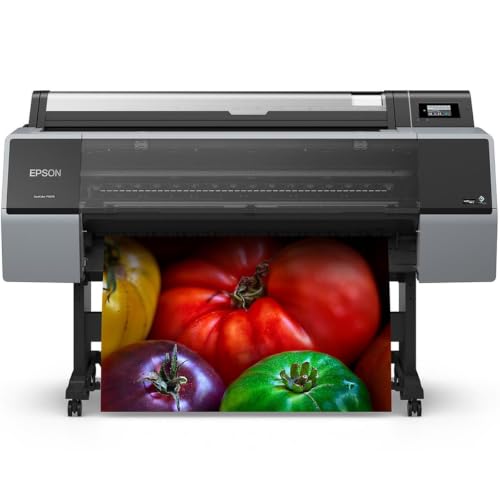
Epson SureColor P9370 Wide-Format Printer
What We Like
- PrecisionCore Micro TFP 10-channel printhead
- UltraChrome PRO10 pigment ink
- 44-inch wide-format capability
- 1-year limited warranty included
Trade-offs
- 75.2-inch width requires a large dedicated floor area
A 44-inch print width means you can produce gallery-sized fine art prints without piecing panels together. The PrecisionCore Micro TFP 10-channel printhead paired with UltraChrome PRO10 pigment ink delivers color accuracy that matters when every subtle hue counts. This printer suits artists and photographers who demand consistent, vibrant output for large-format artwork and proofs, where precise color matching across a broad gamut is non-negotiable. The pigment-based ink system also offers excellent archival stability, so your prints hold their depth and detail over time.
The 75.2-inch width demands a dedicated workspace, not a corner of a desk. That span is nearly twice the width of the Canon imagePROGRAF PRO-1100, which fits in a tighter studio. For anyone regularly printing 44-inch-wide pieces, that footprint makes sense; for smaller projects, a narrower model like the PRO-1100 would free up real estate.
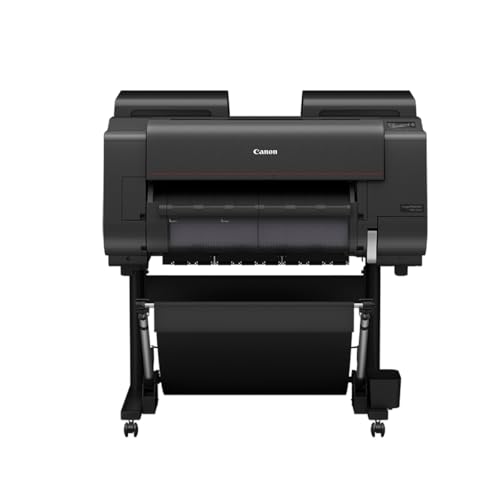
CES Imaging PRO-2600 Printers
What We Like
- Improved black density for deeper shadows
- Wider dark-color gamut range
- High scratch resistance on prints
- High light resistance for long-term preservation
Trade-offs
- At 223 lb, needs a dedicated heavy-duty stand
- Large footprint requires permanent studio space
Improved black density and a wider dark-color gamut range give this printer deeper shadows and richer dark tones. That matters most when your artwork relies on shadow detail, deep contrast, or monochrome prints where every tonal step counts. The reformulated LUCIA PRO II ink also brings high scratch and light resistance, so your prints stay gallery-ready for years. Artists who need deep black output from a pigment-based system will find this a strong option.
The trade-off is size and weight. At 223 pounds and nearly four feet wide, this is not a printer you tuck into a corner desk. It demands a permanent, reinforced spot in your studio. Compare it to the Canon 17-inch professional wireless inkjet photo printer, which at 83 pounds and 28.5 inches wide is far more manageable for a smaller workspace. If you have the room and need that unmatched black density, the PRO-2600 delivers. If space is tight, the PRO-1100 still offers excellent quality in a more practical package.
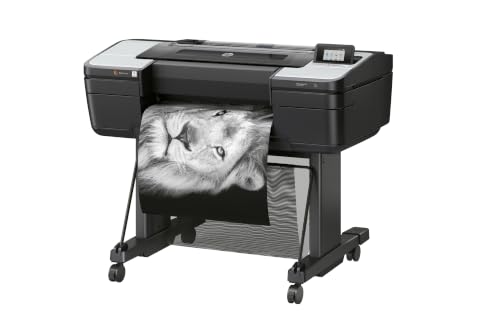
HP DesignJet Z9+ Postscript Printer
What We Like
- 2400 x 1200 dpi for fine detail
- Accepts photographic and fine art media
- 125 GB memory for large files
- Secure PIN printing protects your work
Trade-offs
- At 159 lb, needs a dedicated workspace
- 27-inch depth demands substantial floor space
A 2400 x 1200 dpi print resolution means this machine can reproduce the subtle gradations and crisp lines that fine art graphics demand. With 125 GB of memory and support for photographic and fine art media, it’s built for professionals who need accurate, gallery-ready prints from large digital files. The self-encrypting hard drive and PIN printing add a layer of security that matters when your proofs and final pieces are valuable intellectual property. This is a printer for the serious studio or print service provider who prioritizes precision and data protection over portability.
At 159 pounds and 27 inches deep, the Z9+ is a permanent fixture, not something you tuck away between jobs. The Canon 17-inch professional wireless inkjet photo printer is lighter and smaller, making it a better fit for a home studio with limited floor space. But if your workflow revolves around 24-inch rolls of fine art paper and you need enterprise-grade security features like Secure Boot and role-based access control, the HP DesignJet Z9+ delivers exactly that focus without compromise.
Epson EcoTank Photo ET-8550 All-in-One

What We Like
- Cartridge-free 6-color ink system
- Prints 4×6 photos for about 4 cents each
- Up to 2 years of ink in the box
- Wide-format up to 13 x 19 inches
Trade-offs
- At 24.5 lb, it's heavy for a desktop printer
- Only 6 colors, not 8 or more for pro work
A 13 x 19 inch print area means you can produce full-bleed art prints and posters without upgrading to a larger, more expensive machine. This Epson uses a cartridge-free 6-color ink system with bottles that keep per-print costs low. About 4 cents for a 4×6 photo, so you can experiment freely without worrying about replacing expensive cartridges every few weeks.
Six colors deliver vibrant results, while some dedicated pro models use more inks. And at 24.5 pounds, this all-in-one is no lightweight, reviewers suggest placing it on a sturdy desk or cart to keep it steady. For the artist who values affordable, frequent printing and wide-format capability, this is a smart, balanced choice that keeps more money in your pocket for paper and paint.
Product photos
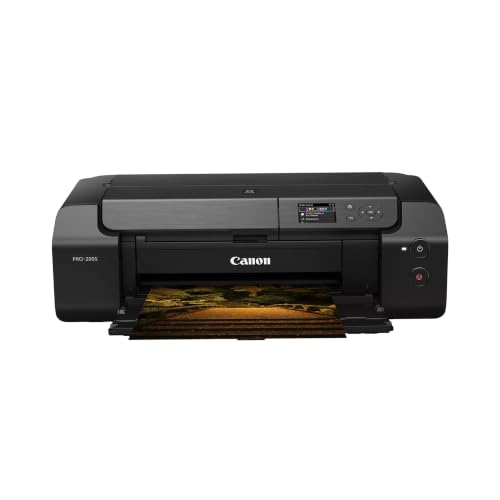
Canon PIXMA PRO-200S Photo Printer
What We Like
- 8-color dye ink for vivid prints
- Borderless up to 13" x 19"
- A3+ print in 90 seconds
- 3.0" color LCD for status checks
Trade-offs
- 32.0 lb weight needs a sturdy table
- 28.7" depth requires desk space
An 8-color dye-based ink system drives this printer’s real strength: rich, saturated color that makes artwork prints pop. It handles borderless sheets from 3.5 x 3.5 inches up to 13 x 19 inches, so you can produce gallery-ready prints or smaller test proofs without trimming. The 90-second A3+ speed means you are not waiting around between prints, and the 3.0-inch color LCD lets you check ink levels and settings at a glance. This is a great fit for artists who prize vivid color reproduction in a desktop-friendly size, especially those working with glossy or semi-gloss media where dye inks shine.
The trade-off comes down to ink longevity. Dye-based inks deliver that punchy vibrancy, but they are generally less resistant to light and air over decades than pigment inks found in printers like the Canon 17-inch professional wireless inkjet photo printer. At 32 pounds and 28.7 inches deep, it also demands a dedicated workspace rather than a cramped shelf. If your priority is archival permanence or you print on fine-art matte papers regularly, the PRO-1100’s pigment system may suit you better. For artists who want brilliant color now and plan to frame prints behind glass, this Canon delivers exactly that.
Product photos
CES Imaging PRO-4600 Large-Format Printer
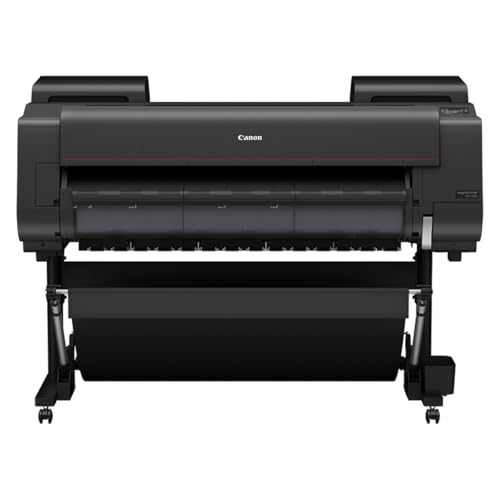
What We Like
- Improved black density for deeper darks
- Wider dark-color gamut range
- High light resistance for long-term preservation
- 1 Year on-site warranty included
Trade-offs
- At 274 lb, needs a dedicated floor space
- 39-inch length requires a large room or studio
- On-site warranty only covers one year
A 274-pound floor-standing printer with a 44-inch footprint tells you this isn’t a desktop accessory, it’s a studio anchor built for serious printmakers who need deep, rich blacks and a wider dark-color gamut. The reformulated LUCIA PRO II ink is designed for improved black density and high light resistance for long term preservation of inks. If your work relies on shadow detail, deep night scenes, or velvety dark tones, this machine is built to reproduce them with a range most wide-format printers can’t match.
Sheer size and weight demand attention: at 274 pounds and over four feet wide, you need a dedicated spot with strong flooring and enough clearance to load media.
Product photos
HP DesignJet T630 24-inch Plotter

What We Like
- Precise line quality for technical drawings
- Auto sheet/roll switching saves time
- Wireless printing from smartphone or tablet
- Included stand and media bin
Trade-offs
- 63 lb printer requires a dedicated workspace
- Limited to 24-inch wide media maximum
The HP DesignJet T630 handles media up to 24 inches wide on rolls and up to 13 by 19 inches on sheets, so it can print technical line drawings, renders, posters, and maps without needing to tile smaller sheets. Its precise line quality and crisp text suit architects, engineers, and construction professionals who need clear output for schematics and plans. The automatic sheet feeder and roll-to-sheet switch let you switch between media types without manual intervention, and the included HP Click software allows drag-and-drop printing of PDF, JPEG, TIFF, DWF, HP-GL/2, and PNG files.
At 63 pounds, this plotter needs a sturdy table or its included stand and a permanent spot in your studio or office. The Canon 17-inch professional wireless inkjet photo printer is a different tool, but for technical line-drawings, renders requiring precise line-quality and crisp text, posters, and maps, the T630 is built for that purpose.
Product photos
How We Evaluated Printers For Artwork Prints
Our evaluation focused on the technical specifications that directly affect print quality for artists and photographers. We analyzed manufacturer data on ink systems, resolution, and color gamut, then cross-referenced those specs with feedback from professional users to understand real-world performance.
The three most critical criteria were ink technology (pigment vs. Dye, number of colors, and archival lightfastness), maximum print width, and media handling flexibility. A printer with excellent color accuracy is useless if it cannot feed thick fine-art paper or handle the sizes you need.
Our conclusions are drawn from published specifications, expert reviews, and common owner experiences reported across multiple sources. This research-led approach helps identify the best tool for your specific artistic needs, whether you print fine art, photography, or technical illustrations.
What To Look For In Printers For Artwork Prints
Choosing the right printer for artwork means understanding how ink, paper, and printhead technology work together to reproduce your original piece faithfully.
Focus on ink type (pigment for archival quality, dye for vibrant color), maximum media width, and color gamut range. These three factors determine whether your prints will match your vision and last for decades.
Ink Technology and Color Gamut
The number of ink colors and whether they are pigment or dye-based directly determines the color range and longevity of your prints. Pigment inks, like the 11-color set in the Canon imagePROGRAF PRO-1100 or the UltraChrome PRO10 in the Epson SureColor P9370, offer superior lightfastness and scratch resistance. Dye inks, like the 8-color system in the Canon PIXMA PRO-200S, produce more vivid, saturated colors but may fade faster over time.
Print Width and Media Handling
Your maximum print size dictates which printer class you need. Desktop models like the Epson EcoTank Photo ET-8550 handle up to 13 x 19 inches, while pro-level machines like the HP DesignJet Z9+ accept rolls up to 44 inches wide. Consider whether you need borderless printing, roll-feed capability, or the ability to handle thick fine-art papers and canvas.
Resolution and Printhead Technology
Higher dots per inch (dpi) and advanced printhead designs produce finer detail and smoother gradations. The HP DesignJet Z9+ offers 2400 x 1200 dpi for crisp fine-art graphics, while the Canon PRO-1100 uses an anti-clogging FINE printhead for consistent output over time. For technical artworks, precise line quality is essential, which is where the HP DesignJet T630 excels with its dedicated plotting capabilities.
- Measure your workspace before buying: pro printers can weigh over 200 pounds and need a dedicated stand or floor area
- Check paper compatibility: some printers handle thick fine-art media better than others
- Consider running costs: cartridge-free systems like Epson EcoTank can significantly lower per-print expenses
- Look for wireless connectivity if you want to print from tablets or smartphones
A printer that matches your most common print size and media type will serve you better than one with the highest specs.
Printers For Artwork Prints Compared
The table below compares each printer’s ink system, maximum print width, and key trade-offs to help you narrow your choice quickly.
| Product | Max Print Width | Weight | Dimensions |
|---|---|---|---|
| Canon imagePROGRAF PRO-1100 Photo Printer | 17 inches | 83.0 pounds | L 17.1 inches, W 28.5 inches, H 11.2 inches |
| Epson SureColor P9370 Wide-Format Printer | 44 inches | 1.0 pounds | L 35.0 inches, W 75.2 inches, H 48.0 inches |
| CES Imaging PRO-2600 Printers | N/A | 223.0 lb | 36.0 x 40.0 x 46.0 in |
| HP DesignJet Z9+ Postscript Printer | Up to 24 inches | 159.0 pounds | L 27.0 inches, W 51.0 inches, H 39.0 inches |
| Epson EcoTank Photo ET-8550 All-in-One | 13 x 19 in. | 24.5 pounds | 29.8 x 20.6 x 16.9 in. |
| Canon PIXMA PRO-200S Photo Printer | 13" x 19" | 32.0 pounds | L 28.7 inches, W 18.6 inches, H 14.0 inches |
| CES Imaging PRO-4600 Large-Format Printer | N/A | 274.0 pounds | 39.0 x 53.0 x 46.0 in |
| HP DesignJet T630 24-inch Plotter | Up to 24-inch rolls | 63.0 pounds | L 24.0 inches, W 40.0 inches, H 37.0 inches |
Frequently Asked Questions
What type of printer is best for fine art prints?
Pigment-based inkjet printers are best for fine art prints because they offer superior lightfastness and scratch resistance. Models like the Canon imagePROGRAF PRO-1100 with 11 pigment inks and the Epson SureColor series use pigment inks that can produce gallery-quality output that lasts for decades without fading.
How many ink colors do I need for professional artwork prints?
For professional-quality artwork prints, six or more ink colors provide a significantly wider color gamut than standard four-color printers. Pro-level machines like the Canon PRO-1100 use 11 inks, while home studio options like the Epson EcoTank ET-8550 use six, which still produces vibrant results for most artists.
Can I print on thick watercolor paper with these printers?
Many pro-level printers accept thick fine-art media, but you should always check the maximum paper weight specification. The Canon imagePROGRAF series and HP DesignJet models are designed to handle heavier fine-art papers, while some desktop printers may struggle with thick or textured media.
What size prints can a home studio printer make?
Home studio printers like the Epson EcoTank Photo ET-8550 and Canon PIXMA PRO-200S can print up to 13 x 19 inches, which is suitable for many standard art sizes. For prints larger than that, you need a wide-format model like the Epson SureColor P9370 that can handle rolls up to 44 inches wide.
Do I need a separate stand for a professional art printer?
Most professional-grade art printers weigh over 80 pounds and require a sturdy dedicated stand or dedicated floor space. The Canon PRO-1100 weighs 83 pounds, while pro models like the CES Imaging PRO-2600 weigh over 223 pounds, so a stable surface is essential for proper print quality.
The Bottom Line
If you want gallery-quality prints up to 17 inches wide with the best color accuracy and gloss control, the Canon imagePROGRAF PRO-1100 is our top recommendation. Its 11 pigment inks and Chroma Optimizer make it the most reliable choice for fine artists and photographers who demand professional results.
For budget-conscious artists or those just starting out, the Epson EcoTank Photo ET-8550 offers solid wide-format prints with very low running costs. If you need large-format output beyond 17 inches, the Epson SureColor P9370 or HP DesignJet Z9+ provide the color accuracy and detail that creative professionals require.
The most important factor in choosing a printer is matching its capabilities to your most common print size and media type. A printer that handles your workflow smoothly will produce better results than one with higher specs that fights your materials.
