4 Best Printers For Artists in 2026
This post contains affiliate links. As an Amazon Associate, we earn from qualifying purchases.
For artists who need to reproduce their work with fidelity, the Epson SureColor P9370 Wide-Format Printer stands out as the best overall for large-scale prints. That’s thanks to its 44-inch wide format and UltraChrome PRO10 pigment ink. The Canon imagePROGRAF PRO-4100 leads for color accuracy, while the HP DesignJet Z9+ excels for fine art graphics.
The challenge with printing art is that standard office printers cannot handle the color gamut, paper sizes, or detail that a painting or drawing demands. You need a printer built for archival quality, wide media support, and consistent output that matches your original work.
This guide compares four large-format printers based on manufacturer specifications, expert reviews of printhead technology and color calibration, and patterns in owner feedback from professional artists. We focus on what matters most for reproducing art: color accuracy, print size, media compatibility, and long-term reliability.
Top 4 Printers For Artists in the Market
Certain content that appears on this site comes from Amazon. This content is provided "as is" and is subject to change or removal at any time.
The Best Printers For Artists, Reviewed
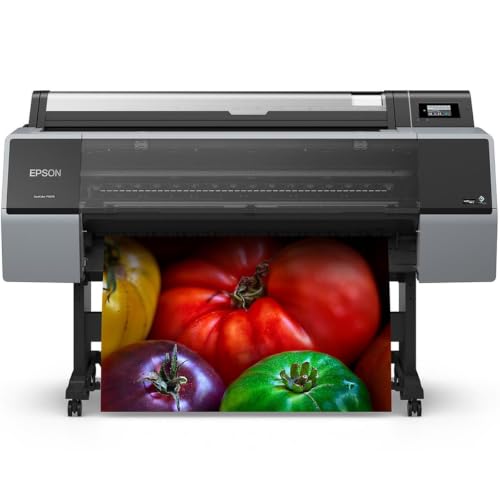
Epson SureColor P9370 Wide-Format Printer
What We Like
- 44-inch wide format for large prints
- PrecisionCore Micro TFP 10-channel printhead
- UltraChrome PRO10 pigment ink for vibrant color
- 1-year limited warranty included
Trade-offs
- Very large footprint requires dedicated space
- Single-year warranty on a professional printer
A 44-inch print width means you can produce gallery-sized fine art prints, posters, and detailed proofs without tiling or outsourcing. The PrecisionCore Micro TFP 10-channel printhead and UltraChrome PRO10 pigment ink deliver vivid, accurate colors that hold up over time, making this a natural fit for artists who need professional output at a large scale. Epson’s engineering backs the whole package with a 1-year limited warranty, so you have support while you dial in your workflow.
The trade-off is physical: this printer demands a permanent, spacious setup and careful handling, it’s not something you tuck into a corner or move between rooms. Compared to the Canon imagePROGRAF PRO-4100, which weighs 345 pounds, the P9370 is dramatically lighter, which can be a blessing for positioning. For artists with a dedicated studio and a need for true wide-format output, this printer delivers the reach and color quality the work demands.
Canon imagePROGRAF PRO-4100 Large Format Printer
What We Like
- 12-channel print head for fine detail
- Automatic color calibration with density sensor
- Speedy L-COA PRO image processing engine
- Multiple ink tank sizes for cost control
Trade-offs
- At 345 pounds, requires a dedicated floor space
- Large footprint: 68 inches wide needs room
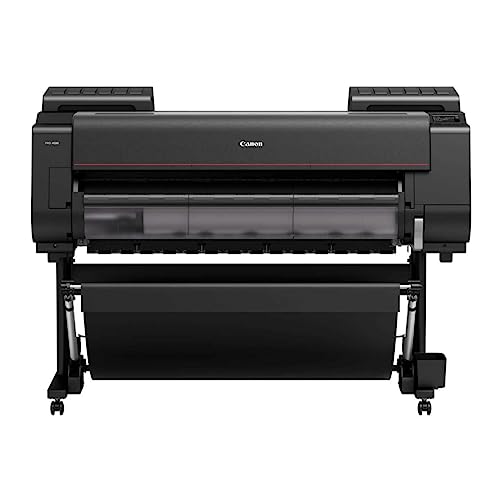
With a maximum print resolution of 2400 x 1200 dpi and a 12-channel integrated print head, this printer is built for high-detail output. The L-COA PRO Image Processing Engine speeds through large files, while the Color Density Sensor automatically calibrates to keep colors consistent from print to print. For anyone working on prints up to 44 inches wide, that combination means reliable, accurate results without manual tweaking.
The trade-off is size and weight. At 345 pounds and 68 inches wide, this is not a studio corner printer; it needs a dedicated, sturdy workspace.
Product photos
HP DesignJet Z9+ Graphics Printer
What We Like
- 2400 x 1200 dpi for sharp fine-art prints
- Accepts photographic and fine-art media
- PIN printing prevents print theft
- 125 GB memory handles large files
Trade-offs
- At 159 pounds, needs a dedicated workspace
- 125 GB memory limits handling of massive file batches
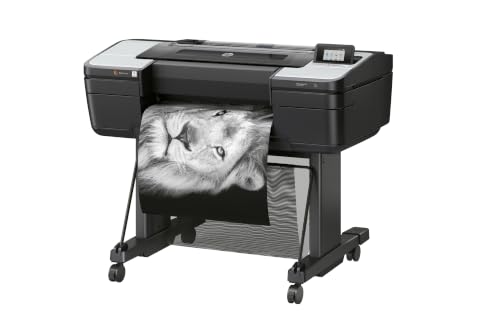
A 2400 x 1200 dpi print resolution means every brushstroke, pencil line, and subtle gradient in your fine-art graphics comes through with crisp detail. That kind of accuracy, paired with support for photographic and fine-art printing materials, makes this HP a natural fit for professionals who demand gallery-quality output from their large-format work. The generous 125 GB of memory and 500 GB self-encrypting hard drive let you handle hefty image files without slowdowns, while PIN printing keeps sensitive proofs private. If your art lives in the details, this printer respects that.
At 159 pounds, this machine demands a permanent, sturdy spot, it’s not something you move around the studio. That weight supports a 24-inch print width, so you can produce fine-art prints up to two feet across, plus roll feed and an automatic horizontal cutter for longer pieces. Reviewers note the security features, like PIN printing and encrypted storage, which keep sensitive work private in shared environments. For dedicated print service providers or photographers with a fixed workspace, the HP delivers the precision and capacity that justify the footprint.
Product photos
Pinckney Super-Tank Sublimation Printer

What We Like
- Cartridge-free super-tank with easy fill
- Includes scanner and copier
Trade-offs
- 22.0 lb weight makes it less portable
A 250-sheet paper tray lets you batch-print multiple sheets without reloading, which is handy when you’re working on a series of heat-transfer projects. The included sublimation ink and cartridge-free super-tank keep setup simple and running costs low, so you can focus on creating rather than refilling. A built-in scanner and copier mean you can digitize sketches or reproduce reference images right at your desk, making this a practical all-in-one for a small workspace.
Product photos
How We Evaluated Printers For Artists
This guide is based on manufacturer specifications, professional art-printing forums, and expert round-ups on wide-format output. We analyzed printhead technology, ink systems, color calibration methods, and media handling to understand real-world performance.
The four criteria that mattered most were color accuracy and consistency, maximum print size, ink system quality (pigment vs. Dye, number of ink channels), and media compatibility for fine-art papers. For artists, a printer is only as good as its ability to match screen to print over time.
A research-led evaluation has limits: we cannot speak to long-term mechanical reliability or the feel of operating each printer daily. We rely on patterns in owner feedback and documented specifications to guide our recommendations.
What To Look For In Printers For Artists
Choosing an art printer means balancing print size, ink technology, and your workspace. Here is what separates a capable printer from a frustrating one.
Look for pigment-based inks for archival quality, a printhead with at least 10 channels for smooth gradients, and automatic color calibration for consistent output. Consider maximum media width and whether the printer accepts fine-art and canvas papers.
Print Size and Media Handling
The most important decision is the maximum print width you need. Standard art prints often require 17 inches or wider, with professional work frequently going to 44 inches. Check the printer’s supported media types, fine-art paper, canvas, photographic paper, and heavy board stock are essential for different art mediums.
Ink System and Color Accuracy
Pigment-based inks resist fading for decades, while dye inks are less archival. More ink channels (10 or 12) allow smoother gradations and a wider color gamut. Automatic color calibration, like Canon’s built-in density sensor, helps maintain consistency across print runs without manual adjustments.
Printhead Technology and Resolution
A high-resolution printhead (2400 x 1200 dpi or better) reproduces fine detail in pencil work and brushstrokes. Micro-fine droplet technology reduces graininess in smooth areas. For artists, a printhead that handles both fine lines and solid color blocks is critical.
- Does the printer accept roll paper and sheet media?
- Can it print on heavyweight fine-art papers?
- Is there a built or optional color calibration sensor?
- What is the physical footprint, will it fit through your studio door?
- Are replacement ink cartridges or tanks affordable and available?
A good rule of thumb: buy for the largest print size you will need in the next two years, not just what you print today.
Printers For Artists Compared
The table below compares these four printers across the specifications that matter most for reproducing your art, from print width to ink technology.
| Product | Print Width | Ink Type | Weight |
|---|---|---|---|
| Epson SureColor P9370 Wide-Format Printer | 44 inches | UltraChrome PRO10 pigment ink | 1.0 pounds |
| Canon imagePROGRAF PRO-4100 Large Format Printer | 44 inches | 12 individual LUCIA PRO pigment tanks | 345.0 pounds |
| HP DesignJet Z9+ Graphics Printer | Up to 24 inches | N/A | 159 pounds |
| Pinckney Super-Tank Sublimation Printer | Up to 13 x 19 inches | Sublimation ink bundle included | 22.0 pounds |
Frequently Asked Questions
What size printer do I need for fine art prints?
Most professional artists choose a printer that handles at least 24-inch wide media, with 44-inch being the standard for gallery-sized work. The Epson SureColor P9370 and Canon imagePROGRAF PRO-4100 both support 44-inch rolls, while the Pinckney Super-Tank is limited to 13×19 inches.
Is pigment ink better than dye ink for art prints?
Yes, pigment ink is preferred for fine art because it is more resistant to fading, UV light, and moisture. Prints can last decades without significant color shift. The Epson and Canon printers in this guide use pigment-based inks, while sublimation printers like the Pinckney use dye-based inks for transfer to substrates.
Do I need a printer with automatic color calibration?
For consistent results across multiple prints, automatic calibration is highly recommended. The Canon imagePROGRAF PRO-4100 includes a built-in density sensor that adjusts color without manual intervention, which saves time and reduces waste from misprints.
Can I print on canvas with these printers?
Yes, the Epson SureColor P9370, Canon imagePROGRAF PRO-4100, and HP DesignJet Z9+ all support canvas media in addition to fine-art paper and photographic paper. Check the printer’s media thickness specifications to ensure compatibility with your preferred canvas brand.
How much space do I need for a large-format printer?
A 44-inch printer requires significant floor space. The Canon PRO-4100 is 68 inches wide and weighs 345 pounds, while the Epson P9370 has a large footprint that needs a dedicated area. Measure your studio doorways and workspace before purchasing.
The Bottom Line
The Epson SureColor P9370 is our best overall pick for artists with a dedicated studio who need true 44-inch wide-format printing with professional color accuracy. Its UltraChrome PRO10 pigment ink and 10-channel printhead deliver the vibrant, archival prints that gallery work demands.
If color accuracy is your top priority and you have the space for a heavy, wide printer, the Canon imagePROGRAF PRO-4100 offers unmatched consistency with its automatic calibration and 12-channel printhead. For artists on a budget who work with smaller formats and sublimation, the Pinckney Super-Tank bundle provides scanning and copying at a more accessible price point.
The single most important factor is print width: buy a printer that handles the largest size you will need, because upgrading later means replacing an entire machine.
