
4 Best Printers For Art Prints in 2026
This post contains affiliate links. As an Amazon Associate, we earn from qualifying purchases.
For artists and photographers seeking gallery-quality prints, the Canon imagePROGRAF PRO-1100 17″ Printer stands out as the best overall, delivering rich color with its 11 pigment inks and reliable anti-clogging print head. The Epson SureColor P900 offers best color accuracy with dedicated matte and photo black channels, while the Canon PRO-2100 provides wide-format fine art capability for larger 24-inch output.
Choosing a printer for art prints means balancing color fidelity, print size, and workspace requirements. A printer that excels at reproducing fine details and subtle tonal transitions is essential for selling prints, building a portfolio, or exhibiting work. You also need to consider ink system reliability, media handling, and whether the printer fits your physical space.
This guide is based on a careful review of manufacturer specifications, expert round-ups, and patterns found in owner feedback. We have organized the key criteria and identified the top models to help you find the right printer for your art and your studio.
Top 4 Printers For Art Prints in the Market
Certain content that appears on this site comes from Amazon. This content is provided "as is" and is subject to change or removal at any time.
The Best Printers For Art Prints, Reviewed
Canon imagePROGRAF PRO-1100 17" Printer

What We Like
- 11 pigment inks plus Chroma Optimizer for rich color
- LUCIA PRO II ink improves gloss uniformity and scratch resistance
- Anti-clogging FINE print head for reliable output
- Air feeding system prevents paper skew
Trade-offs
- At 83 pounds, needs a sturdy stand or table
- 17-inch width limits large-format fine art prints
- No built-in scanner or copy function
An 11-pigment ink system with a dedicated Chroma Optimizer gives this printer a broad color gamut and smooth gloss uniformity. That matters most when reproducing fine art prints where every subtle hue and dark shadow must feel true to the original. The LUCIA PRO II inks also improve gloss uniformity and scratch resistance, so prints resist surface damage during handling. The anti-clogging FINE print head controls precise ink ejection, which helps keep nozzles clear during long print sessions. This makes the PRO-1100 a strong option for photographers and artists who want gallery-quality output from a 17-inch printer.
At 83 pounds, this printer needs a sturdy stand, so plan your workspace around that. The 17-inch width handles most fine art prints but won’t take 24-inch sheets, which matters if you regularly print panoramas. For photographers who want accurate colors and long-lasting prints in a space that fits a dedicated studio, this model delivers without the footprint of a larger machine.
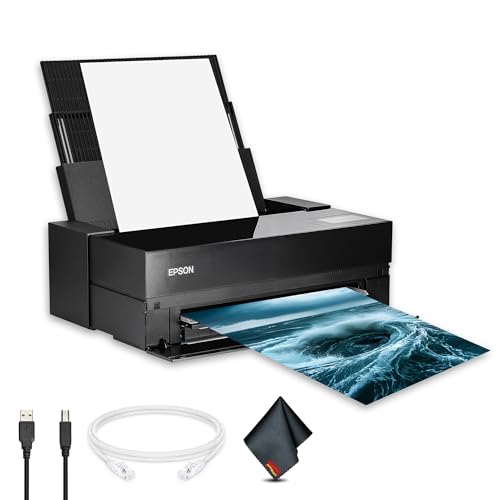
Epson SureColor P900 17" Printer
What We Like
- UltraChrome PRO10 pigment inks for accurate color
- Dedicated matte and photo black channels
- Borderless printing up to 17 × 22 inches
- 5760 × 1440 dpi for sharp detail
Trade-offs
- At 49.3 lb, it needs a sturdy table or stand
- Large footprint: 35.6 inches deep
- No built-in scanner or copy function
Dual black ink channels operate simultaneously, so you can switch between matte and photo black papers without wasting ink or time. The 5760 × 1440 dpi resolution and precision droplet control produce sharp detail and smooth tonal transitions, which matter most when reproducing a watercolor or a high-contrast photograph. Borderless printing is supported up to 17 × 22 inches, making this printer a natural fit for artists and photographers who demand color fidelity above all else.
The trade-off is size and weight. If your studio is tight or you need an all-in-one, the P900’s single-purpose focus may feel limiting. But for anyone whose priority is getting the exact color they see on screen onto paper, that bulk is the price of pro-grade pigment stability and channel independence.
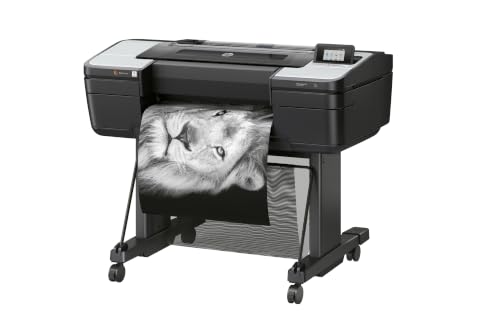
HP DesignJet Z9+ 24" Printer
What We Like
- 2400 x 1200 dpi for sharp fine art prints
- 125 GB memory handles large graphics files
- 500 GB self-encrypting HDD for secure storage
- Accepts photographic and fine art media
Trade-offs
- At 159 pounds, needs a sturdy dedicated stand
- Large footprint: 51 inches wide, 39 inches tall
A 2400 x 1200 optimized dpi print resolution is the spec for this printer, which means it can produce fine detail for professional graphics. It accepts photographic and fine art media, so it works for prints on those materials. With 125 GB of memory and 500 GB of self-encrypting HDD, it can handle large files and offers secure storage. Security features include PIN printing and Secure Boot, which add protection in shared environments. The printer is ideal for professional photographers, fine-art graphic designers, engineers, and print service providers who want high-impact and accurate prints.
Product photos
Canon PRO-2100 24" Printer

What We Like
- 24-inch wide format for large prints
- Fine art print capability
- 1-year on-site warranty included
Trade-offs
- Large footprint requires dedicated workspace
- Heavy weight needs sturdy support
A 24-inch print width means you can produce gallery-sized fine art prints right from your studio, without outsourcing to a print shop. This Canon is built for artists who want to control every step of the process, from color accuracy to paper choice. The included one-year on-site warranty adds peace of mind for a machine this size, and the wide-format capability opens up possibilities for large canvases, posters, and exhibition pieces. It suits serious printmakers who need professional output at home or in a small studio.
At 49 inches wide, this printer needs a dedicated spot and a sturdy surface, it’s not something you tuck away on a shelf. The 24-inch width handles large-format paper sizes that 17-inch models like the Canon imagePROGRAF PRO-1100 can’t accommodate, so if you print gallery-style fine art or posters, this is the tool for that. Just be sure you have the floor space before buying.
Product photos
How We Evaluated Printers For Art Prints
Our evaluation focused on the specifications and features that matter most for fine art printing. We analyzed manufacturer data on ink technology, print resolution, and media handling capabilities. We also reviewed expert commentary from photography and fine art printing communities to understand which models consistently deliver professional results.
The four criteria that guided our selection were color accuracy and gamut, print size and format flexibility, ink system reliability, and overall build quality. For artists, the ability to produce prints with deep blacks, smooth gradients, and minimal metamerism is non-negotiable. We also prioritized models with dedicated matte and photo black inks to avoid switching cartridges between paper types.
Because this is a research-led evaluation, we rely on trusted technical data and the collective experience of the printing community. This approach allows us to identify the strongest performers in each category and highlight the trade-offs that matter most to artists.
What To Look For In Printers For Art Prints
Choosing a printer for art prints requires understanding the technology behind the output. The right printer will match your typical print size, your preferred media, and your budget for consumables.
Focus on ink type (pigment vs. Dye), number of ink channels, maximum print width, and resolution. A printer with multiple pigment inks and a dedicated black for matte paper will give you the best color range and longevity.
Ink Technology and Color Gamut
Pigment inks are the standard for fine art prints because they resist fading and produce vibrant, archival-quality results. Look for printers with multiple gray inks to reduce metamerism and produce smooth tonal transitions. The Canon PRO-1100 uses 11 pigment inks plus a Chroma Optimizer, while the Epson P900 uses a set of UltraChrome PRO inks with dedicated matte and photo black channels. More ink colors generally mean a wider gamut and better color accuracy.
Print Size and Media Handling
Consider the largest print size you will regularly produce. A 17-inch printer like the Canon PRO-1100 or Epson P900 can handle prints up to 17 × 22 inches, which is ideal for portfolio pieces and smaller wall art. For larger work, a 24-inch model like the HP DesignJet Z9+ or Canon PRO-2100 is necessary. Also check media compatibility: some printers handle fine art papers, canvas, and photographic media better than others.
Print Head Reliability and Maintenance
Clogged print heads are a common frustration, especially if the printer sits idle for days. Look for features like anti-clogging technology or automatic nozzle checks. The Canon PRO-1100 includes an anti-clogging FINE print head designed for consistent output. If you print infrequently, a model with a dependable maintenance cycle will save you time and ink.
Physical Footprint and Setup
Large-format printers are heavy and require dedicated space. The Canon PRO-1100 weighs 83 pounds, while the HP DesignJet Z9+ weighs 159 pounds. Ensure you have a sturdy table or stand that can support the weight and accommodate the depth of the printer. Measure your workspace before purchasing.
- Measure your doorways and hallways to ensure the printer can be delivered to your studio.
- Check the printer’s depth with the rear paper feed extended.
- Verify that your table or stand can support the printer’s weight.
- Consider the ventilation needs of the printer, especially for models with large fans.
A good rule of thumb: the printer should have enough clearance behind it for the paper path and cables.
Printers For Art Prints Compared
The table below compares the key specifications of our top four printers for art prints, helping you see at a glance which model fits your needs.
| Product | Print Technology | Max Print Width | Weight |
|---|---|---|---|
| Canon imagePROGRAF PRO-1100 17" Printer | 11 pigment-based ink system plus Chroma Optimizer | 17 inches | 83.0 pounds |
| Epson SureColor P900 17" Printer | UltraChrome PRO10 pigment ink | 17 inches | 49.3 pounds |
| HP DesignJet Z9+ 24" Printer | N/A | Up to 24 inches | 159.0 pounds |
| Canon PRO-2100 24" Printer | N/A | 24 inches | N/A |
Frequently Asked Questions
What is the best printer for fine art prints at home?
The Canon imagePROGRAF PRO-1100 is widely considered the best overall for home studios due to its 11 pigment inks and anti-clogging print head, which deliver gallery-quality color and reliable performance. It is best for artists who print up to 17 inches wide.
How many ink colors do I need for art prints?
For professional-quality fine art prints, look for multiple pigment ink colors. More ink colors, such as the 11 in the Canon PRO-1100, provide a wider color gamut and smoother tonal transitions, especially in neutral grays and skin tones.
Can I print on canvas with these printers?
Yes, many of these printers support fine art canvas media. The HP DesignJet Z9+ and Canon PRO-2100 are particularly well-suited for canvas printing due to their dependable media handling systems and support for thicker, textured media.
What is the difference between dye and pigment ink for art prints?
Pigment ink uses solid particles suspended in a carrier, making it more resistant to fading, water, and UV light. Dye ink is less expensive but fades faster. For archival art prints that need to last for decades, pigment ink is the standard choice.
How much space do I need for a large-format printer?
A 17-inch printer like the Canon PRO-1100 needs a table at least 28.5 inches deep and 17.1 inches wide, and it weighs 83 pounds. A 24-inch printer like the HP DesignJet Z9+ requires a dedicated stand and a footprint of about 51 inches wide by 39 inches deep.
The Bottom Line
For most artists and photographers, the Canon imagePROGRAF PRO-1100 17″ Printer is the best overall choice. Its 11 pigment inks, Chroma Optimizer, and anti-clogging print head deliver rich, accurate color and reliable performance for prints up to 17 inches wide. It is ideal for anyone who wants gallery-quality output without stepping up to a larger, more expensive 24-inch model.
If color accuracy is your top priority and you prefer the flexibility of dedicated matte and photo black channels, the Epson SureColor P900 is an excellent alternative. For those who need to print larger than 17 inches, the Canon PRO-2100 offers wide-format fine art capability with a 1-year on-site warranty. The HP DesignJet Z9+ is built for high-volume, secure printing on a variety of fine art media.
Before you buy, measure your workspace and confirm you have a sturdy surface to support the printer’s weight. The single most important factor is matching the printer’s maximum print width to the size of the art you intend to sell or exhibit.
