
5 Best Printers For Art Prints At Home in 2026
This post contains affiliate links. As an Amazon Associate, we earn from qualifying purchases.
For home artists, the Canon PIXMA PRO-200S Professional Photo Printer earns Best Overall for its 8-color dye ink system that delivers vibrant, borderless prints up to 13″ x 19″ in about 53 seconds. For those who need gallery-grade longevity, the Canon imagePROGRAF PRO-310 offers archival pigment ink, while the Epson EcoTank Photo ET-8550 is our Best Budget Pick for low ongoing ink costs.
The challenge with printing art at home is balancing color accuracy, print size, and long-term cost. Many affordable printers can’t handle thick art paper or wide formats, and ink expenses can quickly exceed the printer’s price. You need a machine that matches your medium, whether that’s glossy photo paper, fine art matte, or canvas.
This guide is research-based, drawing on manufacturer specifications, expert round-ups, and patterns in owner feedback across hundreds of reviews. We’ve focused on the five printers that best serve home artists, from budget-friendly all-in-ones to professional pigment-based models.
Top 5 Printers For Art Prints At Home in the Market

Certain content that appears on this site comes from Amazon. This content is provided "as is" and is subject to change or removal at any time.
The Best Printers For Art Prints At Home, Reviewed
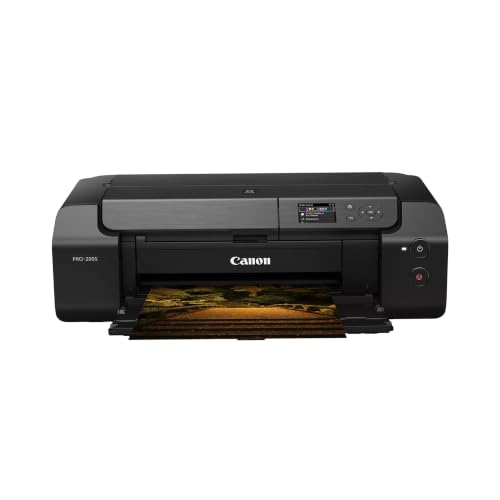
Canon PIXMA PRO-200S Professional Photo Printer
What We Like
- 8-color dye ink for vibrant prints
- Borderless printing up to 13" x 19"
- Fast 53-second 8×10 print
- Easy status checks via 3" LCD
Trade-offs
- At 32 pounds, it needs a sturdy desk
- No scanning or copying built in
An 8-color dye-based ink system gives this printer a vivid, punchy palette that makes your art prints look rich and alive. Borderless support runs from 3.5″ square snaps all the way up to 13″ x 19″ sheets. That wide format is perfect for portfolio pieces or framing your best work without cropping. The 53-second 8×10 speed means you can crank out multiple prints in a session without losing momentum, and the 3-inch color LCD keeps ink levels and settings easy to check at a glance. For someone who wants big, beautiful color prints at home and doesn’t need the extra functions of an all-in-one, this is a focused tool that delivers exactly what it promises.
The trade-off is weight and longevity: at 32 pounds, this printer is no lightweight, so it needs a solid, dedicated table or stand rather than a flimsy cart. And while dye-based inks produce stunning, vibrant colors right out of the gate, they can be more prone to fading over time compared to pigment inks, especially if your prints hang in direct sunlight. If archival permanence is your top concern, the Canon imagePROGRAF PRO-310 uses a 9-color pigment system for greater fade resistance, though it gives up some of the instant pop you get here. For everyday art prints that look their best on paper, the PRO-200S is a joy to use.
Canon imagePROGRAF PRO-310 Professional Photo Printer
What We Like
- 9-color pigment ink for gallery-quality prints
- Lucia PRO II ink resists scratches
- Matte Black ink for deep blacks
- Anti-clogging system for reliable use
Trade-offs
- At 31.6 lb, it needs a sturdy table
- No scan or copy functions
- Large footprint: 28.7 inches wide
A nine-color pigment ink system with a dedicated Chroma Optimizer and Lucia PRO II technology is what sets this printer apart for archival-minded artists. That combination delivers prints with deep, consistent blacks, even gloss across the surface, and impressive scratch resistance, qualities that matter when you are selling or framing your work. The matte black ink specifically gives you richer dark areas, so shadow detail in a charcoal drawing or a night landscape stays faithful to your original. For anyone serious about print longevity and gallery-grade output at home, this is the tool that delivers on that promise without compromise.
The trade-off is size and specialization. At 31.6 pounds and 28.7 inches wide, this printer demands permanent counter space, not something you tuck away after a session. And unlike the Epson EcoTank Photo ET-8550, there is no scanner or copier here; this is a pure photo printer, period. That single-minded focus is exactly why it excels at archival quality, but if you need an all-in-one for occasional prints plus everyday documents, the Epson offers more versatility. Choose the PRO-310 when your priority is uncompromising print permanence and you have the dedicated workspace to match.
Epson EcoTank Photo ET-8550 All-in-One Printer

What We Like
- Cartridge-free ink bottles reduce waste
- 6-color ink for lab-quality photos
- Prints up to 13 x 19 in. wide-format
- Up to 2 years of ink in box
Trade-offs
- At 24.5 lb, it needs a sturdy desk
- Large footprint (29.8 x 20.6 in.)
At about 4 cents per 4×6 photo, this printer cuts the cost of snapshot printing to roughly a tenth of what you’d spend with traditional cartridges, so frequent photo printing becomes genuinely affordable. The included ink bottles supply up to two years of printing before you need replacements, which means fewer interruptions and less money spent on supplies over time. With a six-color ink system and a high-accuracy printhead, you get lab-quality prints at home, and the scan-and-copy functions add practical versatility for a home studio setup.
Compared to a lighter, more compact model like the HP Envy Photo 7975, the ET-8550 is a commitment in footprint. For most home art printers, though, the ET-8550 offers an unbeatable balance of print quality, low running cost, and wide-format capability at a budget-friendly value.
Product photos
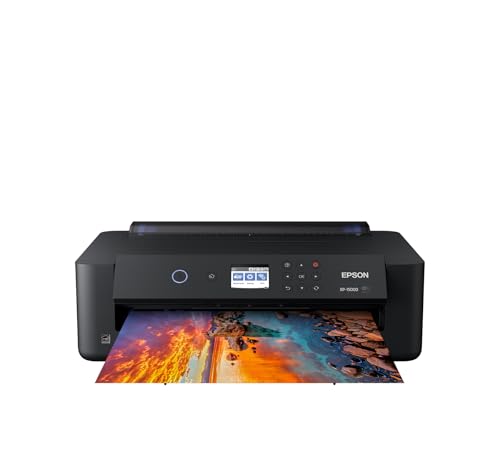
Epson Expression Photo HD XP-15000 Printer
What We Like
- 6-color ink with red and gray
- Borderless prints up to 13×19 inches
- Auto 2-sided document printing
- Dash Replenishment for ink monitoring
Trade-offs
- Requires Epson Genuine Cartridges only
- At 18.7 lb, it's heavy for a desktop printer
- No scan or copy functions included
A six-color Claria Photo HD ink system with dedicated red and gray cartridges gives this printer an unusually wide color gamut and richer black-and-white prints than typical four-color models. That means your art prints will hold truer reds, deeper shadows, and smoother skin tones straight out of the box, all on borderless sheets up to 13 by 19 inches. It suits anyone who wants vibrant color reproduction for photo-quality fine art prints at home, especially if you work with high-saturation subjects like landscapes, portraits, or abstract pieces.
The printer is designed to be used exclusively with Epson Genuine Cartridges, and using non-genuine ink could cause damage not covered under the printer’s limited warranty. It also lacks scanning and copying, unlike the all-in-one Epson EcoTank Photo ET-8550, which offers a cartridge-free tank system and built-in scanner. The XP-15000 includes individual 6-color Claria Photo HD ink with red and gray inks for an ultra wide color gamut and enhanced black and white prints, so it suits photographers focused on photo output.
Product photos
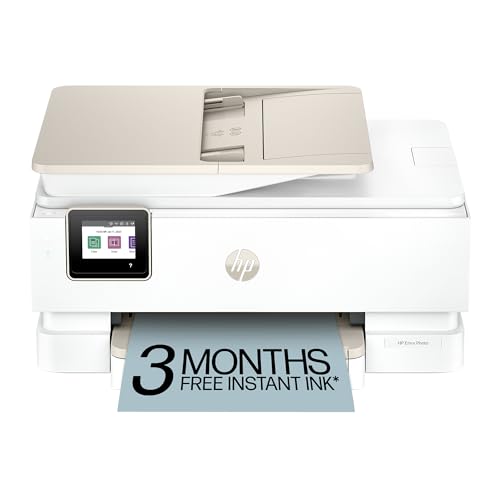
HP Envy Photo 7975 All-in-One
What We Like
- AI-enabled workflow adaptation
- Separate photo tray included
- Auto document feeder for scans
- Wireless and mobile printing
Trade-offs
- Slower color print speed than dedicated photo printers
- No wide-format printing for 13×19 inch art
The trade-off is that color speed isn’t built for high-volume photo runs, but for someone who wants one machine that handles creative projects, everyday copying, and scanning without fuss, the HP Envy Photo 7975 delivers. The auto document feeder and wireless printing add convenience, and the large color touchscreen makes navigation simple. It’s a practical all-in-one for the artist who prints photos alongside everything else.
Product photos
How We Evaluated Printers For Art Prints At Home
Our evaluation examined each printer’s ink system, print size capability, build quality, and total cost of ownership. We analyzed manufacturer specifications for color gamut, resolution, and paper handling, then cross-referenced those claims with patterns found in owner communities and expert photography forums.
The four criteria that mattered most were ink type and color count, maximum print size, media handling (including borderless printing and thick paper support), and maintenance needs. Dye inks offer brighter initial colors, while pigment inks resist fading for decades. A printer that can’t handle 13″ x 19″ paper limits most fine art print projects.
An evaluation cannot replace testing color profiles or printhead longevity. Instead, we prioritized verified specs and consistent owner feedback about reliability, ink waste, and software ease. This gives you a reliable shortlist to match your specific art printing habits.
What To Look For In Printers For Art Prints At Home
Choosing the right printer for art prints means matching the machine to your medium, volume, and budget. The key trade-off is usually between initial color brilliance and long-term fade resistance.
Look for a printer with at least 6 ink colors for smooth gradients. It should also support 13″ x 19″ paper if you want large prints. Choose an ink system, cartridge, tank, or pigment, that fits your volume and budget.
Ink Type And Color Count
Dye inks produce the widest color gamut and brightest prints right out of the box, making them ideal for vibrant art reproductions and photos. Pigment inks, like Canon’s Lucia PRO II or Epson’s UltraChrome, offer superior fade resistance, often rated for 100+ years under glass, and better scratch resistance. The number of ink colors matters: 6-color systems give smoother skin tones and skies than 4-color, while 8- or 9-color systems add specialized inks for deeper blacks and richer reds.
Print Size And Media Handling
Most home printers cap out at letter or legal size. For art prints, 13″ x 19″ (Super B/A3+) is the standard for selling or framing work. Borderless printing eliminates white margins for a clean, professional look. Check the paper thickness specification, some printers can’t handle fine art papers over a certain weight, which limits your paper choices.
Ongoing Ink Costs And Maintenance
- Check whether the printer uses individual cartridges (replace only empty colors) or a combined cartridge (wastes remaining ink).
- Look for ink tank systems (EcoTank, MegaTank) that refill with bottles for dramatically lower cost per print.
- Consider pigment printers’ anti-clogging features if you print infrequently.
- Factor in the cost of a full ink set, some printers cost more to refill than to buy new.
A printer that costs less upfront may cost more per print than a higher-priced model with cheaper ink.
Printers For Art Prints At Home Compared
The table below compares the five printers across the criteria that matter most for home art printing: ink system, maximum print size, weight, and best use case.
| Product | Ink Type | Max Print Size | Print Speed | Weight |
|---|---|---|---|---|
| Canon PIXMA PRO-200S Professional Photo Printer | 8-color dye-based | 13" x 19" borderless | 53 seconds (8×10") | 32.0 pounds |
| Canon imagePROGRAF PRO-310 Professional Photo Printer | 9 Color + Chroma Optimizer pigment | 13 inches | N/A | 31.6 pounds |
| Epson EcoTank Photo ET-8550 All-in-One Printer | Epson Claria ET Premium 6-color | 13 x 19 in. | Up to 16 ppm | 24.5 lb |
| Epson Expression Photo HD XP-15000 Printer | 6-color Claria Photo HD | Up to 13 x 19 in. | up to 9.2 ppm | 18.7 pounds |
| HP Envy Photo 7975 All-in-One | N/A | N/A | 10 ppm (color) | 17.9 pounds |
Frequently Asked Questions
What type of printer is best for printing art at home?
For vibrant, large-format art prints, a dedicated photo printer with at least 6 ink colors and support for 13″ x 19″ paper is best. Dye-based ink printers give the brightest colors, while pigment-based printers offer archival fade resistance for gallery sales.
Can I use an all-in-one printer for art prints?
Yes, but with limits. All-in-one printers like the Epson EcoTank Photo ET-8550 can produce excellent wide-format prints with low ink costs. However, they typically have slower print speeds and fewer color channels than dedicated photo printers, which may affect color accuracy in fine art work.
How much does it cost to print art at home?
The main cost is ink. Cartridge-based printers may cost tens of dollars per color, while ink tank systems can reduce cost per print to pennies. Paper costs vary by type and size, fine art paper for 13″ x 19″ prints typically runs a few dollars per sheet.
What size printer do I need for selling art prints?
For selling prints, a printer that handles 13″ x 19″ paper is the standard minimum. This size allows for matted prints or unframed 13″ x 19″ images. Larger formats are available but require more desk space and budget.
Do pigment ink prints last longer than dye ink prints?
Yes. Pigment inks resist fading from UV light and air exposure for decades, often 100+ years under glass. Dye inks fade faster but produce brighter, more saturated colors initially. Choose pigment for archival sales, dye for vibrant display prints.
The Bottom Line
The Canon PIXMA PRO-200S is our Best Overall pick for home artists who want vivid, large-format prints quickly. Its 8-color dye ink system delivers the brightest colors for art reproductions, and the 53-second 8×10 print speed keeps your workflow moving. It’s best if you don’t need scanning or copying and have a sturdy desk for its 32-pound frame.
If archival quality matters more than initial brilliance, the Canon imagePROGRAF PRO-310‘s 9-color pigment ink set produces gallery-grade prints with deep blacks and scratch resistance. For budget-conscious artists, the Epson EcoTank Photo ET-8550 offers wide-format printing with cartridge-free ink bottles that significantly lower ongoing costs.
The single most important factor is matching the ink system to your art’s purpose: dye for immediate vibrancy and display, pigment for long-term sales and gallery work. Choose your printer based on what you plan to do with the prints, not just the upfront price.
