
10 Best Computers For Digital Art in 2026
This post contains affiliate links. As an Amazon Associate, we earn from qualifying purchases.
For digital artists, the right computer is as essential as a favorite brush. The Dell Tower Plus EBT2250 Desktop takes the best overall spot with its 24-core Intel Core Ultra 9 processor and NVIDIA RTX 4060, making it a capable choice for demanding creative tasks. We also highlight the ultra-compact Apple Mac mini M5 Pro Desktop for space-savvy illustrators and the versatile HP 27 AIO Desktop for artists who want a color-accurate touchscreen.
The challenge is balancing processing power, display quality, and portability against your specific art style. A 3D modeler needs a different machine than a 2D illustrator who works on the go.
This guide is built from manufacturer specifications, expert round-ups, and patterns in owner feedback. We focus on the specs that matter most to digital artists: CPU and GPU performance, color accuracy, RAM, and storage.
Top 10 Computers For Digital Art in the Market
Certain content that appears on this site comes from Amazon. This content is provided "as is" and is subject to change or removal at any time.
The Best Computers For Digital Art, Reviewed
Dell Tower Plus EBT2250 Desktop

What We Like
- 24-core Intel Core Ultra 9 processor
- NVIDIA RTX 4060 with 8GB GDDR6
Trade-offs
- Requires separate monitor and peripherals
- No built-in display for portability
Because this is a full tower, it takes up more desk space than a compact system like the Apple Mac mini M5 Pro, and you’ll need to supply your own monitor and peripherals. That larger chassis, however, accommodates the RTX 4060 graphics card and 32GB of RAM, providing performance that a small-form-factor machine with unified memory can’t match for graphics-heavy work. If you want an all-in-one with a built-in screen, something like the HP 27 AIO Desktop might be a better fit. For anyone who needs desktop-grade power for demanding tasks, this Dell delivers the speed and capacity to get the job done.
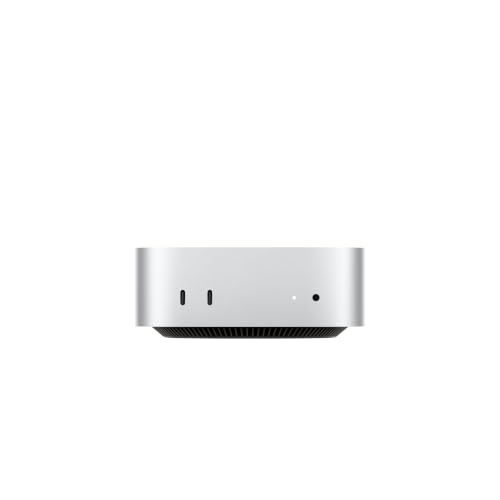
Apple Mac mini M5 Pro Desktop
What We Like
- Ultra‑compact 5‑inch square footprint
- M5 Pro chip with 307GB/s memory bandwidth
- Three Thunderbolt 5 ports for fast connectivity
- Supports up to three external displays
Trade-offs
- No discrete GPU for heavy 3D rendering
- Requires separate monitor, keyboard, and mouse
A five-by-five-inch desktop that weighs just 1.6 pounds means you can tuck this machine under a monitor or slip it into a bag for a studio visit. The M5 Pro chip provides 307GB/s of memory bandwidth and up to 2x faster storage, which supports faster renders and larger file support for video editors using ProRes RAW files or researchers loading custom datasets. For digital artists who work primarily in 2D painting, photo compositing, or vector illustration, this compact system frees up desk space without sacrificing the processing muscle needed for multi-layer canvases and real-time brush engines.
HP Pavilion Gaming Desktop

What We Like
- AMD Ryzen 7 5700G processor for multitasking
- NVIDIA GeForce RTX 2060 dedicated graphics
- 1 TB PCIe NVMe SSD for fast storage
- Windows 11 Pro for professional workflow
Trade-offs
- 13.1 pounds is heavy to move frequently
- RTX 2060 lags behind newer GPU options
The AMD Ryzen 7 5700G processor handles demanding tasks like gaming and creative work without stuttering, so you can run layered projects and multiple apps at once. The NVIDIA GeForce RTX 2060 graphics add real-time ray tracing, which makes photo editing and video rendering feel fluid. With a 1 TB PCIe NVMe SSD that performs up to 10 times faster than a traditional hard drive, you get near-instant loading for your files and software.
The trade-off comes in weight and future-proofing. At 13.1 pounds, this tower isn’t something you’ll want to carry between rooms or to a cafe, so it’s best left on a desk. Compared to the Dell Tower Plus EBT2250 Desktop with its RTX 4060 and 32 GB of RAM, the HP’s 16 GB memory and older RTX 2060 will feel tighter when working with massive canvases or 4K video timelines. For artists starting out or working on mid-sized projects, though, this desktop delivers strong performance at a practical cost. The dedicated GPU means you’re not relying on integrated graphics that can choke on complex layers.
Product photos
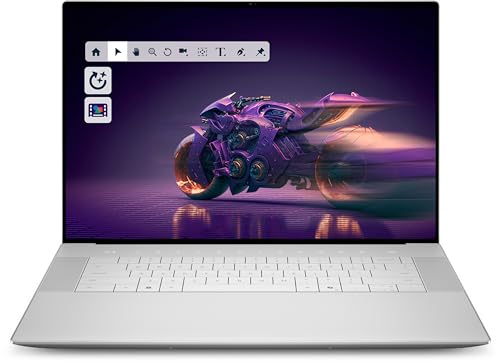
Dell Premium 16 Laptop
What We Like
- 2K 120Hz 500-nit low-blue-light display
- 32GB fast LPDDR5X memory for multitasking
- NVIDIA RTX 5050 with 8GB GDDR7 VRAM
- Fingerprint reader for quick login
Trade-offs
- 8.0 pounds is heavy for frequent travel
- Non-touch display limits direct canvas interaction
At 8.0 pounds, this laptop is noticeably heavier than the ASUS ROG Strix G16 at 5.8 pounds, so it’s less suited for frequent travel. If you primarily work at a single desk, the bright high-refresh screen and generous memory make it a capable stationary workstation. Reviewers note it feels substantial but stable on a desk.
Microsoft Surface Studio 1st Gen

What We Like
- 28-inch PixelSense touchscreen with 13.5M pixels
- Zero Gravity Hinge for one-hand angle adjustment
- Includes Surface Pen, Keyboard, and Mouse
- Discrete NVIDIA GeForce dGPU
Trade-offs
- At 32.8 pounds, it is heavy to reposition
- 16GB RAM limits heavy multitasking for large files
- Older 1st Gen hardware compared to current desktops
A 28-inch PixelSense display with 13.5 million pixels means you get a canvas that shows every subtle gradation and fine line as you draw directly on the screen. The Zero Gravity Hinge lets you move the display from an upright angle down into Studio Mode with one hand. This all-in-one includes the Surface Pen, keyboard, and mouse, so you have the tools to start drawing right away.
At 32.8 pounds, this is a desk fixture, not something you move between rooms easily, and the 16GB of RAM is modest compared to the Dell Tower Plus EBT2250’s 32GB. If your work stays in one place and you want a large touchscreen for drawing, the Surface Studio offers that. For those who need more memory or a lighter setup, the Dell tower provides an alternative.
Product photos
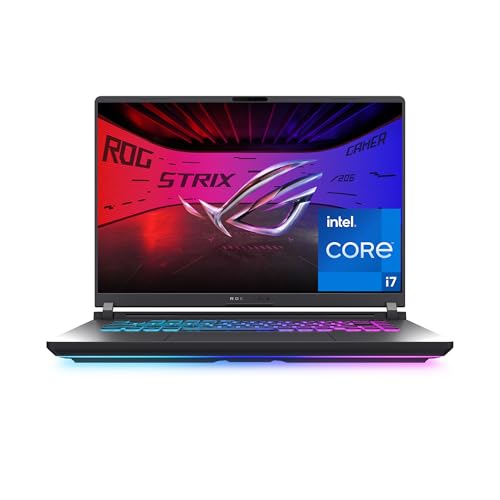
ASUS ROG Strix G16 Laptop
What We Like
- 165Hz display with anti-glare ACR film
- RTX 5060 with DLSS 4 for graphics work
- Vapor chamber and tri-fan cooling
- Stealth Mode disables RGB for professional use
Trade-offs
- At 5.8 pounds, heavy for frequent travel
- FHD+ resolution limits canvas detail at 16 inches
A 165Hz refresh rate on a 16-inch display makes on-screen motion feel fluid, which helps when you’re working with fast-moving content or scrolling through timelines. The RTX 5060 GPU with DLSS 4 supports graphics-intensive tasks, and the vapor chamber with tri-fan cooling keeps the system from overheating during extended use. This laptop is built for users who need strong performance in a portable form.
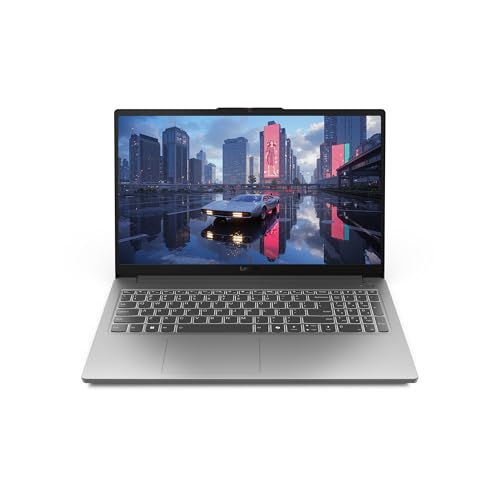
Lenovo LOQ Essential Laptop
What We Like
- 144Hz display for smooth canvas work
- 100% sRGB for vibrant color accuracy
- NVIDIA RTX 4050 with DLSS3
- Lightweight 4.2 lbs for portability
Trade-offs
- 8GB memory limits large multi-layer files
- Small 512GB SSD fills fast with art projects
The trade-off comes with only 8GB of memory, which limits how many apps you can keep open at once. Compared to the Dell Premium 16 Laptop with 32GB RAM, this Lenovo will require you to be more selective about what you run simultaneously. The 512GB SSD also fills up fast if you install several large games. For a student or casual user who works one task at a time, it delivers solid performance without overspending, but heavy multitaskers should look for more RAM.
HP 27 AIO Desktop

What We Like
- 99% sRGB touchscreen for color-accurate work
- 32GB RAM handles large art files smoothly
- 2TB SSD offers generous project storage
Trade-offs
- FHD resolution limits fine detail at 27 inches
- All-in-one design is not easily upgradable
The 27-inch FHD IPS anti-glare touchscreen covers 99% sRGB, so colors look vivid and accurate for photo editing or design work right on the display. With 32GB of RAM and a 2TB SSD, you can keep multiple creative apps open and store large project files without worrying about space. It’s a complete, tidy desktop that comes with a wireless keyboard and mouse, meaning you just plug it in and start working.
Product photos
XPPen Magic Drawing Pad
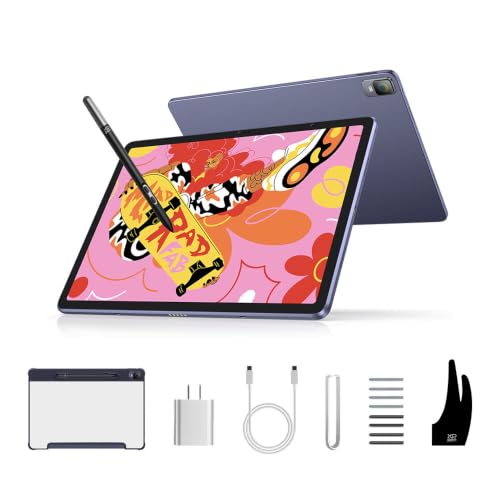
What We Like
- Paper-like AG-etched screen with 97% sRGB
- No computer needed for drawing
- 16,384 pressure levels with 60-degree tilt
Trade-offs
- Android 14 limits professional desktop software
- 12.2-inch screen is smaller than desktop monitors
A 16,384 pressure-level stylus with 60-degree tilt recognition means every brush stroke and pencil hatch translates with a level of nuance that wired tablets often struggle to match.
The trade-off is software reach: Android 14 gives you mobile versions of creative apps, not the full desktop suites that run on a traditional computer. Compared to the Dell Premium 16 laptop, which runs Windows and includes an NVIDIA GeForce RTX 5050, the Magic Drawing Pad is built for a different kind of work. It’s designed for sketching and painting on the go rather than heavy compositing. If your workflow fits mobile drawing apps and you want a 1.3-pound tablet that slips into a bag, this standalone device offers a dedicated, portable drawing experience.
Product photos
HUION KAMVAS Slate 11 Standalone Drawing Tablet

What We Like
- No computer needed, works standalone
- Full-laminated anti-glare screen reduces glare
- 4096 pressure levels with 60° tilt
- Pre-installed drawing app and Android 14
Trade-offs
- 10.95-inch screen is small for detailed work
- Android 14 limits professional desktop software
A standalone Android drawing tablet with a 10.95-inch full-laminated anti-glare screen and 90Hz refresh rate means you can sketch, take notes, or draw anywhere without a computer. The 4096-level pressure-sensitive stylus with 60° tilt mimics a real pencil, and the 8000mAh battery keeps you going all day. This is built for artists who want a portable, distraction-free sketchbook that runs drawing apps right out of the box.
The trade-off is screen size: at 10.95 inches, it is smaller than many laptops or monitors, so complex compositions or multi-window workflows can be tight. The 8GB RAM and Android 14 limit the range of software compared to desktop operating systems. It is a focused tool for sketching, notes, and on-the-go creativity, not a replacement for a full workstation.
Product photos
How We Evaluated Computers For Digital Art
Our research began with a deep dive into the technical specifications that directly impact digital art workflows. We analyzed processor benchmarks, GPU capabilities, and memory configurations across dozens of models.
We prioritized four key criteria: raw processing power for rendering and complex filters, dedicated graphics for smooth canvas manipulation, and color-accurate displays for print and web work. We also looked for sufficient RAM and fast storage for large multi-layer files. These factors separate a machine that feels responsive from one that slows your creative flow.
Because we do not have a testing lab, our evaluation relies on manufacturer documentation, expert analysis, and the reported experiences of other digital artists. We looked for consistent praise or criticism across multiple sources to form our recommendations.
What To Look For In Computers For Digital Art
Choosing a computer for digital art means understanding which components directly affect your drawing, painting, and rendering experience. Here are the specs that matter most.
Focus on a dedicated GPU for smooth brush strokes and fast rendering, a color-accurate display (99-100% sRGB), at least 16GB of RAM for multi-layer files, and a fast SSD for quick project loading.
Processor and Graphics Card
The CPU and GPU are the heart of any art computer. For 2D illustration and photo editing, a modern mid-range processor like an Intel Core i7 or Apple M-series chip is sufficient. For 3D modeling, animation, or heavy filter work, step up to an Intel Core i9 or a dedicated NVIDIA RTX graphics card. A discrete GPU handles complex brush engines and real-time previews without bogging down the system.
Display Quality and Color Accuracy
A monitor is your canvas. Look for a display that covers at least 99% of the sRGB color space for accurate color reproduction. A 2K or 4K resolution gives you more screen real estate for palettes and toolbars. For artists who draw directly on screen, a touchscreen or pen-enabled display with high pressure sensitivity and tilt recognition is a significant advantage.
RAM and Storage
Digital art files, especially at high resolutions, eat up memory quickly. We recommend at least 16GB of RAM for comfortable multitasking, with 32GB being a safer bet for large, multi-layer PSD or TIFF files. A fast NVMe SSD is non-negotiable for quick boot times and instant file access. Consider 1TB or more if you work with many large projects.
- Check if the GPU has enough VRAM for your largest textures and scenes.
- Verify the display’s color gamut (sRGB, Adobe RGB, or DCI-P3) matches your output needs.
- Confirm the RAM is upgradeable if you plan to expand later.
- Look for multiple USB and Thunderbolt ports for drawing tablets and external drives.
A faster GPU and more RAM will improve your daily workflow more than a slightly faster processor.
Computers For Digital Art Compared
The table below compares the key specs of our top picks side-by-side to help you see which machine fits your art style and budget.
| Product | Processor | RAM | Storage | GPU |
|---|---|---|---|---|
| Dell Tower Plus EBT2250 Desktop | Intel Core Ultra 9 285 24-Core up to 5.6 GHz | 32GB DDR5 | 1TB NVMe SSD | NVIDIA GeForce RTX 4060 8GB GDDR6 |
| Apple Mac mini M5 Pro Desktop | M5 Pro (15‑core CPU, 16‑core GPU) | 24GB Unified Memory | 512GB SSD | M5 Pro (16‑core GPU) |
| HP Pavilion Gaming Desktop | AMD Ryzen 7 5700G | 16 GB | 1 TB SSD | NVIDIA GeForce RTX 2060 |
| Dell Premium 16 Laptop | Intel Core Ultra 7 255H | 32GB LPDDR5X | 1TB M.2 SSD | NVIDIA GeForce RTX 5050 8GB GDDR7 |
| Microsoft Surface Studio 1st Gen | Intel Core i7 | 16GB | 1TB | NVIDIA GeForce dGPU |
| ASUS ROG Strix G16 Laptop | Intel Core i7 14650HX | 16GB DDR5-5600MHz | 1TB PCIe Gen 4 SSD | NVIDIA GeForce RTX 5060 |
| Lenovo LOQ Essential Laptop | Intel Core i5-12450HX | 8GB | 512GB SSD | NVIDIA GeForce RTX 4050 |
| HP 27 AIO Desktop | AMD Ryzen AI 7 350 (8-core) | 32GB | 2TB SSD | AMD Radeon 860M |
| XPPen Magic Drawing Pad | N/A | 8GB | 256GB (expandable to 1TB) | N/A |
| HUION KAMVAS Slate 11 Standalone Drawing Tablet | 8-core CPU | 8GB | 128GB (expandable to 1TB) | N/A |
Frequently Asked Questions
What is the best computer for digital art for beginners?
The Lenovo LOQ Essential Laptop is a great starting point for students or casual artists. Its 144Hz display and 100% sRGB coverage provide a smooth, color-accurate canvas, and the lightweight 4.2-pound build makes it easy to carry to class or a coffee shop.
Do I need a dedicated graphics card for digital art?
Yes, for most serious digital art work. A dedicated GPU like an NVIDIA RTX series handles complex brush engines, real-time effects, and 3D rendering much better than integrated graphics. It keeps your canvas responsive even with large, multi-layer files.
Is a laptop or desktop better for digital art?
It depends on your need for portability. Desktops like the Dell Tower Plus offer more power and upgradeability for the price, making them ideal for a studio. Laptops like the ASUS ROG Strix G16 let you draw anywhere but may have thermal and upgrade limitations.
What screen size and resolution do I need for digital art?
A 16-inch or larger screen with at least 2K resolution gives you comfortable workspace for palettes and tools. For fine detail work, a higher resolution like 4K is better. If you draw on screen, a 27-inch all-in-one like the HP 27 AIO provides a generous canvas.
How much RAM do I need for digital art software?
16GB is the minimum for smooth performance with programs like Photoshop or Clip Studio Paint. For heavy 3D work or large multi-layer files, 32GB or more is recommended to prevent slowdowns and crashes.
The Bottom Line
The Dell Tower Plus EBT2250 Desktop is our best overall pick for digital artists who need uncompromising power for 3D rendering, video editing, or heavy compositing. Its 24-core processor and RTX 4060 GPU handle the most demanding creative software with ease.
If space is tight or you prefer a portable setup, the Apple Mac mini M5 Pro Desktop offers incredible performance in a tiny footprint. The HP 27 AIO Desktop gives you a color-accurate touchscreen and plenty of RAM in one package. Budget-minded artists should look at the Lenovo LOQ Essential Laptop for a solid balance of features and value.
The single most important factor when choosing an art computer is matching the GPU and RAM to the size and complexity of your projects. Everything else, display, storage, portability, comes second to making sure your machine never slows your creative flow.
