10 Best Art Tablets For Beginners in 2026
This post contains affiliate links. As an Amazon Associate, we earn from qualifying purchases.
For beginners entering digital art, the Wacom Intuos Small Graphics Drawing Tablet earns our Best Overall pick with its battery-free pen, compact design, and free bundled software that gets you started immediately. The XPPen Deco 01 V3 offers the highest pressure sensitivity available, while the HUION KAMVAS Slate 11 is our top choice for those who want a standalone tablet that works without a computer.
A new artist faces a confusing choice between pen tablets (no screen, lower cost) and pen displays (draw directly on the screen, higher cost). The right pick depends on your budget, whether you already own a computer, and how much portability matters.
This guide compares 10 art tablets for beginners based on specifications, manufacturer documentation, expert round-ups, and patterns in owner feedback. We focus on what actually matters for someone learning digital art for the first time.
Top 10 Art Tablets For Beginners in the Market
Certain content that appears on this site comes from Amazon. This content is provided "as is" and is subject to change or removal at any time.
The Best Art Tablets For Beginners, Reviewed
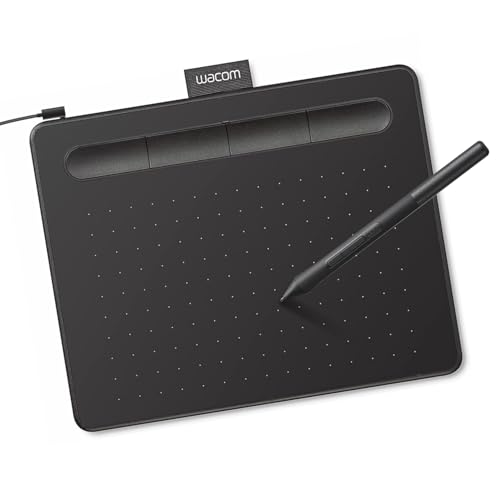
Wacom Intuos Small Graphics Drawing Tablet
What We Like
- Battery-free pen for uninterrupted drawing
- Compact and lightweight at 0.5 pounds
- 4 ExpressKeys for custom shortcuts
- Works with Mac, Windows, and Chromebook
Trade-offs
- Wired connection limits desk placement
- Small 6.3 x 7.9 inch active area
- No built-in screen for direct drawing
A battery-free pen that never needs charging means you can draw for hours without stopping to hunt for a cable. The Wacom Intuos Small pairs a compact, lightweight body with four programmable ExpressKeys, so you can set shortcuts for undo, brush size, or zoom without lifting the stylus. It works right out of the box with Mac, Windows, and Chromebook, and Wacom includes creative software and online training to help you learn the ropes. The pen technology is designed to feel like pen on paper, and the tablet has no screen, which keeps the price accessible and the setup simple.
Wired connection keeps you tethered to your computer, and the small active area means you will move the pen more and your arm less compared to a larger tablet. If you prefer a display you can draw directly on, the Wacom One 14 offers a full HD laminated screen, but it weighs over three times as much and costs more. For a beginner who wants a reliable, no-fuss introduction to digital drawing without spending extra on batteries or a big desk footprint, this Intuos delivers exactly what matters: a responsive pen, solid software support, and a brand that has led the tablet market for over forty years.
Wacom One 14 Drawing Tablet

What We Like
- Laminated 14-inch IPS Full HD display
- 98% sRGB color accuracy
- Battery-free pen with pressure sensitivity
- Includes software trials and training courses
Trade-offs
- Requires a computer to function
- HDMI converter and power kit sold separately for some setups
A 14-inch laminated IPS Full HD display with 98% sRGB color accuracy gives you a crisp, color-true canvas that feels like paper under the pen. The battery-free stylus captures every light line and bold stroke with Wacom’s responsive pressure sensitivity, so you can focus on your drawing instead of charging a pen. This is a complete starter kit that includes trials of Clip Studio Paint Pro, Concepts, and Skillshare training courses, making it a thoughtful entry point for anyone learning digital art on Windows, Mac, or Chromebook.
If your computer doesn’t have a USB-C port that supports video, you’ll need to buy an HDMI converter and power adapter kit separately. The Wacom One 14 works with Windows 10 or later, Mac OS 13 or later, and Chromebooks. It weighs 1.7 pounds, which keeps it stable on a desk while you draw.
Product photos
XPPen Deco 01 V3 Drawing Tablet

What We Like
- 16K pressure sensitivity for fine shading
- 8 customizable shortcut keys for efficiency
- Lightweight 8 mm thin body
- Works with Android, Windows, Mac, Chromebook
Trade-offs
- Battery and charger not included
- No built-in screen for direct drawing
- Requires USB-C or adapter for connection
The 16,384 levels of pressure sensitivity let you capture very light sketch lines and dark shading transitions with precision, which is especially helpful for beginners learning control over line weight. The battery-free stylus never needs charging, and the 10 x 6.25-inch active area gives you plenty of room to work without feeling cramped. This tablet is a good fit for someone who wants to develop pressure control before moving to a display tablet.
This is a pen tablet, not a screen tablet, so you will be drawing while looking at your computer monitor rather than directly on the drawing surface. That takes a little practice, but the payoff is a much lighter, more portable device that slips into a backpack.
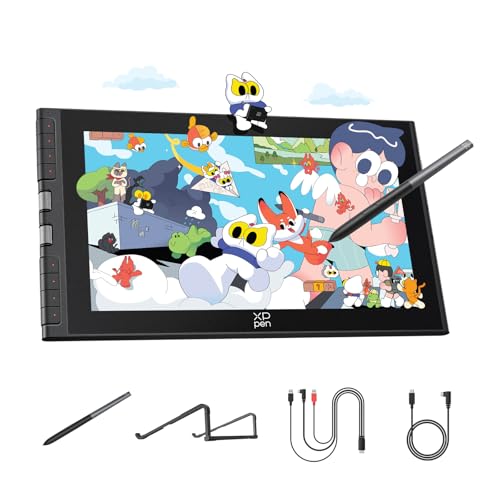
XPPen Artist 12 3rd Drawing Tablet
What We Like
- AG etched glass reduces 85% glare
- Dual X-Dial wheels for quick adjustments
- Weighs 2.5 lb for portable use
Trade-offs
- Requires computer or compatible device to function
- 11.9-inch screen limits multitasking workspace
At 2.5 pounds, this pen display is light enough to carry in a bag for sketching at a café or between classes, though it is not as featherweight as some might hope. The 11.9-inch AG etched glass gives you a paper-like feel that cuts glare by 85%, so your eyes stay comfortable during long sessions. With 16,384 pressure levels and a magnetic pen that attaches to the tablet, you get precise, responsive strokes from the start, which suits a beginner seeking a portable, screen-based setup without the bulk.
You will need a computer, Chromebook, or Android device to use this tablet, which adds one more thing to carry. Compared to the Wacom Intuos Small, a non-screen tablet, the XPPen Artist 12 3rd gives you a built-in display for direct drawing, but it is heavier and larger to transport. For someone new to digital art who values an ultra-lightweight screen and does not mind tethering to a host device, this is a thoughtful, travel-friendly pick.
HUION KAMVAS Slate 11 Standalone Drawing Tablet

What We Like
- No computer needed, ready out of box
- Full-laminated anti-glare paper-like screen
- 90Hz refresh rate for smooth visuals
- 8MP front and 13MP rear cameras
Trade-offs
- At 1.1 pounds, not the lightest portable tablet
- Pen requires battery or charging, unlike some competitors
A 10.95-inch Full HD screen with 99% sRGB color gamut means your colors pop true right on the display, no computer tether needed. This standalone Android 14 tablet lets you sketch anywhere, on the couch, in a café, or during a commute. Open the box, grab the H-Pencil with 4096 pressure levels and 60-degree tilt, and start drawing.
This is a self-contained Android device, not a pen display for a laptop. If you already own a powerful computer and want a screen that works with desktop software, the Wacom One 14 connects to your existing setup. But for someone who wants a portable, all-in-one creative tool with an 8000mAh battery that supports all-day use, the Kamvas Slate 11 delivers that freedom.
Product photos
HUION Inspiroy H950P Drawing Tablet

What We Like
- 8192 pressure levels for natural strokes
- Battery-free stylus never needs charging
- 8 customizable shortcut keys
- Works with Mac, Windows, Linux, and Android
Trade-offs
- No built-in screen requires looking at monitor
- At 1.8 pounds, heavier than some travel tablets
The 8192 levels of pressure sensitivity on this pen tablet allow for fine control from light to heavy strokes, which helps beginners develop a natural feel for digital drawing. The battery-free stylus never needs charging, so you can keep working without interruptions. Eight customizable shortcut keys let you assign your most-used commands, reducing the need to reach for the keyboard. It’s a practical setup for anyone starting out in digital art.
The H950P’s 1.76-pound weight and 0.3-inch thickness make it easy to slide into a laptop bag or backpack for daily commutes between home and class. Owners mention the compact footprint fits well on a crowded desk, so you can keep it ready without sacrificing workspace. While the Wacom Intuos Small is lighter at half a pound, the HUION still offers a portable form factor that suits artists who need a reliable drawing surface on the go.
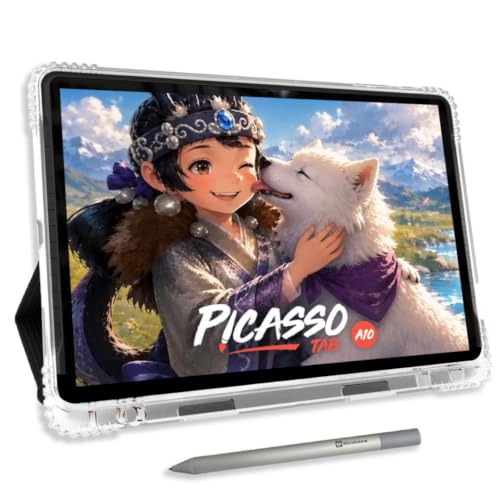
Simbans A10 Art Tablets
What We Like
- Standalone, no computer needed
- Lifetime VIP tutorial access included
- Paper-like laminated screen reduces glare
- Expandable storage up to 1TB
Trade-offs
- At 3.3 pounds, heavier than many tablets
- Only 4096 pen pressure levels
A standalone drawing tablet with a 10-inch laminated paper-like screen and a 4096-level pressure-sensitive pen lets you start drawing immediately without connecting to a computer. This makes it ideal for beginners who want a simple, all-in-one setup for learning digital art. The included lifetime VIP tutorial access provides step-by-step lessons and guided practice as described in the product details.
Weight is the main consideration: at 3.3 pounds, it is noticeably heavier than a standard pen tablet like the Wacom Intuos Small, which weighs only 0.5 pounds and requires a computer. If portability and a lightweight feel are priorities, the Simbans A10 may feel bulky for carrying around. However, for someone who values having everything built into one device, the convenience of a standalone tablet with preloaded tutorials and apps outweighs the extra heft.
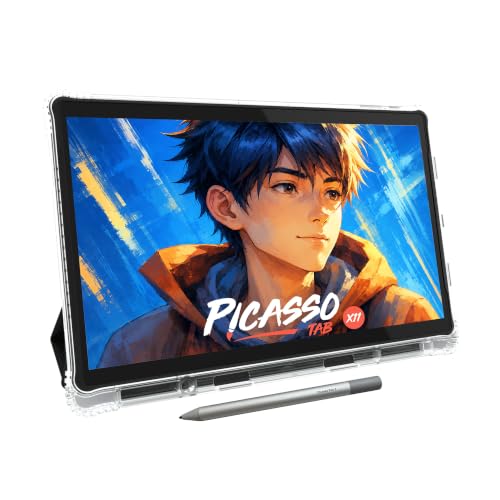
PicassoTab X11 Standalone Drawing Tablet
What We Like
- Standalone, no computer needed
- Laminated 2K paper-like screen reduces glare
- Preloaded with 5 creative apps + tutorials
- Expandable storage up to 1TB
Trade-offs
- No bundled stylus holder or storage case included.
- Requires separate purchase for a keyboard accessory.
A fully standalone 11-inch 2K laminated screen means you can draw anywhere without hooking up a laptop or desktop. The octa-core processor and 6GB of RAM handle drawing apps, streaming, and multitasking without stutter, while the preloaded apps and lifetime VIP tutorials give beginners a guided start. For someone who wants a dedicated art device that works from the moment it is unboxed, this is a focused, ready-to-go package.
The 4096 pressure levels are lower than the 8192 found on the HUION Inspiroy H950P, a tethered tablet. If you need finer pressure sensitivity for delicate shading, that’s worth weighing. But for someone new to digital art who values independence from a computer and a crisp, glare-free screen, the PicassoTab X11 delivers exactly that.
Product photos
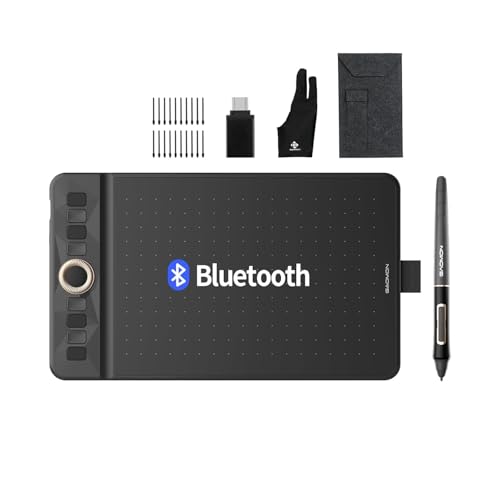
GAOMON WH851 Bluetooth Drawing Tablet
What We Like
- 18-hour battery for long wireless sessions
- Intuitive dial and 8 customizable keys
- Battery-free pen with tilt detection
Trade-offs
- No built-in display: requires computer or Android device
- At 0.9 pounds, light but not pocket-sized
- Bluetooth pairing needed for wireless use
This is a pen tablet, not a screen tablet, so you draw on the pad while looking at your monitor. Compared to the Wacom One 14, which has a built-in display and weighs 1.7 pounds, the WH851 weighs 0.9 pounds, making it easier to carry. For someone who wants wireless capability and high pressure sensitivity in a portable pen tablet, this model offers useful features.
Product photos
UGEE UE12 11.6 Inch Drawing Tablet

What We Like
- Full-laminated screen for zero parallax
- 124% sRGB color gamut with 3 color spaces
- 16K pressure and 60° tilt recognition
- 8 concave-convex shortcut keys for blind operation
Trade-offs
- At 11.6 inches, screen is compact for detailed layouts
- No Bluetooth: requires wired connection via Type-C
The UE12’s 124% sRGB color gamut covers a wider range of colors than standard sRGB, which helps when you’re working on digital art or photo editing where color accuracy matters. The full-laminated screen gives a zero-parallax drawing experience, meaning the cursor aligns with the pen tip without offset. You can switch between sRGB, Adobe RGB, and DCI-P3 color spaces directly on the tablet. The battery-free stylus offers 16K pressure sensitivity and 60° tilt recognition, providing a natural drawing feel similar to using a pencil.
The trade-off is size: at 11.6 inches, this screen is compact enough to fit in a laptop bag, but it won’t give you the larger display area of the Wacom One 14. If you prefer a bigger drawing surface, you might find it limiting. Also, the UE12 relies on a wired connection via its dual Type-C ports; there’s no Bluetooth option, so you’ll stay tethered to your computer. For someone who values color accuracy and a zero-parallax screen over a large canvas and doesn’t mind a cable, this is a capable pen display for starting out.
Product photos
How We Evaluated Art Tablets For Beginners
Our evaluation combines manufacturer specifications, expert round-ups from art education sources, and patterns in owner feedback across multiple retail platforms. We looked for tablets that remove friction for a new artist rather than adding complexity.
The four criteria that mattered most were pressure sensitivity, active area size, whether the pen requires a battery, and the learning curve of setup and included software. Higher pressure levels give finer control over line weight and shading. Larger active areas allow more natural arm movements. Battery-free pens are lighter and never die mid-stroke.
We prioritize features that consistently reduce frustration for beginners based on what experienced digital art teachers recommend and what new users report struggling with most.
What To Look For In Art Tablets For Beginners
Choosing your first art tablet means balancing cost, workspace size, and whether you want to draw on the screen or look at a monitor. Here are the key factors to consider.
A beginner’s tablet should have at least 8192 pressure levels, a battery-free pen, a large enough active area for natural strokes, and software that teaches you the basics. Prioritize reliability over extra features you may not use.
Pressure Sensitivity
Pressure sensitivity determines how your tablet translates pen pressure into line weight. Most modern tablets offer 8192 levels, which is plenty for learning shading and brush control. The XPPen Deco 01 V3 and UGEE UE12 go further with 16K pressure sensitivity, giving finer control for delicate work. Beginners rarely need more than 8192 levels, but higher sensitivity provides room to grow.
Active Area vs. Screen Size
The active area is the drawing surface. A larger area lets you use your whole arm rather than just your wrist, which improves line quality and reduces fatigue. Pen tablets like the HUION Inspiroy H950P offer generous active areas without a screen. Pen displays like the Wacom One 14 give you a 14-inch screen you draw on directly. For beginners, a medium active area around 10 by 6 inches balances natural movement with desk space.
Pen Type: Battery-Free vs. Battery-Powered
Battery-free pens (also called EMR pens) are lighter, require no charging, and never lose connection mid-stroke. Most Wacom and HUION tablets use them. The HUION KAMVAS Slate 11 uses a battery-powered pen that needs occasional charging, which is a minor inconvenience. For a beginner, a battery-free pen removes one more thing to remember.
- Does the pen need a battery? Battery-free pens are lighter and more reliable.
- Does the tablet require a computer or does it work standalone?
- Are the shortcut keys programmable and easy to reach?
- What free software or tutorials are included?
- Is the active area large enough for natural arm movement?
A battery-free pen with at least 8192 pressure sensitivity is the single most important feature for a beginner’s first tablet.
Art Tablets For Beginners Compared
The table below compares all 10 art tablets for beginners across the features that matter most: pressure sensitivity, active area or screen size, pen type, and whether the tablet works standalone or requires a computer.
| Product | Pen Technology | Pressure Levels | Weight |
|---|---|---|---|
| Wacom Intuos Small Graphics Drawing Tablet | Battery-free EMR | N/A | 0.5 pounds |
| Wacom One 14 Drawing Tablet | Battery-free | N/A | 1.7 pounds |
| XPPen Deco 01 V3 Drawing Tablet | Battery-Free Stylus | 16,384 | 2.2 pounds |
| XPPen Artist 12 3rd Drawing Tablet | X4 Pen | 16,384 | 2.5 pounds |
| HUION KAMVAS Slate 11 Standalone Drawing Tablet | Tilt-Alignment Stylus | 4096 | 1.1 pounds |
| HUION Inspiroy H950P Drawing Tablet | Battery-free stylus | 8192 | 1.8 pounds |
| Simbans A10 Art Tablets | 4096-level pressure sensitive | 4096 | 3.3 pounds |
| PicassoTab X11 Standalone Drawing Tablet | 4096 Pressure | 4096 | N/A |
| GAOMON WH851 Bluetooth Drawing Tablet | Battery-Free Pen AP519 | 16,384 | 0.9 pounds |
| UGEE UE12 11.6 Inch Drawing Tablet | Battery-free | 16K levels | N/A |
Frequently Asked Questions
What is the best art tablet for a complete beginner?
The Wacom Intuos Small is the best overall pick for beginners because it includes free software, uses a battery-free pen, and works with Mac, Windows, and Chromebook. It is a pen tablet, meaning you draw on the pad while looking at your computer screen, which takes a short adjustment period but keeps costs low.
Do I need a pen display or a pen tablet as a beginner?
A pen tablet (no screen) is more affordable and works well once you adjust to looking at your monitor while drawing. A pen display like the Wacom One 14 lets you draw directly on the screen, which feels more natural but costs more. Beginners on a budget should start with a pen tablet.
Can I use a drawing tablet without a computer?
Yes, standalone tablets like the HUION KAMVAS Slate 11 and Simbans A10 work without a computer. They include built-in software and storage. If you already own a computer, a tethered tablet offers more software options and often better value.
What pressure sensitivity level do I need as a beginner?
8192 pressure levels are sufficient for learning shading, line variation, and brush control. Higher levels like 16K found on the XPPen Deco 01 V3 offer finer gradation but are not necessary for beginners. Focus on getting a reliable tablet with at least 8192 levels.
How much drawing area do I need?
A medium active area around 10 by 6 inches allows natural arm movement without taking up too much desk space. The Wacom Intuos Small has a 6.3 by 7.9 inch area, which is fine for beginners but may feel cramped for larger strokes. Larger areas reduce wrist strain.
The Bottom Line
The Wacom Intuos Small earns our Best Overall pick for beginners because it combines a battery-free pen, free software, and reliable build quality at a price that leaves room to grow. It is the safest first tablet for anyone unsure whether digital art will become a long-term hobby.
If you prefer drawing directly on a screen, the Wacom One 14 gives you a laminated display with accurate color and a natural pen feel. For those who want a standalone tablet without a computer, the HUION KAMVAS Slate 11 is ready out of the box.
The single most important factor for a beginner is choosing a tablet you will actually use. A smaller, simpler tablet you pick up daily beats a larger, more expensive one that stays in the box. Start with a reliable pen tablet, learn the basics, and upgrade only when you know exactly what you need.
