
7 Best Art Scanners in 2026
This post contains affiliate links. As an Amazon Associate, we earn from qualifying purchases.
For artists who need faithful digital reproductions of their work, the Epson Perfection V850 Pro Photo Scanner is the best overall pick. It delivers 6400 dpi resolution and deep 4.0 Dmax for archival-quality scans of film, slides, and fine art. The VIISAN VF3240 is the best fast A3 option for blueprints and large sketches, while the Canon CanoScan LiDE 400 offers a slim, portable solution for letter-size originals on the go.
The challenge with scanning art is capturing every pencil stroke, brush texture, and subtle gradation without losing detail or introducing dust. A scanner that works fine for documents can flatten the depth of a watercolor wash or miss the fine lines of a pen-and-ink drawing.
This guide is based on manufacturer specifications, expert round-ups, and patterns in owner feedback. We focused on resolution, color depth, scan area, and build quality to help you choose the right tool for your medium and workspace.
Top 7 Art Scanners in the Market
Certain content that appears on this site comes from Amazon. This content is provided "as is" and is subject to change or removal at any time.
The Best Art Scanners, Reviewed
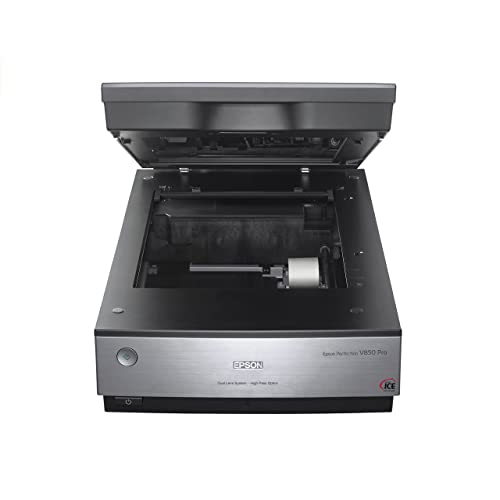
Epson Perfection V850 Pro Photo Scanner
What We Like
- 6400 dpi resolution for fine detail
- 4.0 Dmax for smooth shadow gradations
- Dual lens system optimizes each scan
- Digital ICE technology removes dust
Trade-offs
- At 20.9 lb, it needs a sturdy desk
- Large footprint: 19.8 inches wide
A 6400 dpi optical resolution and a 4.0 Dmax dynamic range mean this scanner captures the finest grain in a negative and preserves subtle shadow transitions that cheaper models lose entirely. For anyone digitizing film, slides, or high-quality prints for reproduction or archiving, that combination of resolving power and tonal smoothness is exactly what separates a usable scan from a flat, noisy one. The dual lens system automatically picks the better lens for the job, one optimized for film, one for reflective originals, so you don’t have to guess or swap parts. This is the scanner you choose when the final image matters more than speed or portability.
Compared to the Epson Perfection V600, which weighs only 9 pounds and fits a smaller footprint, the V850 Pro demands commitment. But if your work regularly involves medium-format film, dense negatives, or large prints where every bit of shadow detail counts, the V850 Pro delivers results that justify the space. It is a professional tool for serious image work, not a casual document scanner.
VIISAN VF3240 A3 Scanner

What We Like
- 4-second A3 scan at 200 DPI
- Frameless glass for edge-to-edge scanning
- Auto-scan starts when lid closes
- 2400 DPI resolution for fine detail
Trade-offs
- CIS sensor not for 3D objects or thick media
- Windows A3 scan limited to 1200 DPI
- Large footprint at 24.8" long
A four-second scan at full A3 size at 200 DPI means you can digitize blueprints, architectural drawings, or large sketchbook spreads quickly. The frameless glass lets you scan right to the edge, so nothing gets cropped out. The auto-scan function kicks in as soon as you close the lid, handy when you’re feeding through a stack of reference images or oversized documents. For an artist or designer who regularly works with large-format originals, that speed alone can turn a tedious digitizing session into a quick workflow.
The trade-off is that the CIS sensor is built for flat paper only. If you need to scan textured paint swatches, thick book spines, or anything with depth, this isn’t the tool for that. And on Windows, the full 2400 DPI resolution only works at smaller sizes. A3 tops out at 1200 DPI through ViiScan software, while Mac users get the full resolution natively. The Epson Perfection V850 Pro offers 6400 DPI and CCD-based scanning for more versatile media, while the VIISAN is designed for speed and large-format coverage.
VIISAN 3120 A3 Flatbed Scanner

What We Like
- Frameless design for large documents
- Auto-Scan when lid closes
- 8-second A3 color scans
- 48-bit color depth for vivid detail
Trade-offs
- CIS sensor cannot scan 3D items
- WIA driver limited to 600 dpi
- Large footprint at 24.8 inches long
An 11.98 by 16.8 inch scan area means you can digitize full-size art boards, oversized sketchbooks, and large-format prints without trimming or folding. The frameless edge lets you position documents right to the boundary, and the Auto-Scan function starts the capture as soon as you close the lid. So you can work through a stack of reference images or album pages quickly. This is the scanner for anyone who regularly handles A3 or larger originals, from architects with CAD drawings to artists who work on big sheets of watercolor paper. Its 1200 dpi optical resolution delivers enough detail for digital publishing or high-quality archiving, and the 48-bit color depth keeps gradients smooth and true to the original.
The CIS sensor only handles flat paper items, so you cannot scan textured surfaces, fabric, or three-dimensional objects without blurring. For artists who occasionally want to digitize a thick book spine or a layered mixed-media piece, that is a real limitation. Compare it to the Epson Perfection V850 Pro, which uses a dual-lens CCD system and Digital ICE for higher resolution and better depth handling, but the VIISAN 3120 gives you that extra scan area and speed for a more affordable investment. If your work stays flat and large, this is the practical choice.
Canon CanoScan LiDE 400 Slim Scanner

What We Like
- 4800 dpi preserves photo detail
- 8-second scan speed with USB-C
- Color restore and dust removal
- EZ buttons with auto scan mode
Trade-offs
- Paper size limited to 8.5 x 11.69 inches
- No film or slide scanning capability
The fastest scan speed is 8 seconds, so you can digitize a photo or document in the time it takes to grab a coffee. The USB-C cable carries both data and power, which means no extra power brick to carry. Weighing just 3.6 pounds, this scanner is light enough to toss in a bag like a tablet. Auto scan mode detects what you place on the glass, and the EZ buttons let you save multi-page PDFs with one press. If your work fits on letter-size paper, this is a portable way to bring it into your digital workflow.
With a maximum paper size of 8.5 x 11.69 inches, you cannot scan larger works like A3 drawings or full-page book spreads. The Epson Perfection V600 offers higher resolution and a larger bed for those bigger pieces, but it weighs more than twice as much and takes up far more desk space. The LiDE 400 is the right choice when portability matters more than canvas size. For artists who work small and travel light, this slim scanner keeps your creative process moving without anchoring you to a studio desk.
Product photos
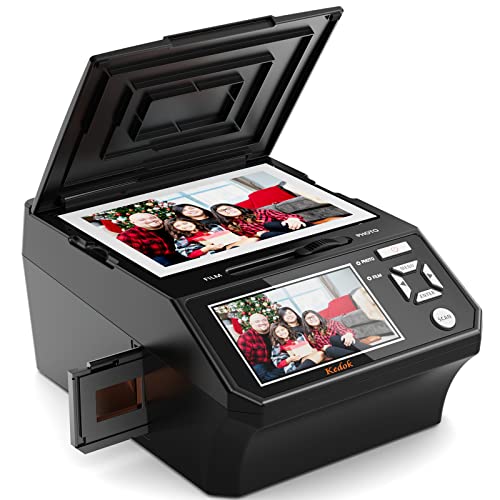
Kedok 5-in-1 Film & Slide Scanner
What We Like
- Scans 35mm, 110, slides, photos, name cards
- Large 5-inch LCD for previewing
- Includes 8 GB SD card
- No computer required
Trade-offs
- At 4.9 lb, heavier than a typical portable scanner
- 22 MP resolution is lower than dedicated photo scanners
This Kedok scanner supports 35mm negatives, 110 film, slides, photos, and name cards, and it works without a computer. The built-in 5-inch LCD lets you preview each scan right away, and the included 8 GB SD card means you can start digitizing straight out of the box. For someone with a shoebox full of mixed film formats and printed snapshots, this is a convenient all-in-one option.
At 22 megapixels, it produces shareable digital copies, but it won’t match the resolution of a dedicated flatbed like the Epson Perfection V600, which offers 6400 dpi. The Kedok also weighs nearly 5 pounds, so it’s not something you’d toss in a bag for quick trips. If your priority is convenience and variety over maximum resolution, this scanner covers multiple media types in one device.
Product photos
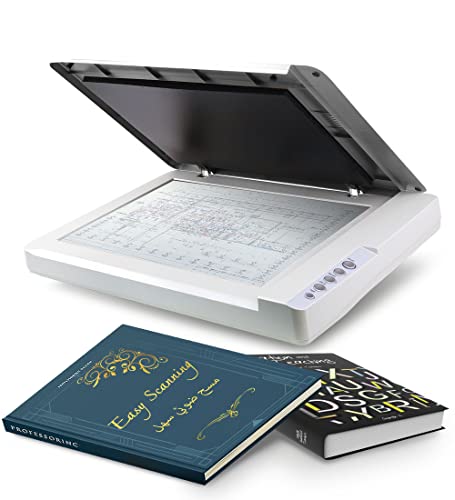
Plustek OS1180 A3 Flatbed Scanner
What We Like
- Large A3 scan area for oversized art
- LED light source saves energy, no warm-up
- One-touch button for quick scanning
- ABBYY OCR software included for text accuracy
Trade-offs
- Only flatbed scanning; no document feeder
- No automatic document feeder for batch scanning
A full A3 scan bed (11.7 x 17 inches) means you can digitize large drawings, maps, or tabloid-sized documents without folding or stitching. The LED light source fires up instantly, so there is no waiting for a warm-up lamp, and the 48-bit color depth captures subtle gradations in pencil shading or paint washes. For artists, librarians, or small-office users who regularly work with oversized originals, this flatbed offers a straightforward, no-fuss way to bring big work into digital form.
At 9.5 pounds and 16 inches deep, it is not something you tuck into a shelf between uses, and there is no automatic document feeder for batch scanning stacks of paper. Compared to the lighter Canon CanoScan LiDE 400, which is slim and portable but limited to letter-size scans, the Plustek OS1180 commits to handling large formats at the cost of everyday mobility. If your priority is scanning big art or A3 documents cleanly without breaking the bank on a pro photo scanner, this machine fills that slot well.
Product photos
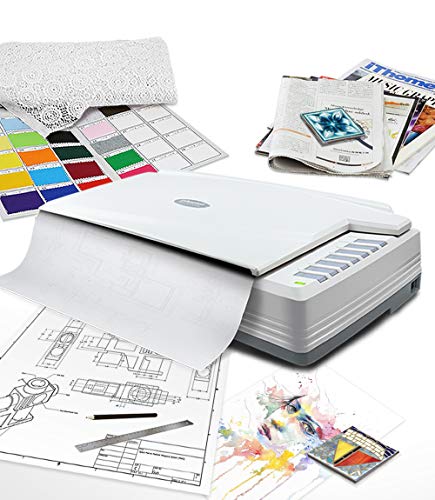
Plustek OpticPro A320E Large-Format Scanner
What We Like
- CCD sensor for accurate color scanning
- Scans up to 12" x 17" artwork
- Batch scanning for multiple images
- TWAIN and WIA driver compatibility
Trade-offs
- At 16.5 lb, it's heavy to move
- Large footprint: 31.2 inches long
A 12″ x 17″ scan area means you can digitize full A3-sized paintings, maps, or bound sketchbooks without folding or cropping the edges. The CCD sensor captures color more faithfully than cheaper CIS scanners, which matters when you’re preserving subtle washes or layered pencil work. This makes the OpticPro A320E a natural fit for artists who regularly work on large sheets or need to archive oversized originals without losing detail.
At 16.5 pounds and over two and a half feet long, it’s not something you stash on a shelf between uses. You’ll want a dedicated desk or cart. Compared to the VIISAN VF3240, which scans an A3 page in four seconds, the Plustek’s 7.8-second speed is slower, but the CCD sensor gives it an edge in color accuracy for fine art reproduction. If your priority is sheer speed over color fidelity, the VIISAN might suit you better; for serious archival work, this Plustek earns its place.
Product photos
How We Evaluated Art Scanners
Our evaluation started with the technical specs that matter most for art reproduction: optical resolution, dynamic range (Dmax), color depth, and sensor type. CCD sensors generally capture better color accuracy and shadow detail than CIS sensors, which is a key distinction for fine art and film scanning. We also weighed scan speed and maximum document size against the typical needs of artists working in different formats.
We then looked at how each scanner handles real-world art materials. Features like frameless glass for edge-to-edge scanning, Digital ICE for dust removal, and batch-scanning capabilities can save hours of post-processing. Owner feedback patterns helped us understand which scanners work well and which have quirks that matter in a studio setting.
A research-led evaluation has limits: we didn’t test each scanner side by side, and individual results can vary based on your specific art materials and software workflow. We prioritized scanners with strong manufacturer documentation and consistent positive feedback from artists and photographers who use them professionally.
What To Look For In Art Scanners
Choosing an art scanner means balancing resolution, color accuracy, and scan area against your budget and workspace. The right choice depends on whether you scan sketches, paintings, film negatives, or oversized prints.
Look for an optical resolution of at least 2400 dpi for fine detail, a Dmax of 4.0 or higher for shadow depth, and a CCD sensor if color accuracy matters. Match the scan area to your largest common artwork size.
Optical Resolution and Dynamic Range
Optical resolution, measured in dots per inch (dpi), determines how much fine detail the scanner can capture. For pencil drawings, ink work, and detailed prints, 2400 dpi is a good baseline; 4800 dpi or higher is better for film negatives and small originals you plan to enlarge. Dynamic range (Dmax) measures how well the scanner preserves detail in shadows and highlights. A Dmax of 4.0 or higher is ideal for art with subtle tonal gradations, like charcoal or watercolor washes.
Sensor Type: CCD vs. CIS
CCD (charge-coupled device) sensors use a lens and mirror system to capture more accurate color and deeper shadow detail, making them the standard for fine art and film scanning. CIS (contact image sensor) scanners are thinner, lighter, and faster but struggle with three-dimensional objects, thick books, and some textured surfaces. If you scan flat, two-dimensional artwork only, a CIS scanner can work well; for mixed media or film, choose CCD.
Scan Area and Footprint
The scan area determines the maximum size of artwork you can digitize in one pass. Letter-size (8.5 x 11.7 inches) is fine for sketchbooks and small prints; A3 (11.7 x 16.5 inches) is necessary for large paintings, blueprints, and oversized drawings. Keep in mind that larger scanners have bigger footprints and higher weight, measure your desk space before buying. Many A3 scanners are over 20 inches long and weigh 16.5 pounds or more.
- Measure your largest common artwork to determine the minimum scan area you need.
- Check the scanner’s depth and weight against your desk’s capacity.
- Look for frameless glass if you need edge-to-edge scanning of documents.
- Confirm the scanner includes software compatible with your operating system.
- Consider whether you need film or slide scanning capability before choosing a dedicated photo scanner.
A good rule of thumb: buy the largest scan area you can fit on your desk, because you can always scan a smaller piece, but you can’t scan a larger one without stitching.
Art Scanners Compared
The table below compares the seven art scanners we evaluated, highlighting their key specs and best uses at a glance.
| Product | Optical Resolution | Scan Speed | Dimensions |
|---|---|---|---|
| Epson Perfection V850 Pro Photo Scanner | 6400 dpi | N/A | 12.1 x 19.8 x 6.0 inches |
| VIISAN VF3240 A3 Scanner | 2400 x 2400 DPI | 4 seconds (A3, 200 DPI) | 24.8 x 21.7 x 5.1 inches |
| VIISAN 3120 A3 Flatbed Scanner | 1200 x 1200 dpi | 8 sec (200dpi, A3 color) | 24.8 x 21.7 x 5.1 inches |
| Canon CanoScan LiDE 400 Slim Scanner | 4800 x 4800 dpi | 8 seconds | 14.5 x 9.9 x 1.7 inches |
| Kedok 5-in-1 Film & Slide Scanner | 22 MP | N/A | 9.5 x 7.9 x 5.1 inches |
| Plustek OS1180 A3 Flatbed Scanner | N/A | A3 in ~9 seconds | 16.0 x 23.2 x 2.7 inches |
| Plustek OpticPro A320E Large-Format Scanner | N/A | 7.8 sec (12×17") | 31.2 x 23.0 x 10.8 inches |
Frequently Asked Questions
What resolution do I need for scanning artwork?
For most artwork, 600 dpi is sufficient for printing at the same size. If you plan to enlarge the image or capture fine pencil or ink details, choose a scanner with at least 2400 dpi optical resolution. Film and slide scanning benefits from 4800 dpi or higher.
Can I scan a painting with thick paint or a 3D object?
Scanners with CCD sensors can handle some texture, but thick impasto paint or three-dimensional objects may not scan clearly. For heavily textured paintings, consider photographing them with a good camera and proper lighting instead. CIS sensors are generally not suitable for 3D objects.
What is the difference between a CCD and CIS scanner?
CCD scanners use a lens system to capture more accurate color and deeper shadow detail, which is important for fine art and film. CIS scanners are thinner, lighter, and scan faster but produce flatter images with less depth. For archival-quality art scans, CCD is the preferred choice.
Do I need a scanner that scans film and slides?
Only if you regularly digitize negatives or slides. Dedicated film scanners offer better resolution for small formats, but some flatbed scanners like the Epson Perfection V850 Pro include film holders and high Dmax for good results. If you only scan flat artwork, a standard flatbed scanner will save money.
How do I clean my scanner glass for the best results?
Use a soft, lint-free microfiber cloth lightly dampened with distilled water or a dedicated electronics cleaning spray. Wipe gently in one direction to avoid streaks. Never use paper towels or abrasive cleaners, which can scratch the glass and affect scan quality.
The Bottom Line
The Epson Perfection V850 Pro Photo Scanner is the best overall choice for artists who need archival-quality scans of film, slides, and fine-art prints, with 6400 dpi resolution and deep shadow detail. It’s heavy and takes up significant desk space, but for uncompromising quality, it’s worth the footprint.
If you work with large A3 documents or blueprints and need speed, the VIISAN VF3240 is the best fast A3 scanner, scanning an A3 page in four seconds. For artists on a budget who scan letter-size originals, the Canon CanoScan LiDE 400 offers excellent portability and 4800 dpi resolution without the bulk.
The single most important factor in choosing an art scanner is matching the scan area and resolution to your largest and most detailed work. Buy the highest optical resolution and largest scan area your budget and desk can accommodate.
