9 Best Art Projectors in 2026
This post contains affiliate links. As an Amazon Associate, we earn from qualifying purchases.
The Artograph Inspire 2000 Digital Art Projector is the best overall art projector for digital artists and illustrators, thanks to its full HD 1080p DLP projection and built-in composition grids. For traditional artists who work from printed line art, the Caydo S1 is our pick for the best optical tracing projector. If you need to enlarge physical source material, the Artograph LED Tracer is the best opaque projector to consider.
Finding the right art projector means matching the technology to your workflow. Digital projectors let you project from your phone or tablet, while optical and opaque projectors work with printed artwork but need a dark room. Battery life, brightness, and resolution all affect how and where you can use the projector.
This guide is based on a thorough evaluation of manufacturer specifications, expert round-ups, and patterns in owner feedback. We focused on the features that matter most for artists: image quality, portability, ease of use, and compatibility with different source materials. Here are our top picks to help you choose with confidence.
Top 9 Art Projectors in the Market
Certain content that appears on this site comes from Amazon. This content is provided "as is" and is subject to change or removal at any time.
The Best Art Projectors, Reviewed
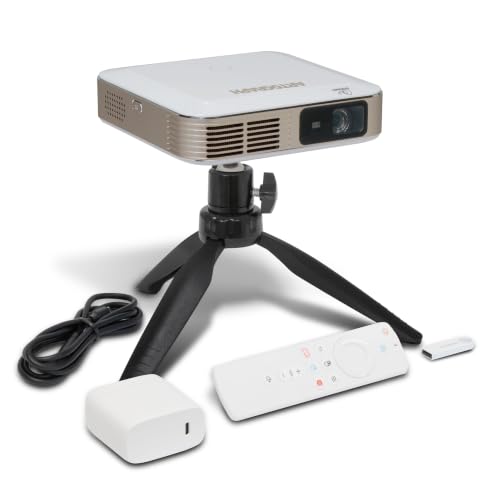
Artograph Inspire 2000 Digital Art Projector
What We Like
- Full HD 1080p DLP projection
- 96 built-in art grids in 3 colors
- Auto focus and keystone correction
- Cordless with 1.5-3 hour battery
Trade-offs
- 230 lumens limits use in bright rooms
- Battery life varies with brightness settings
- Requires digital images; no opaque copy projection
The trade-off is brightness. At 230 ANSI lumens, this projector performs best in dim or controlled lighting; in a sunlit room the image will wash out, unlike an opaque projector that works with physical artwork in any ambient light.
Product photos
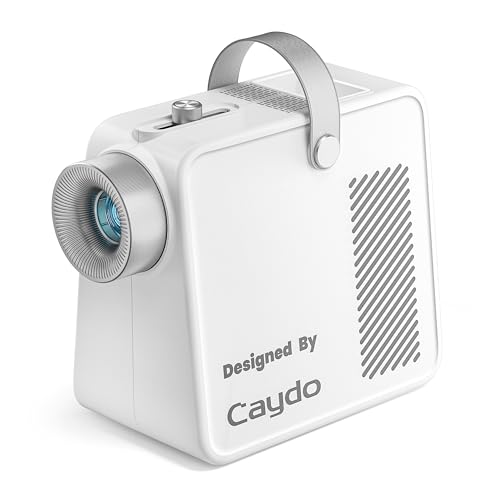
Caydo S1 Art Projector for Tracing
What We Like
- 5000-lumen LED for clear outlines
- 20,000-hour lifespan, no bulb changes
- Built-in handle and cord storage
- Smooth focus knob for sharp projection
Trade-offs
- Requires a completely darkened room
- No digital input for phone or tablet
- 5"×5" copy size limits large originals
The pure optical design keeps things dead simple: place your printed image under the 5″×5″ copy area, plug in, and trace. No apps, no Wi-Fi, no firmware updates. That straightforward approach makes it ideal for artists who want to spend time drawing, not troubleshooting.
The trade-off is that this is strictly an analog tool. Unlike the Artograph Inspire 2000 Digital Art Projector, which supports WiFi 6 and Bluetooth 5.4 for digital input, the Caydo S1 cannot project images from a phone or computer. It also works best in a darkened room, close the curtains and turn off overhead lights, because the optical lens needs low ambient light for good contrast. For traditional line artists and muralists who work from printed reference, that simplicity is a strength. For anyone who wants to project photos directly from their phone, a digital projector makes more sense.
Artograph LED Tracer Opaque Art Projector

What We Like
- Enlarges up to 14X original size
- Portable at 3 pounds
- LED runs cooler and longer than CFL
- Durable 200 mm glass lens
Trade-offs
- Requires a dark room for best visibility
- 5" x 5" copy size limits source material
- Work in sections with larger designs
A 5″ x 5″ copy area that can be enlarged up to 14 times means you can turn a small sketch into a wall mural or a sign. The 200 mm optical glass lens provides clear projections, and the high-intensity LED runs cooler and longer than a CFL bulb. This projector is designed for anyone who works from physical source material and wants a lightweight, portable tool for enlarging onto a wall or easel. It suits both professionals and hobbyists for sketches, outlining, signs, small murals, home wall décor, and quilt patterns.
Ambient light is this projector’s enemy: you’ll need a dark room for the image to pop, which limits daytime use unless you can black out windows. Compared to the Artograph Inspire 2000 digital model, this one has no built-in grids or Wi-Fi, it’s purely optical, so you’re tethered to physical artwork. But if your process starts with paper and pencil, and you value simplicity and a proven optical system over digital bells and whistles, the LED Tracer delivers exactly what it promises.
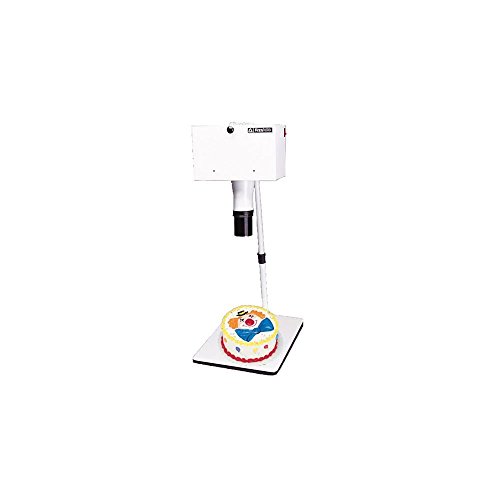
Kopykake K1000 Opaque Art Projector
What We Like
- 6×6 inch copy area with spring clips
- Five-year warranty on materials and workmanship
- Whisper quiet fan cools artwork
Trade-offs
- Weighs 22.9 pounds, not easily portable
- Large footprint at 23.3 inches long
- Opaque design requires physical artwork, no digital input
The ability to project a clear image even in normal lighting conditions is the single biggest reason to consider this projector over others, thanks to its two 250-watt color-corrected photolamps. The 6×6-inch copy area uses spring clips to hold your original artwork securely, and a whisper-quiet 40CFM fan keeps everything cool without distracting noise. This projector suits artists who need to trace or enlarge physical drawings, patterns, or photos in a setting where normal room lighting is present.
Size and weight are the main considerations here: at 22.9 pounds and 23.3 inches long, this is a stationary tool that needs a dedicated table or cart, not something you toss in a bag. Compared to the Artograph LED Tracer at just 3 pounds, the Kopykake K1000 is much heavier. But if your priority is projection in normal lighting conditions and a five-year warranty, that heft is the price of those features. It is not for digital workflows or tight spaces, but for opaque originals in normal lighting, it fits the need.
Artpanda Art Projector for Tracing
What We Like
- No app download needed
- Works offline without WiFi
- Adjustable stand for multiple angles
- Real-time low-latency image mirroring
Trade-offs
- Manual focus requires fine-tuning by hand
- No built-in image library or grids
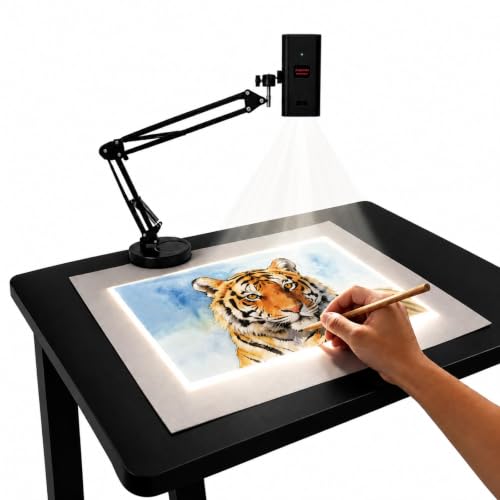
You don’t need to download any app to use this projector, just scan a QR code and control rotation, scaling, and settings from your phone’s browser. That direct web control works with both iOS and Android, so you never fight with software updates or compatibility issues. Its dual-band chip keeps the connection fast and low-latency, mirroring complex sketches from your phone or tablet in real time. For anyone who wants to start tracing without installing anything, this is a direct way to get going.
You give up the auto-focus found on some pricier models like the Artograph Inspire 2000. Manual focus means you’ll turn a small button to sharpen the image, which takes a moment each time you change projection distance. But the adjustable stand tilts for both desktop canvases and vertical walls, and the projector works offline when WiFi isn’t available. If you value simplicity over automated features, the Artpanda delivers exactly that.
Product photos
Dyhodu Tracing Projector for Drawing
What We Like
- Native 720P resolution for sharp tracing
- Projects up to 150 inches for murals
- Wireless connection with iOS, Android, Windows
- Works on canvas, paper, walls, tabletops
Trade-offs
- Manual focus requires adjustment between projections
- No auto-focus or built-in art grids
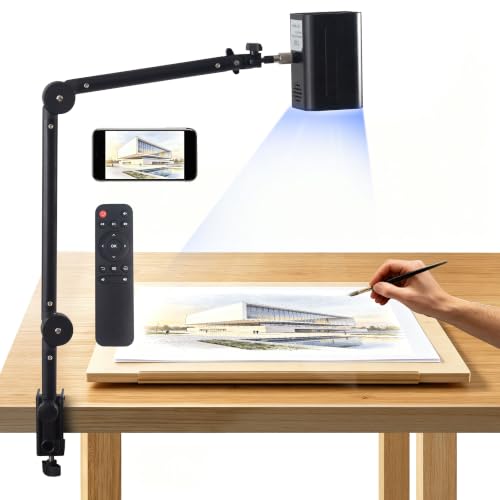
A 1280 x 720 HD projection with manual focus keeps lines sharp for sketch transfer, canvas work, and painting prep, so you can trace contours without losing detail. The image adjusts from 20 inches to 150 inches, which means you can work on a tabletop sketch or scale up for a wall mural. Built-in WiFi connects to phones, tablets, Mac, and Windows devices, and the projector works on canvas, paper, walls, and tabletops, so you can move between surfaces without extra setup.
Focusing is manual, so you turn the lens each time you change the projection distance or switch projects. At 17.1 inches tall, it stands taller than some compact models, which keeps it steady on a stand but takes up more vertical space. Reviewers note the manual focus gives you direct control over sharpness, though it requires a moment of adjustment when resizing.
Product photos
Caydo S2 Art Projector with Art Design App
What We Like
- Built-in art app for editing and AI generation
- Auto-saved design library for repeat projects
- Dual stands for tabletop and wall projection
- Remote control dims projection without turning off
Trade-offs
- Native 720P is lower than some rivals' 1080P
- Requires WiFi setup for wireless use
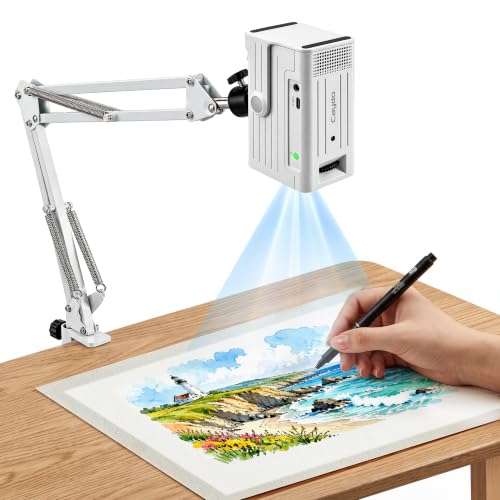
The Caydo S2’s Art Design App sets it apart from basic mirroring projectors: you can import images from your camera or gallery, crop, rotate, flip, collage multiple images, and even generate new artwork with AI text-to-image, then project the final result wirelessly. Every image you use is auto-saved to the projector’s design library, so you can pull up previously used designs without reconnecting your phone, ideal for repeat projects or series work. That workflow saves time for cookie decorators, sketchbook artists, or anyone who wants to fine-tune their reference before tracing.
The native 720P resolution delivers crisp outlines for most tracing tasks, but if you need the finer detail of a 1080P projector like the Artograph Inspire 2000, the S2 won’t match that level of sharpness. And at 16 inches tall, it takes up noticeable vertical space on a desk compared to flatter models. Still, for artists who value creative control over their source images, editing, saving, and recalling designs without reconnecting a phone, the Caydo S2 offers a streamlined workflow that no other projector in this guide provides.
Product photos
KODAK Luma 150 Mini Art Projector
What We Like
- Weighs only 7.75 oz for true pocket portability
- Wireless streaming via Miracast and AirPlay
- 30,000-hour LED life reduces maintenance
- Includes overhead tripod and articulating arm clamp
Trade-offs
- 1 W speaker is quiet for group viewing
- No 1080P resolution for sharp details
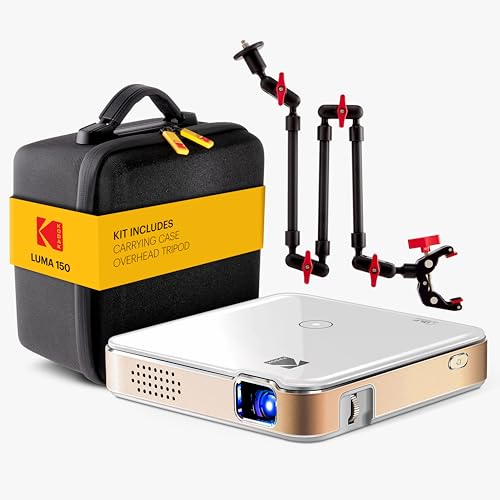
At just 7.75 ounces, the KODAK Luma 150 is light enough to slip into a jacket pocket or a small bag without thinking twice. That makes it a natural fit for artists who want to trace on location, project patterns at a friend’s studio, or set up a quick drawing reference on a wall without hauling heavy gear. Its wireless streaming from phones and tablets through Miracast and AirPlay lets you skip cables entirely, and the included overhead tripod and articulating arm clamp give you precise image positioning for tracing or sewing patterns. The 30,000-hour LED life means you can leave it on for long creative sessions without worrying about a bulb burning out.
The trade-off for that tiny size is a built-in 1 W speaker that barely fills a small room, so you will want external speakers for anything beyond quiet personal use. For the artist who values grab-and-go convenience above all else and works in controlled lighting, this little Kodak is a clever travel companion.
Flycatcher smART Sketcher 2.0 Projector
What We Like
- Over 60 pre-loaded images for variety
- Bluetooth app adds photo-to-tracing fun
- Step-by-step tutorials for guided learning
- Promotes hand-eye coordination and fine motor skills
Trade-offs
- Requires app and smartphone for full features
- Cartridges sold separately for extra content
- Targeted at ages 5+, limited for older kids
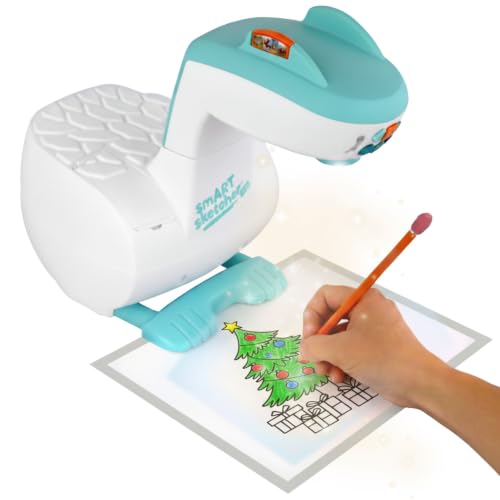
With over 60 pre-loaded images and a Bluetooth-connected app that turns any photo into a tracing template, this projector is built to keep young artists engaged. It’s not just about copying lines; the step-by-step tutorials teach drawing basics while the app encourages kids to snap pictures of their own world and sketch them. That blend of structured learning and open-ended creativity makes it a natural fit for children who want to grow their skills without feeling like they’re in a classroom.
The full experience depends on a smartphone or tablet and the free app; without it, you lose the photo-tracing and interactive tutorials that set this apart. The Artograph Inspire 2000 includes built-in art grids and WiFi/Bluetooth connectivity, so it offers a different approach for users who prefer digital tools. For a child just discovering drawing, though, the smART Sketcher’s app-based guidance is exactly the kind of gentle push that turns a toy into a learning tool.
Product photos
How We Evaluated Art Projectors
We looked at over a dozen art projectors, examining manufacturer specifications, expert reviews from art and hobbyist publications, and common themes in owner feedback. Our goal was to understand what separates a frustrating tool from one that becomes a natural part of the creative process.
The four criteria that mattered most were image quality (resolution, brightness, and lens clarity), versatility (what source materials the projector accepts), and ease of setup (auto-focus, keystone correction, and wireless connectivity). Portability (weight, battery life, and footprint) also played a key role. We prioritized projectors that offer clear, sharp projections with minimal fiddling.
Because this is a research-led evaluation rather than a hands-on test, we rely on published data and the collective experience of many users. We noted where trade-offs like manual focus or room darkness requirements are consistently mentioned, so you know exactly what to expect before you buy.
What To Look For In Art Projectors
Choosing an art projector comes down to matching the projection technology to your preferred source material. Digital projectors work with images on your phone or tablet, while optical and opaque projectors enlarge physical artwork. Here are the key factors to consider.
The best art projector for you depends on your source material, workspace lighting, and desired portability. Prioritize resolution for sharp lines, brightness for visibility, and connectivity for ease of use.
Resolution and Image Quality
Resolution determines how sharp the projected image appears, which directly affects the crispness of your traced lines. Digital projectors typically offer 720p or 1080p resolution. A 1080p projector like the Artograph Inspire 2000 delivers noticeably finer detail for intricate work, while 720p projectors like the Dyhodu and Caydo S2 are still adequate for larger murals or less detailed designs.
Brightness, measured in lumens, matters just as much. Higher-lumen projectors produce clearer outlines in rooms with some ambient light, while lower-lumen units require a darker room for the image to be visible.
Projection Type: Digital, Optical, or Opaque
Digital projectors connect wirelessly to your phone or tablet, allowing you to project digital images, edit them with apps, and adjust settings remotely. They are the most versatile but require a digital source.
Optical projectors use a bright LED to project printed line art onto your surface. They are simple to use with no setup beyond plugging in, but they need a completely dark room and cannot project from digital files.
Opaque projectors work with physical source material like photographs, book pages, or small objects. They are ideal for artists who work from printed references, but the copy size is usually limited to about 5 by 5 inches.
Portability and Setup
If you plan to move your projector between studio, classroom, or outdoor locations, weight and battery life are critical. Cordless projectors with built-in batteries offer the most freedom, while heavier units like the Kopykake K1000 are best left on a dedicated table.
Look for features that simplify setup: auto-focus and keystone correction save time, while a built-in stand or adjustable arm makes it easier to position the projector at the right angle.
- Check the maximum projection size to ensure it fits your workspace.
- Confirm the copy size limit for opaque and optical projectors.
- Look for wireless connectivity that matches your devices (iOS, Android, Windows).
- Consider whether you need built-in art grids or a design app.
- Read about the brightness rating and whether it suits your typical lighting conditions.
A projector with auto-focus and keystone correction will save you significant setup time, especially if you move it between locations.
Art Projectors Compared
The table below compares the nine art projectors on key specifications, so you can see at a glance how they differ in resolution, projection type, and portability.
| Product | Brightness | Weight | Connectivity |
|---|---|---|---|
| Artograph Inspire 2000 Digital Art Projector | 230 ANSI lumens | 0.0 pounds | WiFi 6, Bluetooth 5.4 |
| Caydo S1 Art Projector for Tracing | 5000 lumens | 2.9 lbs | N/A |
| Artograph LED Tracer Opaque Art Projector | High-intensity LED | 3.0 pounds | N/A |
| Kopykake K1000 Opaque Art Projector | Two 250W ECA color-corrected photolamps | 22.9 Pounds | N/A |
| Artpanda Art Projector for Tracing | N/A | N/A | Dual-band chip, low-latency WiFi |
| Dyhodu Tracing Projector for Drawing | N/A | N/A | WiFi, USB, HDMI |
| Caydo S2 Art Projector with Art Design App | N/A | N/A | WiFi + HDMI |
| KODAK Luma 150 Mini Art Projector | N/A | 7.75 oz | Miracast & AirPlay |
| Flycatcher smART Sketcher 2.0 Projector | N/A | 2.6 pounds | Bluetooth to app |
Frequently Asked Questions
What is the difference between a digital and an opaque art projector?
A digital art projector connects to your phone or tablet to project digital images, while an opaque projector uses a lens and bright light to enlarge physical source material like photographs or book pages. Digital projectors offer more features like editing and grid overlays, but opaque projectors work with any printed artwork without needing a digital device.
How many lumens do I need for an art projector?
The brightness you need depends on your workspace lighting. For a completely dark room, a lower lumen rating is often sufficient. For rooms with some ambient light, look for projectors rated at a higher lumen output. The Caydo S1, for example, uses a 5000-lumen LED to produce clear outlines even in moderately dim rooms.
Can I use a regular home projector for art tracing?
Yes, a standard home projector can work for art tracing if it has good resolution and brightness. However, dedicated art projectors often include features that make tracing easier, such as built-in composition grids, auto-focus, and image mirroring. They also tend to be more portable and have longer battery life for use outside the studio.
What is the best art projector for murals?
For murals, you need a projector with high brightness and the ability to project a very large image. The Dyhodu Tracing Projector can project up to 150 inches, making it a strong choice for large-scale work. The Caydo S1 is another good option for muralists who work from printed line art, thanks to its bright 5000-lumen LED.
Do I need WiFi for a digital art projector?
Not all digital art projectors require WiFi. Some, like the Artpanda Art Projector, work offline using a direct wireless connection to your phone. Others, like the Caydo S2, require WiFi for app features and wireless setup. Check the product specifications to see if a WiFi connection is needed for the features you plan to use.
The Bottom Line
The Artograph Inspire 2000 Digital Art Projector is our best overall pick for digital artists who want a portable, full-HD projector with built-in grids and wireless connectivity. It balances high resolution with cordless freedom, making it a versatile tool for studio or on-the-go use.
If you work primarily with printed line art and prefer a simple, no-fuss setup, the Caydo S1 is the best optical tracing projector. For artists who need to enlarge physical source material like photographs, the Artograph LED Tracer is the best opaque projector to consider. Budget-minded shoppers or those who want app-free control should look at the Artpanda Art Projector.
The single most important factor when choosing an art projector is matching the projection type to your source material. Digital, optical, and opaque projectors each serve different workflows, and picking the right one will save you frustration and deliver the best results for your art.
