10 Best Art Projectors For Tracing And Enlargement in 2026
This post contains affiliate links. As an Amazon Associate, we earn from qualifying purchases.
The Artograph Inspire 2000 Digital Art Projector is our best overall pick for artists who want high-resolution 1080p projection with cordless freedom and built-in alignment grids. For traditional artists working from printed images, the Caydo S1 offers whisper-quiet operation, while the Artograph LED Tracer delivers powerful optical enlargement for source images up to 5″ x 5″.
Tracing and enlargement are essential steps in transferring a composition to a larger canvas, wall, or surface. The right projector saves hours of manual grid work and preserves the proportions of your original artwork, whether you are working from a digital file or a physical print.
This guide is built from manufacturer specifications, expert round-ups, and patterns in owner feedback. We evaluated projectors across resolution, connectivity, portability, and the specific needs of tracing work to help you find the right tool for your studio or craft space.
Top 10 Art Projectors For Tracing And Enlargement in the Market
Certain content that appears on this site comes from Amazon. This content is provided "as is" and is subject to change or removal at any time.
The Best Art Projectors For Tracing And Enlargement, Reviewed
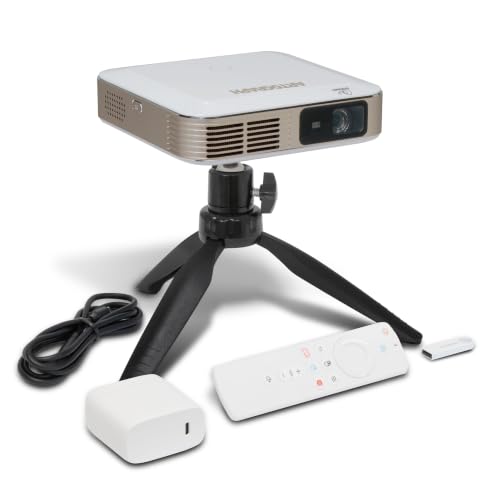
Artograph Inspire 2000 Digital Art Projector
What We Like
- Full HD 1080p DLP projection
- 96 built-in art grids for accuracy
- Auto focus and keystone correction
- Cordless operation with rechargeable battery
Trade-offs
- 230 ANSI lumens limits use in bright rooms
- Requires WiFi connection for full features
The trade-off is brightness: at 230 lumens, this works best in a dimmed studio or evening session, not a sunlit room. The 1.5-3 hour battery life is fine for a focused session, but if you work all day, you’ll want to keep the charger handy.
Product photos
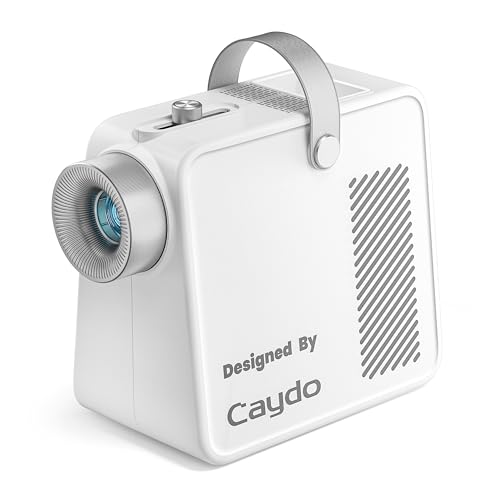
Caydo S1 Optical Art Projector
What We Like
- 20,000-hour LED, no bulb replacements
- Built-in handle and cord storage
- Smooth sliding focus knob
- Non-slip base for steady projection
Trade-offs
- Requires a darkened room for best results
- Only works with physical printed images
A 20,000-hour LED lifespan means years of tracing without ever buying a replacement bulb, no subscriptions, no firmware updates, just plug in and go. This pure optical projector takes physical printed images up to 5×5 inches and enlarges them from 20 to 80 inches diagonally, making it a straightforward tool for wall murals or canvas outlines. The sliding focus knob adjusts from blurry to sharp in a single gentle move, so you spend seconds setting up and hours creating. It suits anyone who wants a quiet, distraction-free tracing session without digital menus or wireless connections.
The trade-off is that this projector needs a darkened room to perform, closed curtains and turned-off overhead lights are part of the deal, which limits daytime use in bright studios. Compared to the Artograph Inspire 2000, which projects digital images via WiFi and HDMI, the Caydo S1 is strictly analog: no phone mirroring, no app, no digital grids. But if your reference is a printed sketch or a photo on paper, the S1 delivers crisp outlines without the complexity of a smart projector. The built-in handle and hidden cord compartment make it easy to reposition, and the front tray keeps brushes within reach.
Artograph LED Tracer Opaque Art Projector

What We Like
- Optical glass lens for clear projection
- LED runs cooler and longer than CFL
- Portable at only 3 pounds
- Enlarges up to 14 times original size
Trade-offs
- Requires a completely dark room for best visibility
- Only works with physical 5" x 5" source images
- No digital connectivity or app support
Ambient light kills the projection, so you need a dark room for maximum visibility. That makes daytime tracing sessions trickier unless you can black out your workspace. The Caydo S1 Optical Art Projector also uses a 5″ x 5″ copy size, but the Artograph relies on its optical glass lens and LED rather than a stated brightness rating. If you prefer working with physical source images and want a simple analog tool, this projector delivers that. Just be ready to work in a dark room.
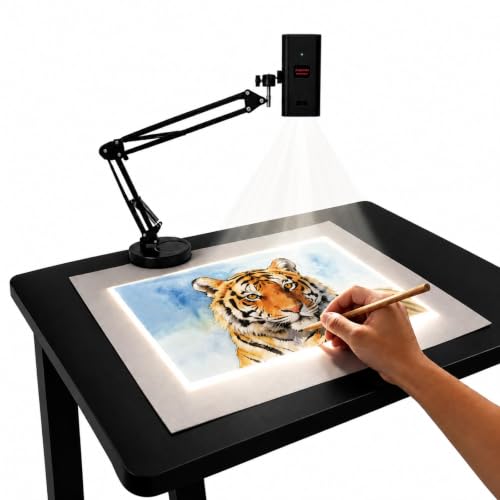
Artpanda Art Projector For Tracing
What We Like
- App-free web control from phone browser
- Adjustable stand for desktop or wall
- Compact 3.5-inch body for portability
Trade-offs
- Manual focus requires fine-tuning by hand
- No optical projection for physical artwork
A compact 3.5-inch body means this projector fits in a drawer or bag, ready to go from desktop sketching to wall murals without a heavy setup. The adjustable stand tilts for horizontal canvases or vertical walls, and the app-free web control lets you rotate and scale images straight from your phone’s browser, no extra downloads needed. It suits artists who want a flexible, portable tool for tracing from digital sources, whether in a studio or a remote location without WiFi.
Manual focus adjustment means you dial in sharpness yourself, which gives you full control over image clarity for tracing. The projector is small enough to fit in a bag or on a crowded desk, so it works well for digital-only artists who trace from a phone or tablet. If you need to project physical photos or printed sketches, an optical model like the Caydo S1 would be a better fit.
Product photos
Caydo P1 Art Projector With Drawing App
What We Like
- Auto focus and keystone correction
- Built-in drawing app with 4 artistic modes
- Compact 2.9 lb design with tripod mount
- Sealed optical engine prevents dust
Trade-offs
- Bluetooth supports audio only, not video
- Cannot mirror copyrighted streaming content
- Remote needs 2 AAA batteries (not included)
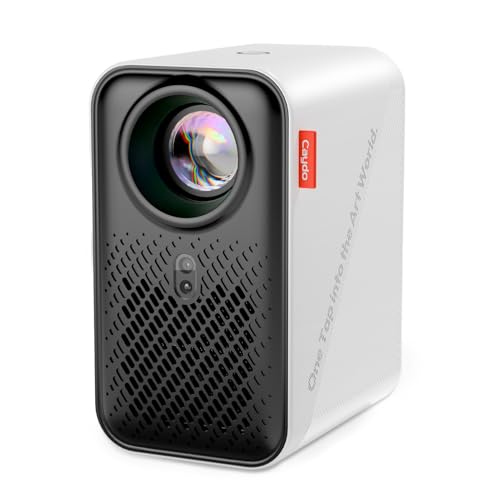
Auto focus, auto keystone, and auto screen-fit let you set this projector on a tripod, point it at your wall, and get a crisp, square image in seconds without fiddling with dials. The built-in drawing app adds four artistic modes. Gridify, Sketchify, Comicize, and Monochromize, along with 360° rotation and 3×3 grids, so you can adapt any photo into a tracing guide that matches your style. Weighing 2.9 pounds, it’s light enough to reposition between projects or take to a studio session.
The Bluetooth connection handles audio only, not video, so you can’t wirelessly send a drawing from your phone via Bluetooth. You’ll use the QR code or USB transfer instead. The Caydo P1 provides auto focus, keystone, and screen-fit along with a built-in drawing app, while the Artograph Inspire 2000 offers 96 built-in art grids and WiFi 6. Best for artists who want a quick, adjustable projection with creative filters built right in.
Kopykake K1000 Opaque Art Projector
What We Like
- Two 250W color-corrected lamps for clear images
- 6×6 inch copy area with spring clips
- Whisper quiet 40 CFM cooling fan
- Five-year warranty on materials and workmanship
Trade-offs
- At 22.9 pounds, it is not portable
- Requires 110-120V AC power, not battery operated
- 6×6 inch copy area limits larger source artwork
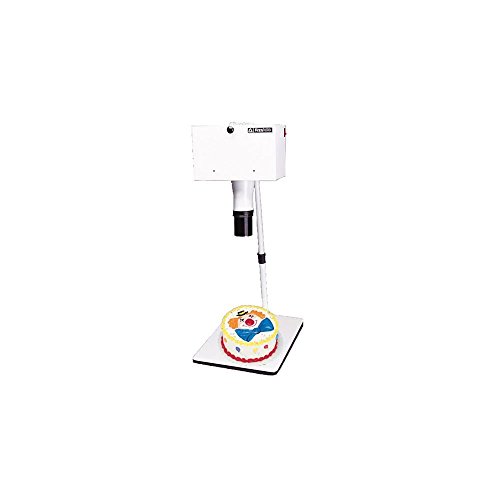
A 6×6 inch copy area with two 250W color-corrected photolamps means you can project small original artwork or photos onto a surface with crisp, true-to-life color even under normal room lighting. The spring clips hold the source material flat so nothing shifts mid-trace. The whisper-quiet fan keeps the artwork cool without distracting noise, and the five-year warranty backs up the build quality for long-term use.
At 22.9 pounds, this projector stays put on a counter or cart rather than moving from room to room. If you need to carry your projector between a kitchen table and a studio desk, the Artograph LED Tracer, at 3 pounds, is far easier to relocate. But for a dedicated station where stability and optical clarity matter more than portability, the Kopykake’s heavy build and dual-lamp design deliver consistent results.
Powants 1280P HD Art Projector

What We Like
- Dedicated Drawing Copy Pro app with distortion correction
- 360° rotatable and height-adjustable stand
- Dual-band WiFi 6 and Bluetooth 5.0 for wireless sync
Trade-offs
- Stand is desktop-only, not floor-standing
- Factory reset erases built-in drawing software
The height-adjustable stand is designed for desktop use, so you won’t get a floor-standing option for very large murals unless you place it on a raised surface. The Artograph Inspire 2000 offers full 1080P resolution and auto focus, while the Powants gives you a lower native resolution but includes a more versatile stand and a purpose-built drawing app. For artists who want precise digital tracing on a budget and don’t need the highest pixel count, this is a well-rounded tool. Just remember not to perform a factory reset, as this will erase the built-in drawing software.
Product photos
Dyhodu 720P Tracing Projector
What We Like
- Wireless mirroring with iOS, Android, Mac, Windows
- Adjustable image from 20 to 150 inches
- Works on canvas, paper, walls, tabletops
- Manual focus for sharper tracing lines
Trade-offs
- 720P resolution is lower than 1080P projectors
- Manual focus requires user adjustment each time
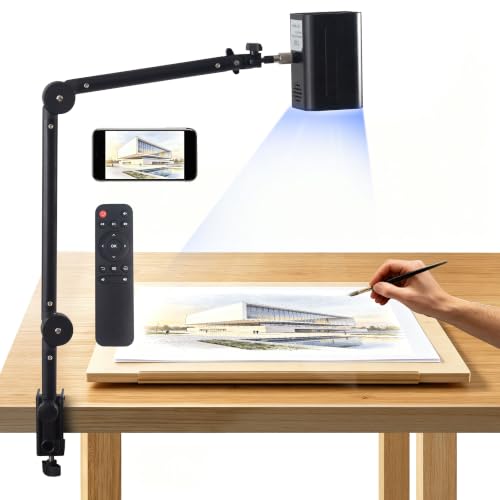
A native 720P resolution and a 20-to-150-inch projection range make this projector a practical tool for scaling phone sketches up to wall murals or shrinking a reference down for tabletop work. The built-in WiFi and support for iOS, Android, Mac, and Windows mean you can mirror whatever is on your screen without fiddling with cables. That is especially handy when you want to trace a digital photo or a Pinterest board directly onto canvas or paper. For artists who hop between devices and surfaces, that wireless flexibility saves time and keeps the workflow fluid.
Manual focus puts the sharpness in your hands, so you will need to dial it in each time you change distance or image size. The 720P resolution is noticeably less crisp than a 1080P model like the Artograph Inspire 2000 if you are enlarging fine details beyond a few feet. It is a capable, connectivity-first choice for artists who value device flexibility over absolute image clarity.
Product photos
MEDAMOC 720P Drawing Projector

What We Like
- 34-inch adjustable stand with 360° rotation
- Projects from 10 to 150 inches
- Wireless mirroring for phones and tablets
- Anti-slip base for stability
Trade-offs
- 720P native resolution limits fine detail at large sizes
- Stand adds bulk to the overall setup
The 34-inch adjustable stand with 360-degree rotation and an anti-slip base lets you position the projector for tabletop sketching or wall murals. That flexibility, paired with a projection range from 10 to 150 inches, makes it a strong fit for artists who switch between small canvas work and larger wall pieces. The wireless mirroring from phones and tablets also saves you from fumbling with cables, so you can pull up a reference image and start tracing quickly.
The native 720P resolution is a limitation. At the largest projection sizes, fine detail may appear softer than what a higher-resolution projector could deliver. The plastic body keeps the weight manageable, but it lacks the heft of some metal-bodied alternatives. If your priority is a versatile, easy-to-position stand and you mainly trace simpler shapes or larger compositions, this projector delivers real convenience. If you need sharper detail for intricate line work, a model with higher native resolution may be a better fit.
Product photos
Master Art Tools HD Art Projector
What We Like
- Works with phones, laptops, and USB drives
- Weighs only 0.1 pounds for easy carrying
- Connects via HDMI, USB, and screen mirroring from phones
Trade-offs
- No built-in art grids or patterns for tracing
- No auto-focus or keystone correction mentioned
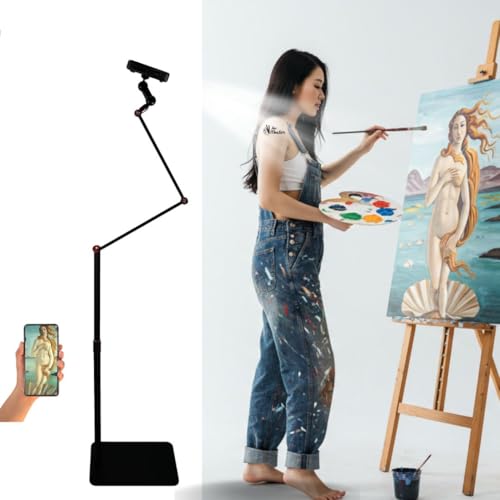
That tiny size means you don’t get built-in tracing grids or auto-focus like the Artograph Inspire 2000, which includes 96 built-in art grids and auto-focus. Instead, the Master Art Tools projector relies on whatever image you feed it through screen mirroring, HDMI, or USB, so you’ll need to bring your own reference or use a phone or tablet as the source. For artists who prioritize portability over extra features, this is a lightweight companion that disappears into a bag. If you prefer guided grids or hands-free focusing, that Artograph model offers those conveniences.
Product photos
How We Evaluated Art Projectors For Tracing And Enlargement
Our evaluation focused on the technical specs that matter most for tracing and enlargement: projection resolution, light source type, connectivity options, and physical setup flexibility. We reviewed manufacturer documentation for each model and compared lumen ratings, lens quality, and image enlargement ratios.
The four criteria that carried the most weight were image clarity, ease of setup, source compatibility, and portability for artists who move between surfaces. Image clarity depends on resolution and lens quality. Ease of setup includes auto-focus, keystone correction, and stand adjustability. Source compatibility covers digital files versus physical prints. We also considered noise levels, lamp life, and the availability of built-in tracing aids like grids or drawing apps.
An evaluation has limits: owner feedback can vary based on individual room lighting and surface texture. We prioritized models with consistent positive patterns in user reports and clear, verifiable specs from the manufacturer.
What To Look For In Art Projectors For Tracing And Enlargement
Choosing the right art projector means balancing resolution, light output, and source compatibility with your specific studio setup and working style.
Look for a projector with at least 720p resolution for clear tracing lines. It also needs a bright enough light source for your room conditions. The connectivity should match your source images. Digital files require a digital projector, while physical prints need an optical model.
Resolution And Image Clarity
Resolution determines how sharp your projected image will be, especially at larger enlargement sizes. A 1080p DLP projector like the Artograph Inspire 2000 delivers crisp lines for detailed tracing, while 720p models from Dyhodu and MEDAMOC are sufficient for murals and larger compositions. Optical projectors like the Artograph LED Tracer rely on glass lenses rather than digital resolution, which can produce clear images but require complete darkness.
Light Source And Room Requirements
The light source affects both image brightness and how dark your room needs to be. LED-based projectors last 20,000 hours or more and run cooler than traditional bulbs. Optical projectors with halogen or CFL lamps need a darkened room to produce a visible image. Digital projectors with higher lumen ratings (like the Artograph Inspire 2000 at 230 ANSI lumens) can work in dim rooms but struggle in bright spaces.
Connectivity And Source Compatibility
Consider what you will project from. Digital projectors connect to phones, tablets, computers, and USB drives via WiFi, Bluetooth, HDMI, or screen mirroring. Optical projectors like the Caydo S1 and Artograph LED Tracer only work with physical printed images placed in their copy area. Some digital models, like the Artpanda Art Projector, use web-based control from a phone browser without requiring a dedicated app.
Physical Setup And Portability
Your workspace determines the right form factor. Desktop projectors with adjustable stands (like the Powants 1280P HD) allow you to switch between tabletop and wall projection. The MEDAMOC features a 34-inch stand with 360-degree rotation for large murals. For artists who travel or work in small spaces, the Master Art Tools HD weighs only 0.1 pounds. Heavier models like the Kopykake K1000 (22.9 pounds) stay put on a counter but are not portable.
- Check the maximum enlargement ratio, some optical projectors enlarge up to 14 times the original image size.
- Verify the copy area dimensions for optical projectors to ensure your source images fit.
- Look for auto-focus and keystone correction if you want a faster setup without manual adjustments.
- Consider cordless operation if you need to move between surfaces without plugging in.
A digital projector with auto-focus and WiFi connectivity offers the most flexibility for artists working from multiple source types.
Art Projectors For Tracing And Enlargement Compared
The table below compares key specs for each projector in our guide, helping you quickly match features to your tracing and enlargement needs.
| Product | Brightness | Projection Size | Weight |
|---|---|---|---|
| Artograph Inspire 2000 Digital Art Projector | 230 ANSI lumens | up to 150 inches | 0.0 pounds |
| Caydo S1 Optical Art Projector | 5000 lumens | 20"–80" diagonal | 2.9 pounds |
| Artograph LED Tracer Opaque Art Projector | High-intensity LED | 2X-14X Enlargement | 3.0 pounds |
| Artpanda Art Projector For Tracing | N/A | N/A | N/A |
| Caydo P1 Art Projector With Drawing App | N/A | 30"–100" | 2.9 lb |
| Kopykake K1000 Opaque Art Projector | Two 250W ECA color-corrected photolamps | N/A | 22.9 pounds |
| Powants 1280P HD Art Projector | N/A | 30" to 150" | N/A |
| Dyhodu 720P Tracing Projector | N/A | 20-150 inches | N/A |
| MEDAMOC 720P Drawing Projector | N/A | 10-150 inches | N/A |
| Master Art Tools HD Art Projector | 2000 lumens | 30-120 inches | 0.1 pounds |
Frequently Asked Questions
What is the difference between a digital and an optical art projector?
A digital projector connects to phones, tablets, or computers to project digital images onto your surface. An optical projector uses a light source and lens to enlarge physical printed images placed in its copy area. Digital projectors offer more source flexibility, while optical projectors work without batteries or WiFi.
How dark does my room need to be for an art projector?
Optical projectors and lower-lumen digital projectors require a completely dark room for a visible image. Digital projectors with higher lumen ratings, like the Artograph Inspire 2000, can work in dim rooms but will not produce a clear image in bright daylight or direct sunlight.
Can I use an art projector with my phone or tablet?
Yes, if you choose a digital projector with wireless mirroring support. Models from Artograph, Powants, Dyhodu, and MEDAMOC can mirror iOS and Android devices. Optical projectors cannot connect to phones or tablets since they only work with physical printed images.
What resolution do I need for tracing fine details?
For detailed tracing work, a 1080p projector like the Artograph Inspire 2000 provides the sharpest lines. A 720p projector works well for larger compositions and murals where fine detail is less critical. Optical projectors rely on lens quality rather than digital resolution for image clarity.
Can I use an art projector for cake decorating or other crafts?
Yes, some projectors are specifically designed for cake decorating. The Kopykake K1000 features a 6″ x 6″ copy area with spring clips and whisper-quiet cooling, making it a popular choice for bakers who need stable, clear projection for decorating cakes and cookies.
The Bottom Line
The Artograph Inspire 2000 Digital Art Projector is our best overall pick for artists who want high-resolution cordless projection with built-in alignment grids. It combines 1080p clarity, auto-focus, and a rechargeable battery in a package that works for both desktop tracing and wall murals in controlled lighting.
If you work from physical printed images and prefer a quiet, no-fuss optical projector, the Caydo S1 offers long-lasting LED illumination with smooth focus adjustment. For artists on a budget who need flexible source compatibility and a rotatable stand, the MEDAMOC 720P Drawing Projector provides solid value for large-scale work.
The single most important factor in choosing an art projector is matching the light source and connectivity to your source images and workspace. A digital projector with WiFi mirroring suits artists who work from phones and tablets, while an optical projector is the right choice for those who trace from physical prints in a dark studio.
