
4 Best Art Printers For Home in 2026
This post contains affiliate links. As an Amazon Associate, we earn from qualifying purchases.
For home artists who print frequently, the Epson EcoTank Photo ET-8550 Printer is the best overall choice, delivering vibrant 6-color prints at a fraction of the cost of cartridges. If gallery-quality pigment prints are your priority, the Canon imagePROGRAF PRO-310 is our top professional pick, while the Canon PIXMA PRO-200S offers the punchiest color output for speed-focused creators.
The challenge with home art printers is balancing print quality, running costs, and size. A printer that produces exhibition-ready colors might guzzle expensive ink, while a budget model could leave your gradients looking flat. You need a machine that fits your space and your medium without compromise.
This guide is based on a thorough analysis of manufacturer specifications, expert round-ups, and patterns in owner feedback. We focused on the features that matter most for reproducing art at home: color accuracy, ink economy, and print size capability. Here are our top picks.
Top 4 Art Printers For Home in the Market
Certain content that appears on this site comes from Amazon. This content is provided "as is" and is subject to change or removal at any time.
The Best Art Printers For Home, Reviewed
Epson EcoTank Photo ET-8550 Printer

What We Like
- 6-color Claria ET Premium inks for vibrant prints
- Ink bottles cost about 4 cents per 4×6 photo
- Up to 6,200 color pages per ink set
- Includes 2 years of ink in the box
Trade-offs
- At 24.5 lb, moving it around a home studio takes effort
- Wide-format 13×19 in. footprint needs dedicated desk space
Printing a 4×6 photo for about 4 cents each versus 40 cents with cartridges is the kind of math that changes how often you hit ‘print.’ The Epson EcoTank Photo ET-8550 uses six Claria ET Premium dye inks and a cartridge-free bottle system. That lets you run up to 6,200 color pages before refilling, which makes it a natural fit for the home creator who wants lab-quality color on everything from 13×19 inch art proofs to everyday snapshots. The included ink bottles alone promise up to two years of printing, which takes the sting out of the upfront investment.
The trade-off is size and weight. At 24.5 pounds and 20.6 inches wide, this all-in-one needs a sturdy, permanent spot on your desk or worktable; it is not something you tuck away in a closet between projects. The dye-based inks deliver rich, punchy colors for display prints, but if archival longevity matters more than initial vibrancy, the Canon imagePROGRAF PRO-310 uses pigment inks that resist fading over decades. For most home artists and photographers, though, the ET-8550’s combination of low running costs, wide-format capability, and built-in scanning and copying makes it the most practical daily driver.
Canon imagePROGRAF PRO-310 Printer

What We Like
- 9-color pigment ink for gallery-quality prints
- Lucia PRO II ink resists scratches
- Anti-Clogging System for reliable use
- Matte black ink for deep, dense blacks
Trade-offs
- At 31.6 lb, it needs a sturdy desk or stand
- No scan or copy functions included
A 9-color pigment ink system with a Chroma Optimizer means this printer can produce prints that look at home in a gallery, with rich blacks and smooth gloss. The Lucia PRO II ink system is designed for enhanced gloss uniformity and scratch resistance, so your finished pieces hold up well. If you sell prints or want to frame your best work, the PRO-310 is built for that level of care, and the anti-clogging system helps keep the nozzles clear between uses.
The trade-off is size and weight: at 31.6 pounds, this is a heavy machine that needs a dedicated spot, not something you tuck away between sessions. Unlike the Epson all-in-one, it doesn’t include a scanner or copier, so it’s purely a print machine. That focus pays off in print quality, but if you need an all-in-one for occasional scanning alongside your art, the Epson might fit better. For dedicated printmakers, the PRO-310 delivers professional-grade results.
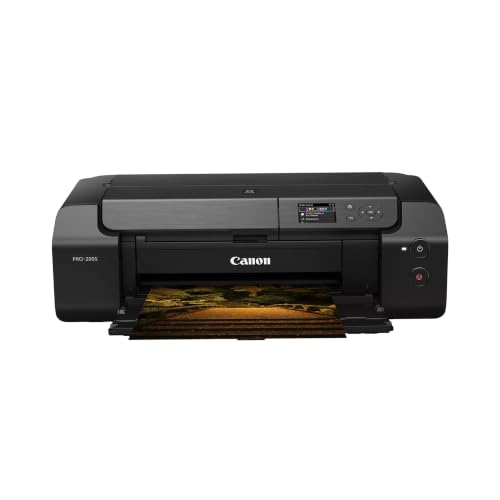
Canon PIXMA PRO-200S Printer
What We Like
- 8-color dye ink for vibrant prints
- Borderless printing up to 13" x 19"
- A3+ print in 90 seconds
- 3.0" color LCD for status checks
Trade-offs
- 32.0 pounds makes it hard to move
- No pigment ink for archival prints.
An 8-color dye-based ink system means this printer is built to deliver vivid, saturated color that makes your photos and art prints pop. If you want rich reds, deep blues, and bright yellows straight out of the box, the PIXMA PRO-200S is designed for that. It handles borderless prints from small 3.5″ x 3.5″ up to 13″ x 19″, so you can produce everything from wallet-size keepsakes to full-page portfolio pieces. The 3.0-inch color LCD gives you a quick view of ink levels and settings without needing to connect to a computer.
The trade-off here is weight. At 32.0 pounds, this is a heavy machine, so you will want a sturdy desk or cart rather than a flimsy shelf. For comparison, the Canon imagePROGRAF PRO-310 uses a 9-color pigment system, which some users prefer for different print characteristics, though it weighs 31.6 pounds.
Product photos
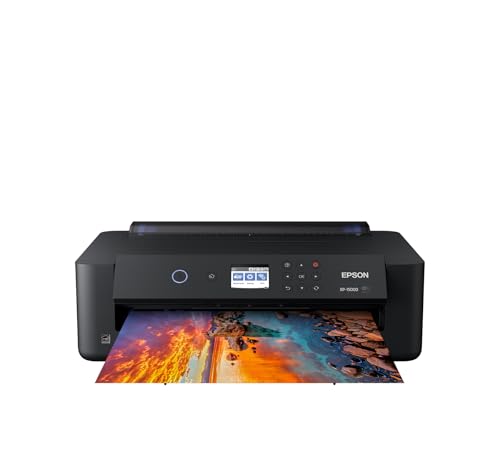
Epson Expression Photo HD XP-15000 Printer
What We Like
- Prints borderless up to 13×19 inches
- 6-color ink includes red and gray
- 30% smaller than predecessor
- Dash Replenishment auto-orders ink
Trade-offs
- Requires Epson Genuine ink cartridges only
- No scan or copy functions
A 13×19-inch print width lets you produce borderless prints up to that size, and the printer’s compact design means it fits on a desktop. The six-color Claria Photo HD ink set includes dedicated red and gray cartridges, which the manufacturer says delivers an ultra wide color gamut and enhanced black-and-white prints. This makes it a strong fit for photographers and home studios who want professional-looking prints without needing a large-format machine.
Tied to Epson’s own ink cartridges, and lacking scan-and-copy capabilities that an all-in-one like the Epson model offers, this printer is a focused tool for dedicated photo work. It operates at 49 dB, so you’ll hear it during longer print runs, but it delivers vivid color and true monochrome prints from a compact desktop footprint.
Product photos
How We Evaluated Art Printers For Home
Our evaluation began with a close look at each printer’s technical specifications and ink system design. We examined the number and type of ink colors, the maximum print resolution, and the supported paper sizes up to 13×19 inches. Manufacturer documentation on ink yields and page costs provided the foundation for our cost-per-print analysis.
We then identified the criteria that matter most for home art reproduction. Color gamut and vibrancy came first, as artists need their prints to match the original work’s saturation. Ink cost per page ranked second because frequent printing can quickly exceed the printer’s purchase price. Print size flexibility and physical footprint rounded out the list, since a wide-format printer that dominates a small desk is impractical for most home studios.
Instead, we cross-referenced expert reviews and aggregated owner experiences to identify consistent strengths and trade-offs. The result is a reliable guide to help you match a printer to your specific needs.
What To Look For In Art Printers For Home
Choosing the right art printer means understanding how ink type, print size, and operating costs will affect your daily workflow. Here are the key factors to consider.
Look for a printer with at least six ink colors for smooth gradations, support for 13×19-inch paper if you sell or frame prints, and a per-print ink cost that fits your monthly volume.
Ink Technology: Dye vs. Pigment
The ink type determines your print’s longevity and vibrancy. Dye-based inks, like those in the Canon PIXMA PRO-200S, produce exceptionally bright, saturated colors that look stunning on glossy paper. They are ideal for portfolios and display prints that won’t face direct sunlight for decades.
Pigment-based inks, such as the Lucia PRO II system in the Canon imagePROGRAF PRO-310, offer superior fade resistance and scratch protection. These prints are considered archival, lasting longer without color shift. If you sell fine art prints or want your work to last for generations, pigment ink is worth paying more for.
Print Size and Paper Handling
Most home art printers can handle letter-size paper, but the real value comes from wide-format capability. A printer that supports 13×19-inch paper lets you print borderless images up to A3+ size, which is essential for matted framing or selling larger prints.
Consider the printer’s paper path as well. Rear-feed trays are better for thick fine-art papers, while front-loading cassettes handle standard photo paper. Some models, like the Epson EcoTank Photo ET-8550, include both a rear feed and a front cassette, giving you flexibility without swapping paper constantly.
Ink Cost and Yield
The cost of replacement ink is the most significant long-term expense. Cartridge-based printers can cost tens of cents per 4×6 print, while tank-based systems like the Epson EcoTank bring that down to about 4 cents per print. If you print more than a few dozen photos or art prints each month, a tank system will save you money quickly.
- Check the printer’s stated color page yield and divide the ink set cost by that number.
- Look for printers that ship with full-capacity ink bottles or cartridges, not starter sets.
- Consider whether the printer supports third-party ink or requires proprietary cartridges.
- Verify that the ink system is easy to refill or replace without making a mess.
A good rule of thumb: if you print more than 50 color pages per month, choose a tank-based printer to keep ongoing costs low.
Art Printers For Home Compared
The table below compares our top picks side by side, highlighting their ink systems, maximum print sizes, and key trade-offs to help you decide at a glance.
| Product | Ink System | Max Print Size | Weight |
|---|---|---|---|
| Epson EcoTank Photo ET-8550 Printer | Epson Claria ET Premium 6-color ink | 13 x 19 in. | 24.5 pounds |
| Canon imagePROGRAF PRO-310 Printer | 9 color + Chroma Optimizer pigment | 13 inch wide | 31.6 pounds |
| Canon PIXMA PRO-200S Printer | 8-color dye-based | 13" x 19" | 32.0 pounds |
| Epson Expression Photo HD XP-15000 Printer | 6-color Claria Photo HD | 13 x 19 inches | 18.7 pounds |
Frequently Asked Questions
What is the best printer for printing art at home?
The Epson EcoTank Photo ET-8550 Printer is our top pick for home artists because it combines six-color dye ink for vibrant prints with ultra-low ink costs. It prints borderless up to 13×19 inches and includes scan and copy functions, making it a versatile hub for a home studio.
Do I need a pigment ink printer for art prints?
Pigment ink is essential if you want prints that resist fading for decades, which is important for selling fine art or archival work. For portfolio prints or personal display where longevity is less critical, dye ink offers more vibrant color at a lower cost.
What size printer do I need for selling art prints?
A printer that supports 13×19-inch paper (A3+) is ideal for selling prints because it can produce images large enough for standard matted framing. Borderless printing at this size lets you maximize the paper area without white borders.
How much does it cost to print art at home?
The cost varies widely by printer type. Tank-based systems like the Epson EcoTank Photo ET-8550 can print a 4×6 photo for about 4 cents in ink. Cartridge-based models typically cost more per print but have a lower upfront price.
Can I print on thick art paper with a home printer?
Many home art printers have a rear paper feed that accepts thick fine-art papers up to about a millimeter thick. Always check the printer’s media specifications before buying, especially if you plan to use watercolor or canvas papers.
The Bottom Line
For the home artist who prints regularly and wants the best balance of print quality and low running costs, the Epson EcoTank Photo ET-8550 Printer is our clear recommendation. Its six-color ink system delivers vibrant, punchy prints, and the included ink bottles cover up to 6,200 color pages, making it an affordable choice for high-volume use.
If your work demands the archival permanence of pigment ink, the Canon imagePROGRAF PRO-310 is the professional-grade option. It produces gallery-quality prints with deep blacks and scratch-resistant surfaces, though you will need a separate scanner. For artists who prioritize speed and the most saturated color possible, the Canon PIXMA PRO-200S offers eight-color dye ink and fast A3+ output.
The single most important factor in choosing an art printer is matching the ink technology to your output goals. Decide whether you need archival fade resistance or maximum vibrancy, then let that decision guide your budget and feature choices.
