
8 Best Scanners For Artwork in 2026
This post contains affiliate links. As an Amazon Associate, we earn from qualifying purchases.
For artists, a scanner is the bridge between a physical piece and its digital life. The Epson Perfection V850 Pro Scanner is our best overall pick, offering 6400 dpi resolution and a 4.0 Dmax for capturing fine detail and smooth tonal gradations that matter for drawings, paintings, and prints. For film-based artwork, the Plustek OpticFilm 9000i Ai delivers professional-grade 35mm scans, while the VIISAN VF3240 A3 Scanner is the fastest way to digitize large-format pieces.
The challenge with scanning artwork is that different mediums demand different tools. A charcoal drawing needs a scanner that preserves subtle tonal shifts, while a watercolor painting requires accurate color reproduction. Film negatives and slides have their own specific needs, and oversized pieces like posters or architectural drawings need a larger scan bed.
This guide is built from manufacturer specifications, expert round-ups, and patterns in owner feedback. We’ve organized eight scanners by their strengths so you can match the right tool to your medium, format, and workspace.
Top 8 Scanners For Artwork in the Market
Certain content that appears on this site comes from Amazon. This content is provided "as is" and is subject to change or removal at any time.
The Best Scanners For Artwork, Reviewed
Epson Perfection V850 Pro Scanner
What We Like
- 6400 dpi resolution for fine detail
- 4.0 Dmax for smooth tonal gradations
- Dual lens system optimizes each scan
Trade-offs
- At 20.9 pounds, it is heavy to move
- Only supports up to Mac OS X 10.10
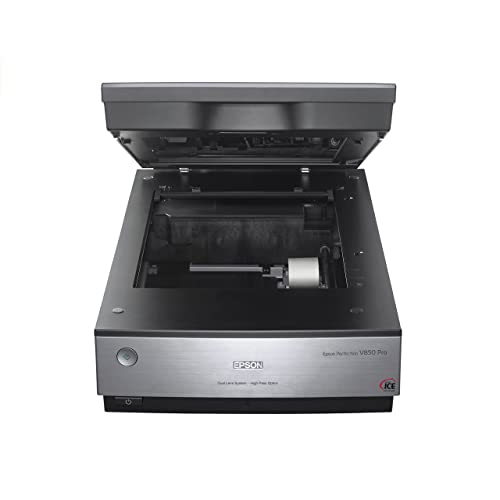
A 6400 dpi optical resolution means this scanner captures the finest pencil strokes, ink washes, and textured paper grain with exceptional clarity. The 4.0 Dmax delivers smooth tonal transitions from deep shadows to bright highlights, making it a strong choice for artists who digitize charcoal, pastel, or watercolor work where subtle gradations matter. The dual lens system automatically selects the best lens for the task, so you get sharper results whether scanning a detailed sketch or a full-page painting. For anyone serious about preserving the true character of their artwork, this machine offers pro-grade quality without guesswork.
The trade-off is size and weight: at 20.9 pounds, it is not a scanner you tuck into a shelf or move around the studio casually. It demands a dedicated, sturdy table. If portability is your priority, the Canon CanoScan LiDE 400 weighs just 3.6 pounds and slides into a bag, but its lower resolution and smaller scan area lack the depth and detail the Epson delivers. The V850 Pro is built for artists who value archival-quality scans over convenience, and it delivers on that promise.
Epson Perfection V600 Scanner

What We Like
- 6400 x 9600 dpi for large enlargements
- Built-in Transparency Unit for film scanning
- DIGITAL ICE technology removes dust and scratches
- ReadyScan LED needs no warm-up
Trade-offs
- Scan area limited to 8.5 x 11.7 inches
- 9.0 pounds makes it less portable
- USB 2.0, not USB-C or wireless
The scan area is limited to 8.5 x 11.7 inches, so if you need to scan larger documents or artwork, you would have to scan in sections and combine them manually. At nine pounds, the scanner is meant to stay on a desk rather than travel with you. But for someone who works with 35mm or medium-format film and letter-size paper, the V600 offers the resolution and film-handling features that make it a capable studio scanner.
Canon CanoScan LiDE 400 Scanner

What We Like
- 4800 dpi resolution for fine detail
- Auto scan mode detects document type
- USB Type-C for data and power
Trade-offs
- No transparency or film scanning capability
- Paper size limited to 8.50 x 11.69 inches
A flatbed that measures 1.7 inches thick and weighs 3.6 pounds means you can slide it onto a crowded desk or tuck it into a shelf when not in use. The 4800 x 4800 dpi resolution captures pencil lines and watercolor washes with enough detail for prints up to moderate sizes. The auto scan mode takes the guesswork out of each session by detecting whether you are feeding in a sketch, a photo, or a document. This is the scanner for the artist who works at a small table and wants a tidy, no-fuss setup that delivers clean digital copies without taking over the room.
For everyday sketchbook pages, reference photos, and journal entries, the slim build and quick USB-C connection make this a practical, space-saving companion. The included USB Type-C cable handles both data and power, so only one cord is needed. Reviewers note that the scanner’s 0.4-inch thickness lets it slide easily into a laptop bag or desk drawer. Auto scan mode detects what you place on the glass, and dedicated PDF buttons let you create editable, searchable multi-page documents without extra software.
Product photos
VIISAN VF3240 A3 Scanner

What We Like
- 4-second A3 scan at 200 DPI
- 2400 DPI optical resolution
- Frameless glass for edge-to-edge scanning
- Auto-Scan starts when lid closes
Trade-offs
- CIS sensor cannot scan 3D objects or bound books
- Windows limited to 1200 DPI for full A3
- Large footprint at 24.8 x 21.7 inches
The VF3240 scans an A3 color page at 200 DPI in 4 seconds, which means you can move through large documents quickly in a busy office. Its 2400 DPI optical resolution captures fine details, and the frameless glass lets you scan edge-to-edge without cropping. This flatbed is built for high-volume work where speed matters, making it a natural fit for CAD and business document digitization.
VIISAN S48 Duo Book Scanner

What We Like
- Scans without flattening or damaging books
- Dual 48MP cameras for sharp detail
- AI flattens curved pages in real time
- Functions as a UVC camera for live sharing
Trade-offs
- 600 DPI is lower than flatbed photo scanners
- 6.2 pounds needs a stable desk or stand
The overhead design captures oversized books, bound materials, maps, and documents up to A2 size without pressing on fragile pages or bindings, making it a natural fit for libraries, schools, offices, and archival work. Dual 48MP sensors capture clear text, fine lines, and accurate color detail at up to 600 DPI, helping preserve books, manuscripts, teaching materials, and professional documents with reliable image quality. Smart image processing helps flatten curved pages, remove finger marks, correct edge distortion, and clean backgrounds in real time, reducing manual editing and improving efficiency when scanning bound books. It also functions as a UVC camera for Zoom, Teams, and other live sharing scenarios, making it a practical solution for distance education, training, presentations, and collaborative office work.
The maximum optical resolution from the dual cameras is 600 DPI, which is lower than the 6400 dpi offered by a dedicated flatbed like the Epson Perfection V850 Pro. That means if your primary need is scanning fine art prints or detailed photographs at extreme enlargements, this overhead design won’t match the detail a high-end flatbed delivers. At 6.2 pounds, it’s portable enough to move between rooms, but you’ll want a steady surface for the overhead arm. For anyone who needs to capture books, manuscripts, or oversized documents quickly and gently, this is a thoughtful, purpose-built tool.
Plustek OpticFilm 9000i Ai Scanner
What We Like
- 7200 dpi captures fine film grain
- Infrared dust and scratch removal
- Includes IT8 calibration target
Trade-offs
- Only scans 35mm film, no larger formats
- At 3.3 lb, compact but not flatbed versatile
- Requires software workflow for best results
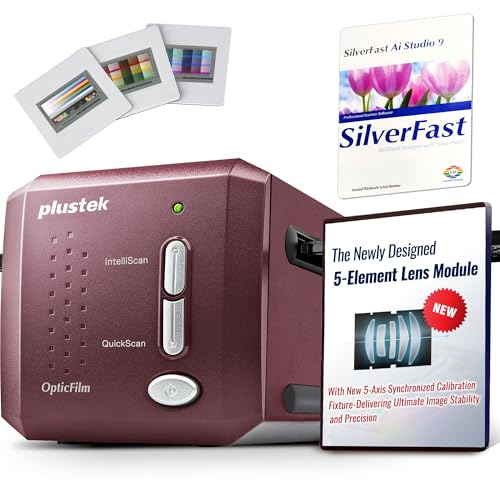
Color accuracy is a priority for anyone digitizing film, and the included software bundle delivers on that front. SilverFast Ai Studio 9 provides professional-grade control, while the advanced IT8 calibration target includes over 600 additional measurement patches compared to standard targets. This extra coverage significantly improves calibration accuracy in dark and pastel tones, areas where many lower-priced scanners struggle to maintain fidelity. The combination ensures that colors remain stable and true to the original film, reducing the need for extensive post-processing adjustments.
This is a dedicated film scanner, not a flatbed. It handles only 35mm film, so if you work with medium format, large format, or want to scan artwork prints or documents, you will need a second device like the Epson Perfection V850 Pro. The 3.3-pound weight and compact footprint make it easy to set up on a desk, but the scanning workflow relies on the included software. Expect a learning curve if you are new to SilverFast. For artists whose primary archive is 35mm film and who value color fidelity and defect removal over versatility, this is a precise, purpose-built solution.
Product photos
Plustek OpticFilm 8300i Ai Scanner

What We Like
- Includes advanced IT8 calibration target
- Bundled SilverFast 9 Ai Studio software
- 38% faster scanning than previous model
- Supports Windows and Mac OS
Trade-offs
- Limited to 35mm film and slides only
- Requires computer; no standalone operation
An included Advanced IT8 calibration target (ISO 12641-2 compliant) means this scanner can produce color-accurate scans straight out of the box, without guesswork or third-party purchases. Designed specifically for 35mm film and slides, the OpticFilm 8300i Ai pairs that calibration with SilverFast 9 Ai Studio software. That gives you professional-grade tools like iSRD dust removal and Multi-Exposure for pulling detail from dense negatives. If your work demands faithful color reproduction from your film archive, this setup removes the usual barriers between a raw scan and a print-ready file.
If you shoot 35mm film and want accurate color from the first scan, this is a purpose-built tool that delivers exactly that. It does nothing but 35mm film and slides, so if you also need to digitize prints, documents, or medium-format negatives, you would need a second scanner like the Epson Perfection V850 Pro. At 6.0 pounds, it is best left on a dedicated desk rather than tucked in a bag.
Product photos
HMWOKPOT A3 Large Format Flatbed Scanner

What We Like
- 4-second A3 color scans at 200 dpi
- 2400 dpi optical resolution for fine detail
- Auto-Scan starts when lid closes
- Frameless narrow-bezel design for large items
Trade-offs
- 12" x 17" scan area limits larger originals
- No film or slide scanning capability
- macOS support requires ICA driver only
A 12″ x 17″ scan area lets you digitize oversized artwork, CAD drawings, and open books without awkward repositioning, while 2400 dpi optical resolution captures pencil shading and brush texture with real clarity. At four seconds per A3 color page (200 dpi), this scanner keeps up with bulk digitizing projects, and the auto-scan feature that kicks in when you close the lid makes repetitive work feel almost effortless. It suits artists, architects, and educators who regularly handle large originals and want a straightforward, fast workflow without fiddling with software settings.
This scanner is designed for flat documents and artwork, so if you need to scan film negatives or slides, you will need a dedicated film scanner such as the Plustek OpticFilm 8300i Ai. The macOS support is limited to ICA driver compatibility, which may require a quick check before buying if you are on an older Mac system.
Product photos
How We Evaluated Scanners For Artwork
This guide is based on manufacturer specifications, expert round-ups in the art and photography space, and consistent patterns in owner feedback from across the web.
We focused on four criteria that matter most for artwork. Optical resolution and dynamic range determine how well a scanner captures fine detail and smooth tonal transitions. Scan area and format support tell you whether the scanner can handle your typical piece size and medium. Speed and workflow features affect how efficiently you can digitize multiple pieces. Build and connectivity matter for fitting into your workspace and transferring files to your computer.
A research-led approach has limits: we cannot report on long-term durability or real-world software quirks beyond what owners consistently mention. Still, by cross-referencing specs with expert analysis and user experience patterns, we can identify the scanners most likely to serve an artist’s needs.
What To Look For In Scanners For Artwork
Choosing a scanner for your art means matching the tool to your medium, format, and workflow. Here are the key factors to consider.
Look for an optical resolution of at least 2400 dpi for prints and drawings, and 4800 dpi or higher for film. A Dmax that preserves shadow detail in dark artwork is important. Match the scan area to your largest typical piece.
Resolution and Dynamic Range
Optical resolution, measured in dots per inch (dpi), determines how much detail the scanner can capture. For standard prints and drawings, 2400 dpi is sufficient for good enlargements. For film negatives and slides, look for 4800 dpi or higher to capture fine grain. Dynamic range, expressed as Dmax, describes the scanner’s ability to distinguish subtle tonal steps from pure white to pure black. A higher Dmax is desirable for artwork with deep shadows or delicate highlights.
Scan Area and Format Support
The scan bed must accommodate your largest piece. Common sizes are letter (8.5 x 11.7 inches) and A3 (11.7 x 16.5 inches). If you work with large-format paper or canvas, look for an A3 scanner. If you shoot film, check whether the scanner includes a transparency unit for negatives and slides. Some scanners only handle reflective media (prints and documents), while others can scan both.
Sensor Type and Speed
Flatbed scanners use either CCD or CIS sensors. CCD sensors produce deeper color and better shadow detail, making them preferable for artwork. CIS sensors are thinner, lighter, and scan faster, but they cannot capture the same tonal range and struggle with textured surfaces. Speed matters if you scan many pieces: a fast A3 scanner can digitize a large drawing in seconds at lower resolutions.
- Measure your largest piece of artwork and confirm the scanner’s bed size.
- Check whether the scanner includes a transparency unit if you shoot film.
- Decide whether CCD image quality or CIS speed and portability matters more.
- Look for USB connectivity that matches your computer (USB-C is newer, USB 2.0 is common).
- Consider the scanner’s weight if you need to move it between workspaces.
A good rule of thumb: buy the highest optical resolution and widest dynamic range your budget allows, then match the scan area to your largest piece.
Scanners For Artwork Compared
The table below compares all eight scanners across the key specs that matter for artwork, so you can see at a glance which model fits your format, resolution, and budget needs.
| Product | Resolution | Scan Area / Film Format | Dimensions |
|---|---|---|---|
| Epson Perfection V850 Pro Scanner | 6400 dpi | N/A | L 12.1 inches, W 19.8 inches, H 6.0 inches |
| Epson Perfection V600 Scanner | 6400 x 9600 dpi | 8.5 x 11.7 inches | L 19.0 inches, W 4.6 inches, H 11.0 inches |
| Canon CanoScan LiDE 400 Scanner | 4800 x 4800 dpi | 8.27 x 11.69, 8.50 x 11.69 | 14.5 x 9.9 x 1.7 inches |
| VIISAN VF3240 A3 Scanner | 2400 x 2400 DPI | A3 (12" x 17") | 24.8 x 21.7 x 5.1 inches |
| VIISAN S48 Duo Book Scanner | 600 DPI | Up to A2 | N/A |
| Plustek OpticFilm 9000i Ai Scanner | 7200 dpi | 35mm negatives and slides | 4.7 × 4.7 × 10.7 inches |
| Plustek OpticFilm 8300i Ai Scanner | N/A | 35mm & slides | L 10.7 inches, W 4.7 inches, H 4.7 inches |
| HMWOKPOT A3 Large Format Flatbed Scanner | 2400 x 2400 dpi | 12" x 17" | L 2.4 inches, W 22.2 inches, H 2.4 inches |
Frequently Asked Questions
What DPI do I need to scan artwork?
For standard prints and drawings, 300 to 600 dpi is enough for most uses. For enlargements or archival quality, 1200 to 2400 dpi is better. Film negatives and slides need 4800 dpi or higher to capture fine grain detail.
Can I scan a painting with a flatbed scanner?
Yes, as long as the painting is flat and dry. Thick paint or heavy canvas texture may not scan well. For thick or delicate pieces, an overhead scanner like the VIISAN S48 Duo Book Scanner is a better choice because it does not press the artwork against glass.
What is the difference between CCD and CIS scanners?
CCD (charge-coupled device) sensors produce deeper color, better shadow detail, and a wider dynamic range, making them ideal for artwork. CIS (contact image sensor) scanners are thinner, lighter, and scan faster, but they cannot capture the same tonal range and struggle with textured surfaces.
How do I scan film negatives and slides?
You need a scanner with a transparency unit, also called a film scanner or a flatbed with a transparency adapter. Dedicated film scanners like the Plustek OpticFilm 9000i Ai offer higher resolution and features like infrared dust removal specifically for 35mm film.
What is the best scanner for large-format artwork?
For pieces up to A3 size, the VIISAN VF3240 A3 Scanner offers fast scans and a frameless glass bed for edge-to-edge coverage. The HMWOKPOT A3 Large Format Flatbed Scanner is another option for oversized paper originals up to 12 x 17 inches.
The Bottom Line
The Epson Perfection V850 Pro Scanner is the best overall choice for artists who need museum-quality scans with exceptional detail and tonal range. It is a heavy, permanent workstation tool, but for serious work with prints, drawings, and film, it delivers results that justify the investment.
If your budget is more modest or you shoot 35mm film, the Plustek OpticFilm 9000i Ai offers professional-grade resolution and dust removal for negatives and slides. For artists who regularly scan large-format pieces, the VIISAN VF3240 A3 Scanner provides speed and edge-to-edge coverage without breaking the bank.
The single most important factor is matching the scanner to your medium and format. Choose a scanner that handles your largest piece, captures the detail your art demands, and fits the workspace you have.
