
10 Best Art Projectors For Tracing in 2026
This post contains affiliate links. As an Amazon Associate, we earn from qualifying purchases.
For tracing, the Artograph Flare 360 HD Digital Art Projector is our best overall pick thanks to its 360-degree projection arm and built-in art grids that make scaling and positioning effortless. Those who need maximum brightness from printed images should look to the Caydo S1 Optical Art Projector, while artists painting large wall murals will appreciate the Artograph LED Tracer Opaque Art Projector.
The challenge with art projectors for tracing is finding one that matches your workspace and source material. Digital projectors work from phones and tablets, while optical projectors enlarge printed images, and each type has different brightness, resolution, and positioning needs.
This guide is built from manufacturer specifications, expert round-ups, and patterns in owner feedback across ten models. We break down what matters most so you can match a projector to your specific tracing setup.
Top 10 Art Projectors For Tracing in the Market
Certain content that appears on this site comes from Amazon. This content is provided "as is" and is subject to change or removal at any time.
The Best Art Projectors For Tracing, Reviewed
Artograph Flare 360 HD Digital Art Projector
What We Like
- 360-degree projection with monopod arm
- 36 built-in art grids in 12 patterns
- Electronic focus and auto keystone
- WiFi, Bluetooth, HDMI, and USB-A
Trade-offs
- 180 ANSI lumens needs a dim or dark room
- 720p native resolution, not full HD
- Requires remote for electronic focus
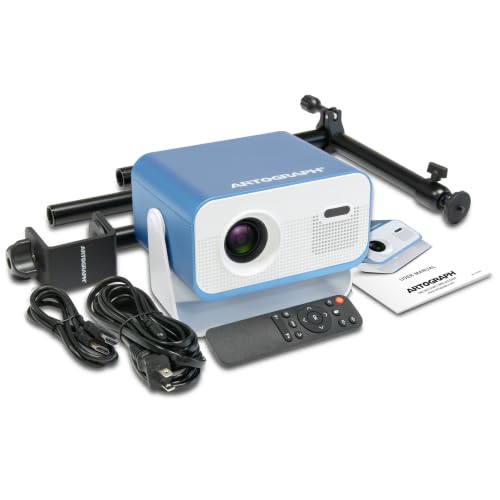
A 0.9:1 short throw ratio lets you project a 150-inch image from just 138 inches away, so even a small studio can fill a wall with reference art. The 36 built-in grids in three colors overlay directly onto your image, helping you check proportion and scale without taping graph paper to the wall. This projector suits artists who want digital flexibility. WiFi mirroring from a phone, HDMI from a laptop, or USB-A from a flash drive, without giving up the classic tracing workflow. The included monopod arm with table clamp and pivot stand lets you aim the beam up at a ceiling mural, straight ahead at a canvas, or down onto a desktop sketchbook.
The trade-off is brightness: at 180 ANSI lumens, you need a dim or darkened room for a clear projection, unlike the Caydo S1 optical model which works in brighter ambient light with its 5000-lumen lamp. But the Artograph compensates with electronic focus and auto keystone, both adjustable via the included remote, so you can dial in sharpness and square up the image without crawling behind the projector.
Product photos
Caydo S1 Optical Art Projector
What We Like
- 5000-lumen LED for bright projection
- 20,000-hour lifespan, no bulb replacements
- Built-in handle and cord storage
- Smooth focus knob for quick sharpness
Trade-offs
- Requires a darkened room for best results
- Only works with physical printed images
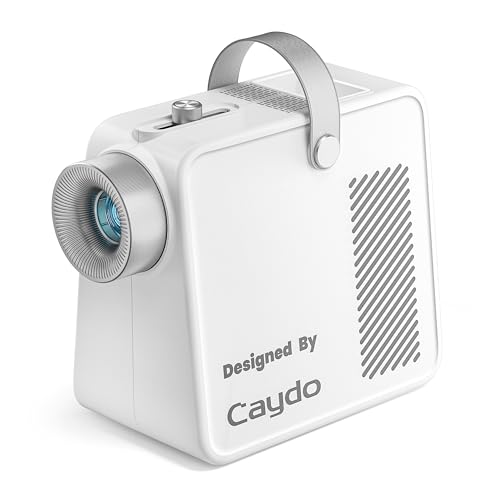
A 5000-lumen LED makes this optical projector exceptionally bright for its class, so outlines stay crisp even when you scale a small sketch up to an 80-inch mural across the room. That pure optical design means no software, no pairing, no firmware, just place your printed image under the 5×5-inch copy area, plug it in, and trace. It suits artists who want a straightforward, high-output tool for enlarging physical reference material onto canvas or walls, especially in a studio or classroom where you can control the lighting.
This projector needs a darkened room to perform at its best, close the curtains and turn off overhead lights, or the outline washes out. That puts it in a different category from a digital projector like the Flare 360 HD, which can handle brighter ambient light and projects from a phone or tablet. But if your workspace is dimmable and you work from printed images, the Caydo S1 delivers exceptional brightness and zero digital fuss for years of tracing.
Artograph LED Tracer Opaque Art Projector

What We Like
- Enlarges up to 14X original size
- Portable at 3.0 pounds
- Durable 200 mm optical glass lens
- LED runs cooler and lasts longer
Trade-offs
- Requires a dark room for best visibility
- Copy size limited to 5" x 5"
- Ambient light reduces projection clarity
A 5×5-inch copy area that can be enlarged up to 14 times its original size means you can turn a small sketch into a mural-spanning image. That optical glass lens and high-intensity LED keep the projection crisp and cool, so you can work on a wall without the unit overheating. This projector is built for artists who need to scale up designs onto vertical surfaces, guest room murals, classroom whiteboards, or quilt patterns. The 3.0-pound weight makes it easy to move from studio to site.
Ambient light is the enemy here; the projector performs best in a fully dark room, which limits daytime use unless you can black out the space. Compared to the Flare 360 HD, which offers digital projection with built-in grids, this optical model requires you to place a physical artwork underneath. That makes it less flexible for digital files but more direct for tracing existing drawings or prints. If your project is a wall mural and you have a dim room to work in, this tool delivers exactly what that job demands.
Caydo T3 AI Drawing Projector
What We Like
- AI generates projected scenes from typed ideas
- Snap a photo for a traceable outline projection
- SGS certified RG0 eye-safe light
Trade-offs
- At 3.2 pounds, heavier than pocket projectors
- Requires smartphone app for AI features
- Designed for kids ages 5+, not advanced artists
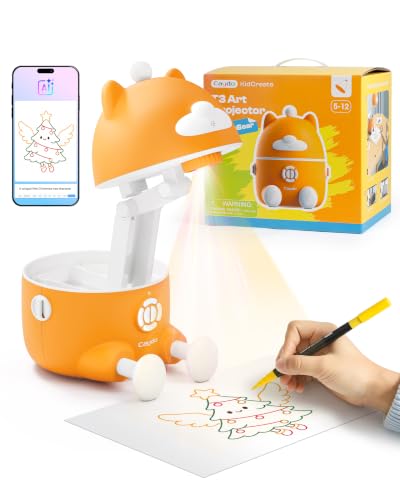
Five learning modes in the Caydo app give young artists a clear path forward as their skills develop. Over two hundred drawing patterns are organized into Letters, Numbers, Basic Strokes, Tracing, and Coloring categories. Tracing and Coloring patterns include follow-along guides, so children never feel stuck when a picture gets tricky. The system grows with the child, turning what could be a frustrating blank page into a guided activity that builds confidence. Parents report that kids soon produce artwork worth framing, which makes the projector feel more like a creative companion than a simple toy.
KODAK Luma 75 Pocket Projector
What We Like
- Palm-sized at 0.4 lb
- 100-inch display capability
- 30,000-hour LED lifespan
- One-touch plug-and-play setup
Trade-offs
- No native 720P resolution for sharp details.
- Tripod mount not included for overhead use.
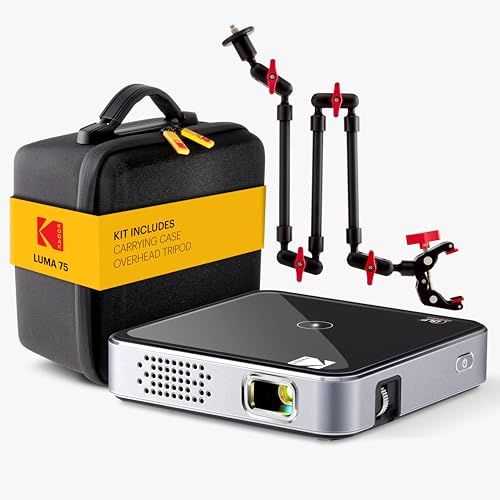
At just 0.4 pounds and small enough to fit in a pocket, this projector lets you take tracing projects anywhere, from a kitchen counter for cookie decorating to a coffee table for sketch practice. Its 100-inch display means you can blow up a reference image to mural size, while the 30,000-hour LED life promises years of reliable use without worrying about bulb replacements. The one-touch setup gets you projecting in seconds, which matters when you want to focus on drawing, not fiddling with cables.
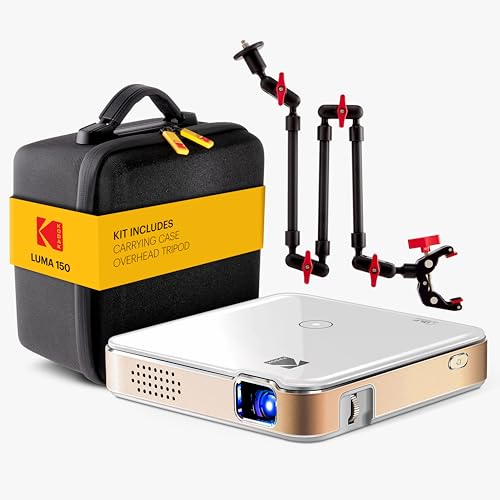
KODAK Luma 150 Mini Projector Kit
What We Like
- Wireless streaming via Miracast and AirPlay
- Included overhead tripod with articulating arm clamp
- Ultra-light 7.75 oz for easy portability
- 30,000-hour LED lifespan reduces maintenance
Trade-offs
- 1 W built-in speaker limits audio for large rooms
- No brightness spec for use in lit rooms
The included overhead tripod and articulating arm clamp let you position the projector exactly where you need it for tracing on walls, canvas, or tabletops. That adjustable mount, paired with wireless streaming from your phone or tablet via Miracast and AirPlay, makes it easy to project reference images without wrestling with cables. At just 7.75 ounces, this mini projector is light enough to toss in a bag and set up anywhere for a quick tracing session.
Weighing just 7.75 ounces, this projector is light enough to slip into a coat pocket, so you can take it from a home studio to a friend’s house without a second thought. The included overhead tripod and articulating arm clamp let you aim the image exactly where you need it, whether that’s on a wall for tracing or down onto a sewing table. The built-in 1 W speaker works for solo viewing, but if you’re planning a family movie night, you’ll want to plug in external speakers through the HDMI or USB port.
Artpanda Art Projector for Tracing
What We Like
- No app download required
- Manual focus for sharp images
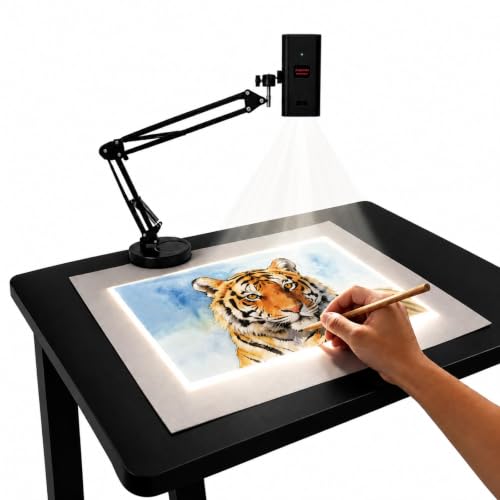
- Adjustable stand for wall or desk
- Works offline without WiFi
Trade-offs
- Small 2-inch width limits internal optics size
- No built-in battery for cord-free use
- Manual focus needs user adjustment each time
Scanning a QR code opens a browser-based control panel on any phone or tablet, so you can rotate, scale, and adjust the image without downloading an app. A manual focus adjustment button lets you fine-tune the focal length for clear images on a canvas or cookie surface. The adjustable stand changes height and tilt angle, allowing you to project onto horizontal canvases, vertical walls, or small DIY crafts.
Product photos
Dyhodu 720P Tracing Projector
What We Like
- Wireless connection with phones and tablets
- Projects up to 150 inches for wall murals
- Works on canvas, paper, walls, tabletops
- Manual focus for sharper tracing lines
Trade-offs
- Manual focus requires careful adjustment each time
- No auto keystone correction for angled setups
- At 17.1 inches tall, it needs stable table space
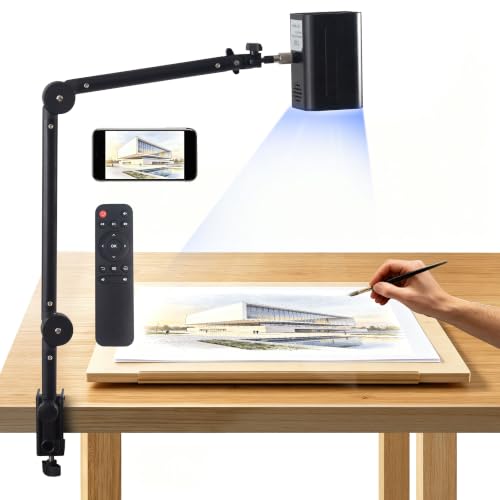
A 1280 x 720 native resolution with manual focus means you can keep traced lines crisp and easy to follow, whether you are sketching on a tabletop or scaling a mural up to 150 inches across a wall. This projector is built for artists who work on multiple surfaces, canvas, paper, walls, or a flat table. They want to pull images wirelessly from a phone, tablet, or computer without hunting for adapters. The generous projection range makes it especially useful for larger formats like wall murals and poster layouts, while the compact 7.5-inch width keeps it from hogging your desk.
The Dyhodu 720P Tracing Projector uses manual focus and lacks auto keystone correction, so you will need to spend a minute dialing in the image each time you move the projector or change surfaces. That is fine for a studio setup where the projector stays put, but less convenient if you are hopping between a table and a wall mid-project. Compared to the Flare 360 HD, which offers electronic focus and auto keystone for quicker adjustments, the Dyhodu asks for a bit more patience in exchange for its wireless flexibility. Best for artists who value multi-surface versatility and wireless ease over instant setup.
Product photos
FEELWORLD LAIZESKE HY520 Art Projector

What We Like
- WiFi 6 and Bluetooth 5.0 for wireless mirroring
- Auto vertical keystone for quick alignment
- 50,000-hour LED lifespan
Trade-offs
- 150 ANSI lumens is dim for bright rooms
- Manual focus requires fine-tuning by hand
WiFi 6 and Bluetooth 5.0 let you cast reference images straight from a phone or tablet without hunting for cables, which makes this projector feel like a natural extension of your digital sketchbook. The auto vertical keystone saves you from fiddling with tilt every time you shift the unit, and the 40-to-120-inch range covers everything from a lap-sized drawing board to a wall mural. If you work mostly from digital photos or online references and want a setup that stays out of your way, this is the one that keeps your workflow connected.
Brightness is the trade-off: 150 ANSI lumens means you’ll want the room dim or shaded to see your traced lines clearly, especially on larger canvases. For tracing from physical prints or opaque originals, an optical projector like the Caydo S1 would skip the digital setup entirely. But if your art starts on a screen and you value wireless freedom, the HY520 delivers that without extra adapters.
Product photos
RTSTEC Art Projector for Tracing

What We Like
- Wireless AirPlay from iPhone/iPad
- Adjustable focus lens for clarity
- Height-adjustable and 360° swivel stand
- Lightweight and foldable for storage
Trade-offs
- 480P resolution limits fine detail at larger sizes
- No Android or PC wireless support
- Only 11-inch minimum distance for small projects
The RTSTEC Art Projector is built around one clear idea: a simple, wireless way to project your iPhone or iPad screen straight onto your canvas or wall. With AirPlay support and a projection range from 11 to 80 inches, you can trace anything from a 6×10-inch sketch to a 60×90-inch mural without juggling cables or adapters.
The 480P resolution means fine details may appear softer at larger projection sizes compared to a 720P projector like the Flare 360 HD. Also, this model only supports iPhone and iPad for wireless mirroring; Android users or those hoping to project from a laptop will need to use the USB or HDMI inputs instead. If your tracing work stays on an Apple device and you value wireless convenience, the RTSTEC offers a straightforward tool for that purpose.
Product photos
How We Evaluated Art Projectors For Tracing
Our evaluation is research-based, drawing on manufacturer specifications, expert round-ups from art and craft communities, and patterns found in owner reviews. We focused on the features that directly affect the tracing experience rather than general projector performance.
The four criteria that mattered most were projection brightness and room requirements, because tracing clarity depends on seeing lines against your surface. Image source compatibility also mattered, since some projectors work only with printed images while others connect to phones or tablets. Positioning flexibility was important too, including mounts, arms, and keystone correction for different surfaces. Resolution determines how much fine detail carries over at larger projection sizes.
A research-led evaluation has limits. We cannot replicate the exact lighting and surface conditions of every studio, so we prioritize specs like lumen ratings and optical magnification that give reliable comparisons. Owner feedback helps us understand real-world usability that numbers alone cannot capture.
What To Look For In Art Projectors For Tracing
Choosing an art projector for tracing means balancing your source material, workspace, and lighting conditions. These four criteria will guide you to the right match.
Match your projector type to your source: digital projectors for phones and tablets, optical projectors for printed images. Brightness and room darkness matter more than resolution for clear tracing lines.
Projection Type: Digital vs. Optical
Digital projectors connect to phones, tablets, or computers via WiFi, Bluetooth, HDMI, or USB-A, letting you project any image from your device. Optical projectors use a bright light and lens to enlarge a physical printed image placed inside the unit. Digital projectors offer more flexibility in image sources, while optical projectors often provide sharper enlargement of printed artwork because there is no digital compression or pixelation.
The Artograph Flare 360 HD and FEELWORLD LAIZESKE HY520 are digital projectors. The Caydo S1 and Artograph LED Tracer are optical projectors. Your choice depends on whether you trace from a screen or from paper.
Brightness and Room Requirements
Brightness determines how dark your room needs to be for clear projection. Optical projectors are often rated in lumens, with the Caydo S1 offering 5000 lumens for bright projection in a dim studio. Digital projectors like the Artograph Flare 360 HD use 180 ANSI lumens, which works well in a dark room but fades in ambient light.
No art projector for tracing performs well in a fully lit room. Plan to work in a dim or dark space, and check the lumen rating to understand how much darkness you need.
Positioning and Mounting
The ability to position the projector exactly where you need it is critical for tracing on different surfaces. Some projectors include a monopod arm for 360-degree projection onto walls, ceilings, or floors, like the Artograph Flare 360 HD. Others come with an overhead tripod and articulating arm clamp, like the KODAK Luma 150 Mini Projector Kit, which is ideal for tracing on a tabletop.
Consider whether you trace on a horizontal surface like a desk or a vertical surface like a wall. The mount or stand included with the projector should match your typical setup.
Resolution and Image Quality
Resolution affects how much fine detail you see in the projected image, especially at larger sizes. The Artograph Flare 360 HD offers 720p native resolution, which is adequate for most tracing work. The RTSTEC Art Projector for Tracing has 480P resolution, which limits fine detail when projecting large.
For tracing, you do not need 4K resolution, but higher resolution helps with intricate linework. Consider the size of your tracing surface and the level of detail in your source images.
- Check whether the projector has manual or electronic focus, and how easy it is to adjust.
- Verify the maximum projection size and whether it fits your workspace.
- Look for keystone correction if you need to project from an angle.
- Confirm the projector works with your device’s operating system.
- Measure the distance from your projector to your tracing surface to ensure it fits your room.
A projector with manual focus and no keystone correction will cost less but requires more setup time each session.
Art Projectors For Tracing Compared
The table below compares brightness, resolution, projection type, and key features across all ten projectors to help you see the differences at a glance.
| Product | Resolution | Projection Size | Weight |
|---|---|---|---|
| Artograph Flare 360 HD Digital Art Projector | 1280 x 720 HD | 20-150 inches | 1.9 pounds |
| Caydo S1 Optical Art Projector | N/A | 20", 80" diagonal | 2.9 pounds |
| Artograph LED Tracer Opaque Art Projector | N/A | 2X–14X Enlargement | 3.0 pounds |
| Caydo T3 AI Drawing Projector | Native 720P | N/A | 3.2 pounds |
| KODAK Luma 75 Pocket Projector | N/A | Up to 100 in | 0.4 lb |
| KODAK Luma 150 Mini Projector Kit | N/A | N/A | 7.75 oz |
| Artpanda Art Projector for Tracing | N/A | N/A | N/A |
| Dyhodu 720P Tracing Projector | 1280 x 720 HD | 20 to 150 inches | N/A |
| FEELWORLD LAIZESKE HY520 Art Projector | 720P Native | 40-120 inches | N/A |
| RTSTEC Art Projector for Tracing | 480P | 6×10 to 60×90 inches | N/A |
Frequently Asked Questions
Do I need a digital or optical art projector for tracing?
Digital projectors work from phones, tablets, and computers, making them versatile for tracing digital photos, designs, or reference images. Optical projectors require a physical printed image placed inside the unit but often provide sharper enlargement of printed artwork. Choose digital if you work from a screen, optical if you trace from printed images.
How dark does my room need to be for an art projector?
Most art projectors for tracing require a dim or dark room for clear projection. Optical projectors with high lumen ratings, like the Caydo S1 at 5000 lumens, can work in a dim studio, while digital projectors with lower ANSI lumens need a darker space. No projector performs well in a fully lit room.
Can I project onto a wall or only onto a tabletop?
Many art projectors can project onto both walls and tabletops, depending on their mount and positioning. The Artograph Flare 360 HD has a monopod arm for wall projection, while the KODAK Luma 150 Kit includes an overhead tripod for tabletop tracing. Check the included stand or mount to see what surfaces it supports.
What resolution do I need for tracing?
720p native resolution is sufficient for most tracing work, providing clear lines without excessive pixelation. Lower resolutions like 480P work for simple shapes or small projections but lose fine detail at larger sizes. You do not need 4K resolution for tracing.
Can I use an art projector with my phone?
Yes, many digital art projectors connect to phones wirelessly via WiFi, Bluetooth, or AirPlay. The FEELWORLD LAIZESKE HY520 uses WiFi 6 and Bluetooth 5.0, while the RTSTEC Art Projector works with iPhone and iPad via AirPlay. Check the projector’s compatibility with your phone’s operating system before buying.
The Bottom Line
The Artograph Flare 360 HD Digital Art Projector is our best overall pick for artists who want a versatile digital projector with flexible positioning and built-in proportion grids. Its 360-degree monopod arm and electronic focus make it ideal for tracing on walls, canvas, or paper in a dim studio.
If you trace from printed images and want maximum brightness, the Caydo S1 Optical Art Projector offers 5000 lumens for a clear image in a dim studio. For wall mural work, the Artograph LED Tracer Opaque Art Projector enlarges up to 14 times the original size from a small sketch.
The single most important buying factor is matching the projector type to your source material and workspace. Choose a digital projector for phone or tablet images and an optical projector for printed images, then confirm the brightness and mounting fit your room and surfaces.
