
7 Best Fine Art Printers in 2026
This post contains affiliate links. As an Amazon Associate, we earn from qualifying purchases.
For artists and photographers who demand gallery-quality prints, the Canon imagePROGRAF PRO-1100 is the best overall fine art printer, delivering exceptional color accuracy with its 11 pigment inks and LUCIA PRO II technology. The Epson SureColor P900 offers a strong alternative for desktop-friendly 17-inch printing, while the CES Imaging PRO-4600 handles large professional output.
Choosing a fine art printer means balancing color gamut, ink stability, print size, and the physical space your studio can dedicate to a heavy machine. The wrong choice can mean wasted paper, frustrating clogged nozzles, or prints that fade too soon.
This guide is built from manufacturer specifications, professional round-ups, and patterns in owner feedback across seven top models. We break down what each printer does best so you can match the right tool to your creative practice.
Top 7 Fine Art Printers in the Market
Certain content that appears on this site comes from Amazon. This content is provided "as is" and is subject to change or removal at any time.
The Best Fine Art Printers, Reviewed
Canon imagePROGRAF PRO-1100

What We Like
- 11 pigment inks plus Chroma Optimizer
- LUCIA PRO II ink for wide color gamut
- Anti-clogging FINE print head
- Air feeding system prevents paper skew
Trade-offs
- At 83.0 pounds, requires a sturdy stand
- 17-inch width limits large-format fine art prints
- Large footprint: 28.5 inches wide
An 11-pigment ink system with a dedicated Chroma Optimizer gives you a color range and gloss uniformity that matter deeply when reproducing fine art. The LUCIA PRO II inks deliver exceptional clarity in dark areas, so a deep shadow or a subtle highlight in a photograph or painting print stays true to the original. For a photographer or artist who prints at 17 inches wide and demands gallery-quality results, this printer brings the precision you need without stepping up to a massive floor-standing machine.
At 83 pounds, this is not a printer you casually move from desk to shelf. It needs a dedicated, sturdy stand or table. Compared to the Epson SureColor P900, which weighs significantly less, the PRO-1100 asks more of your workspace. But that weight comes from a build meant to keep paper feeding straight and ink placement accurate, and for anyone printing fine art for sale or exhibition, the reliability is worth the extra effort to set it up properly.
Epson SureColor P900
What We Like
- Dedicated matte and photo black channels
- Borderless printing up to 17×22 inches
- 4.3-inch full-color touchscreen for easy control
- Mobile printing via AirPrint and Epson Print Layout
Trade-offs
- At 49.3 pounds, it needs a sturdy desk or stand
- Large footprint: 35.6 inches long, 24.2 inches wide
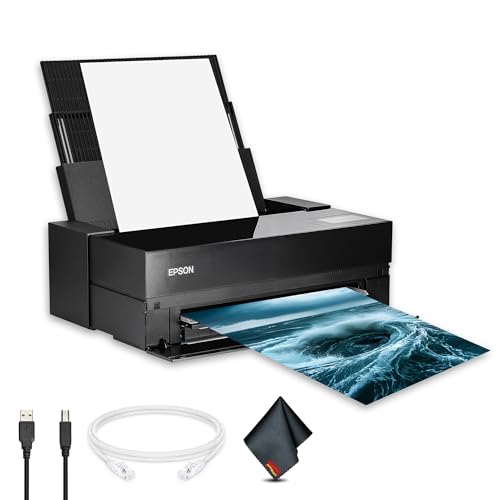
A 17-inch print width and 5760 × 1440 dpi resolution mean you can produce gallery-ready prints with sharp detail and smooth gradients right from your desktop. The UltraChrome PRO10 pigment ink uses separate matte and photo black channels that switch automatically, so you don’t waste time or paper swapping cartridges between glossy and fine-art media. Borderless printing up to 17 by 22 inches makes it a natural fit for photographers and artists who want professional proofs or finished pieces without trimming. The 4.3-inch touchscreen keeps settings and maintenance straightforward, and Wi-Fi plus AirPrint support let you send files from an iPad or iPhone without plugging in.
This printer weighs 49.3 pounds and measures nearly three feet wide, so it demands a dedicated, sturdy surface. You won’t be tucking it onto a flimsy shelf or moving it around often. Still, if floor space is tight or you need a printer that can sit on a standard desk, the P900’s footprint may feel imposing. It’s built for someone who prints regularly and values consistent color and workflow efficiency over portability.
CES Imaging PRO-4600 Fine Art Printer
What We Like
- Improved black density and dark-color gamut
- Reformulated LUCIA PRO II Ink for preservation
- High light resistance for long-term ink stability
- 1-year on-site warranty included
Trade-offs
- At 274 lb, requires a dedicated floor stand
- Large footprint needs substantial studio space
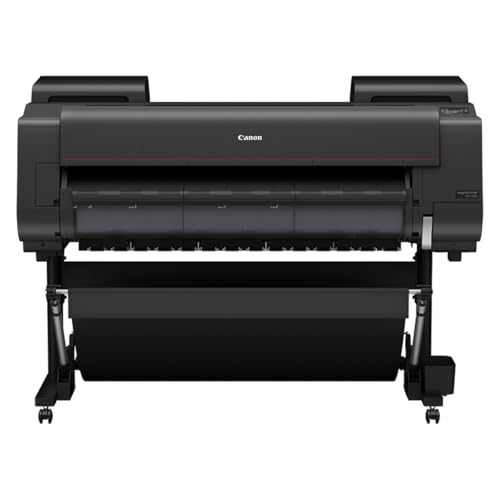
This printer delivers deep, rich blacks and a wider dark-color gamut thanks to the reformulated LUCIA PRO II ink and improved black density. The high light resistance of those inks gives your prints long-term archival stability, so they stay true to your vision for years. It suits any studio or print shop that regularly outputs large, museum-quality pieces and values color accuracy and permanence over portability.
At 274 pounds and nearly four and a half feet wide, this machine demands a permanent, sturdy floor stand and a dedicated space. It is far heavier and larger than a 17-inch printer like the Canon PRO-1100, which you could set on a sturdy table. If you rarely print larger than 24 inches, the PRO-4600 may feel oversized for your workflow.
CES Imaging PRO-2600 Fine Art Printer
What We Like
- High scratch resistance for durable prints
- Reformulated LUCIA PRO II ink for rich blacks
- Improved black density and wider dark-color gamut
- 1 year on-site warranty included
Trade-offs
- At 223 lbs, requires a sturdy dedicated stand
- 36-inch depth needs substantial floor space
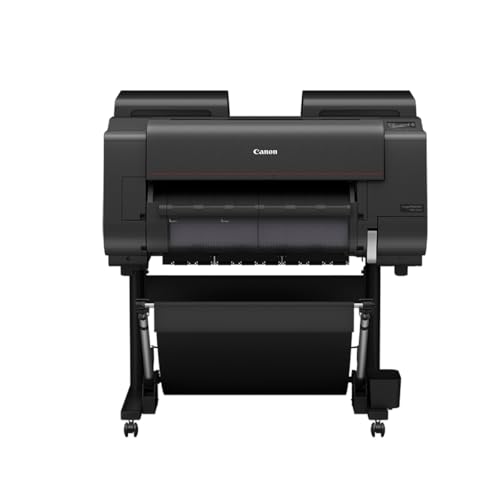
A high scratch resistance rating means your fine art prints can handle handling, framing, and even light stacking without worrying about surface damage. This makes the PRO-2600 a natural fit for artists who sell prints or exhibit work, where durability matters as much as color. The reformulated LUCIA PRO II ink and improved black density with a wider dark-color gamut help shadow detail stay rich and true. For a mid-size printer, it packs serious archival quality into a package that still fits a dedicated studio space.
At 223 pounds and nearly four feet deep, this isn’t a printer you tuck into a corner desk. It needs a proper stand and a permanent home. Compared to the Canon PRO-2100, which is narrower, the PRO-2600 demands more floor commitment but includes scratch resistance and improved black density. If your work involves high-traffic prints or you want the peace of mind that comes with an on-site warranty, the extra footprint is worth it.
Product photos
HP DesignJet Z9+ Postscript
What We Like
- 2400 x 1200 dpi for crisp fine art
- 500 GB self-encrypting storage
- Roll feed, rear sheet, auto cutter
- PIN printing protects sensitive prints
Trade-offs
- At 159 lb, needs a sturdy floor stand
- 27-inch depth requires dedicated workspace
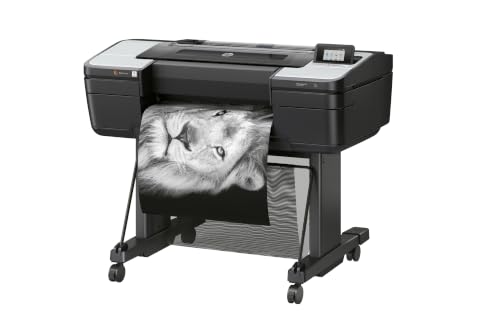
A 500 GB self-encrypting hard drive and 125 GB of memory mean this printer can handle massive fine-art files without slowing down. HP Secure Boot and PIN printing keep your proofs and client work private. That combination of speed and security makes it a natural fit for professional photographers and print service providers who need consistent, gallery-quality output on media up to 24 inches wide. The 2400 x 1200 dpi resolution delivers the kind of sharp detail and smooth tonal transitions that fine-art graphics demand, and the automatic horizontal cutter saves time when switching between rolls of photographic paper or fine-art material.
At 159 pounds and 27 inches deep, this is not a desktop printer. It needs a dedicated floor stand and a permanent spot in your studio or shop. Compared to the Canon imagePROGRAF PRO-1100, which weighs 83 pounds and fits on a smaller footprint, the HP Z9+ demands more space and a stronger floor. But if your work involves high-volume, large-format prints with strict security requirements, the storage, encryption, and media flexibility here justify the footprint. It is built for throughput and trust, not portability.
Product photos
Epson SureColor T5170
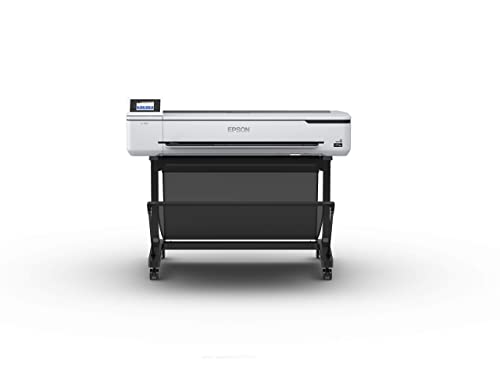
What We Like
- A1/D-size print in 31 seconds
- Large 4.3-inch color touchscreen
- High-capacity 80 mL black ink
- Wi-Fi Direct for router-free printing
Trade-offs
- At 101 pounds, needs a sturdy stand
- 36-inch width limits larger fine art formats
A full 36-inch width and a blistering 31-second A1/D-size print speed make this printer a natural fit for offices or studios where large-format output needs to keep pace with deadlines. The high-capacity 80 mL black cartridge and 50 mL color cartridges mean fewer interruptions to swap ink, and the 4.3-inch color touchscreen simplifies job selection without digging through menus. For artists producing posters, architectural prints, or proofs at scale, this is speed and convenience rolled into one compact frame.
At 101 pounds, this isn’t a machine you casually relocate, so plan for a dedicated workspace. If your work rarely exceeds 24 inches, a smaller-format printer might be easier to accommodate, but the T5170 delivers exactly what it promises for wide-format needs.
Product photos
Canon PRO-2100

What We Like
- 24-inch wide format for fine art prints
- 1-year on-site warranty by Canon
- Sold by Canon Platinum Reseller
Trade-offs
- Large footprint needs dedicated workspace
- 1-year warranty, not longer coverage
A 24-inch print width means you can produce gallery-sized fine art prints without stitching panels together, making this Canon ideal for photographers and artists who want exhibition-ready output from their own studio. The 1-year on-site warranty adds peace of mind for a professional tool that will see heavy use, and the Platinum Reseller status from CES Imaging suggests reliable support and genuine Canon service. This printer suits creators who need consistent, large-format results and value manufacturer-backed protection over a cheaper upfront cost.
Compared to the 17-inch Canon PRO-1100, this model gives you significantly more print area but takes up far more space, so it’s best for those with a proper studio or workshop.
Product photos
How We Evaluated Fine Art Printers
Our evaluation focused on what matters most for fine art output: ink technology, color accuracy, print permanence, and practical workflow. We compared specifications like ink set composition, droplet size, and resolution across all seven models, drawing on manufacturer documentation and expert reviews from professional printmaking circles.
Ink systems were our primary criterion. Printers using dedicated matte and photo black channels, like the Epson SureColor P900, prevent wasteful ink swapping. The Canon PRO-1100’s Chroma Optimizer coating eliminates gloss differential on glossy papers, a critical detail for fine art prints. We also weighed archival quality, noting that LUCIA PRO II inks and improved black density directly affect print longevity.
Physical footprint and setup requirements matter. A 274-pound printer like the CES Imaging PRO-4600 delivers unmatched width but demands a dedicated floor stand and studio space. The models highlighted balance professional output with realistic workspace needs, recognizing that every buyer must weigh the trade-offs.
What To Look For In Fine Art Printers
Choosing a fine art printer starts with understanding your output goals and your physical space. The right printer delivers the color, size, and durability your work deserves without overwhelming your studio.
Focus on ink count and type, maximum print width, paper handling options, and the printer’s physical footprint. These four factors determine whether a model fits your art and your room.
Ink Technology and Color Gamut
The ink set is the heart of any fine art printer. More pigment inks generally mean a wider color gamut and smoother transitions. The Canon PRO-1100 uses 11 pigment inks plus a Chroma Optimizer, which applies a clear coating to eliminate gloss differential on glossy media. Dedicated matte and photo black channels, found on the Epson SureColor P900, save time and ink by eliminating the need to swap cartridges between print types.
Look for inks formulated for archival stability. LUCIA PRO II ink, used in several Canon and CES Imaging models, offers high light resistance for long-term preservation. Black density and dark-color gamut improvements directly affect the depth and richness of your prints.
Print Size and Media Handling
Your printer’s maximum width defines the largest fine art print you can produce. Seventeen-inch models like the Canon PRO-1100 and Epson P900 handle most portfolio and matted prints. Twenty-four-inch models like the Canon PRO-2100 open up larger display work. For mural-scale pieces, the CES Imaging PRO-4600 prints at a wider size.
Paper feeding matters just as much. An air feeding system prevents paper skew on the Canon PRO-1100. Roll feed and rear sheet options, common on larger models, let you switch between media types without rethreading. Borderless printing, available on the Epson P900 up to 17×22 inches, saves trimming time.
Physical Footprint and Weight
Fine art printers are heavy machines, and their weight determines where you can place them. The Canon PRO-1100 weighs 83 pounds and needs a sturdy stand. The Epson P900 is more manageable at 49 pounds but still requires a dedicated desk. Large-format models like the CES Imaging PRO-4600 weigh 274 pounds and demand a floor stand and substantial floor space.
Measure your studio before buying. Account for the printer’s depth and width, plus clearance for paper loading and front access. A printer that fits on paper but crowds your workspace will frustrate your workflow.
- Measure your available floor or desk space, including clearance for paper feed and access doors.
- Check the printer’s weight and whether the manufacturer recommends a specific stand or table.
- Confirm media compatibility: roll feed, sheet feed, and borderless options for your preferred paper types.
- Verify ink configuration: dedicated matte and photo black channels save time and reduce waste.
- Review warranty and support options, especially on-site service for heavy models.
If you print mostly up to 17×22 inches, a desktop model like the Epson SureColor P900 saves space without sacrificing quality.
Fine Art Printers Compared
The table below compares the seven fine art printers across key specifications, making it easy to see which model fits your studio size and print goals.
| Product | Print Width | Ink Type | Weight |
|---|---|---|---|
| Canon imagePROGRAF PRO-1100 | 17 inches | 11 pigment inks + Chroma Optimizer | 83.0 pounds |
| Epson SureColor P900 | 17 inches | UltraChrome PRO10 pigment | 49.3 pounds |
| CES Imaging PRO-4600 Fine Art Printer | N/A | LUCIA PRO II Ink | 274.0 pounds |
| CES Imaging PRO-2600 Fine Art Printer | N/A | Reformulated LUCIA PRO II Ink | 223.0 pounds |
| HP DesignJet Z9+ Postscript | Up to 24 inches | N/A | 159.0 pounds |
| Epson SureColor T5170 | 36 inches | UltraChrome XD2 Pigment | 101 pounds |
| Canon PRO-2100 | 24 inches | N/A | N/A |
Frequently Asked Questions
What is the best fine art printer for a home studio?
The Canon imagePROGRAF PRO-1100 is the best overall choice for a home studio that can accommodate its 83-pound weight and 28.5-inch width. It delivers professional color accuracy with 11 pigment inks and a Chroma Optimizer. For tighter spaces, the Epson SureColor P900 is lighter at 49 pounds and still offers dedicated matte and photo black inks.
How many inks do I need in a fine art printer?
More pigment inks generally provide a wider color gamut and smoother gradients, which is important for fine art reproduction. The Canon PRO-1100 uses 11 inks plus a Chroma Optimizer, while the Epson P900 uses 10. For most artists, that range offers excellent color accuracy. Dedicated matte and photo black channels are more important than total ink count alone.
What size fine art printer should I buy?
Seventeen-inch printers handle most portfolio prints and framed artwork up to 17×22 inches. Twenty-four-inch models like the Canon PRO-2100 are better for larger display pieces and gallery shows. If you produce mural-scale prints or run a print service, a wider model like the CES Imaging PRO-4600 is necessary. Measure your typical print sizes before choosing.
Are fine art printers heavy?
Yes, fine art printers are heavy due to their ink systems and paper handling mechanisms. Desktop models like the Epson SureColor P900 weigh 49 pounds and need a sturdy desk. Larger professional models like the Canon PRO-1100 weigh 83 pounds, while wider printers can exceed 270 pounds. Always verify your workspace can support the printer’s weight.
What is the difference between fine art and photo printers?
Fine art printers use pigment-based inks with wider color gamuts and better archival stability than typical photo printers. They often include dedicated matte and photo black channels, anti-clogging print heads, and more precise paper feeding systems. Fine art printers are designed for gallery-quality prints on specialty media, while photo printers prioritize speed and glossy paper output.
The Bottom Line
For most fine artists and photographers, the Canon imagePROGRAF PRO-1100 delivers the best balance of color accuracy, ink technology, and manageable 17-inch format. Its 11 pigment inks and Chroma Optimizer produce prints with deep blacks and even gloss, making it a reliable choice for portfolio and gallery work.
If you need a lighter desktop option with dedicated matte and photo black channels, the Epson SureColor P900 is a strong 17-inch alternative. For professionals printing at a wider size, the CES Imaging PRO-4600 offers archival LUCIA PRO II ink with on-site warranty support. Budget-minded artists who print smaller sizes can look to the Canon PRO-2100 for 24-inch output with professional backing.
The single most important factor is matching the printer’s maximum print width to your typical output size. Buy the smallest width that fits your work, and invest the savings in better paper and ink.
