
5 Best Paint Markers For 3d Prints in 2026
This post contains affiliate links. As an Amazon Associate, we earn from qualifying purchases.
For 3D prints that need color, the ZSCM Liquid Gloss Shimmer Markers are the best overall choice, delivering a durable, scratch-resistant gloss finish that bonds to PLA, ABS, and resin. For artists who want the widest palette, the Chalkola Acrylic Brush Markers offer 60 colors, while the Nicpro Acrylic Paint Markers provide a 240-color numbered library for serious modelers.
The challenge with painting 3D prints is finding a marker that actually sticks to slick, layered surfaces without bleeding or peeling. Layer lines, porous resin, and smooth filaments each behave differently, so the right marker needs good adhesion, opacity, and a tip that can handle both fine details and broad coverage.
This guide is research-based, drawing on manufacturer specifications, expert round-ups, and patterns in owner feedback to highlight the five best options. We focus on what matters most for 3D prints: adhesion, tip versatility, and finish durability.
Top 5 Paint Markers For 3D Prints in the Market
Certain content that appears on this site comes from Amazon. This content is provided "as is" and is subject to change or removal at any time.
The Best Paint Markers For 3D Prints, Reviewed
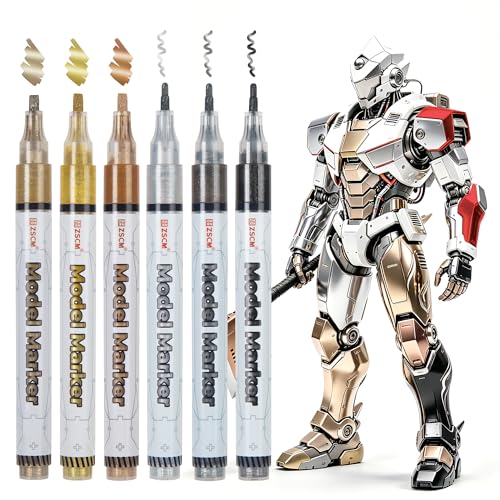
ZSCM Liquid Gloss Shimmer Markers
What We Like
- Glossy shimmer finish with opaque coverage
- Scratch-resistant and water-resistant after curing
- Dual tips for detail and broad coverage
- Bonds to PLA, ABS, resin, and metal
Trade-offs
- 12-hour cure time before handling
- Only 6 colors in the set
A 12-hour cure time might sound like a wait, but it’s the key to a finish that resists scratches and oxidation for years. ZSCM’s Liquid Gloss Shimmer Markers bond directly to PLA, ABS, resin, and metal, so you can paint over layer lines on a 3D print or add metallic highlights to a miniature without worrying about peeling. The dual tips, 1mm for panel lines and 2-3mm for broad coverage, let you switch between precision and speed in one pen. For modelers who want a durable, luminous sheen that actually stays put, this set delivers exactly that.
The trade-off is the color range: six shades (Gold, Silver, Copper, and three neutrals) cover the basics but won’t satisfy someone building a full fantasy army in custom hues. Compared to Coogert’s 30-color set, ZSCM focuses on quality over quantity, with a gloss finish that acrylic markers can’t match. If your project needs a polished, metallic glow and you can plan around the 12-hour cure, these pens are worth the extra patience.
Product photos
Coogert Dual Tip Acrylic Paint Markers

What We Like
- 30 vibrant water-based acrylic colors
- Dual tips: brush and fine point
- Works on 3D prints and many surfaces
- Brush tip for filling and calligraphy
Trade-offs
- 30 colors fewer than some sets in this guide
Thirty colors in one box give you a broad palette right out of the gate, so you can shade, highlight, and detail a 3D print without constantly switching sets. The dual-tip design pairs a 0.5-5mm brush tip for broad strokes and calligraphy with a 1mm fine tip for crisp outlines and tiny details. That flexibility makes this set a natural fit for model painters who want both coverage and precision from a single marker, especially on textured or layered prints where a single tip might struggle.
The 30-color set gives you a broad palette for creative projects, with a brush tip that ranges from 0.5 to 5mm for varied strokes and a 1mm fine tip for detail work. The water-based acrylic ink flows without flooding or jamming, so it works well on surfaces like rock, wood, canvas, glass, ceramic, fabric, and plastic. Compared to the ZSCM Liquid Gloss Shimmer Markers, which offer a glossy, permanent finish on plastic, Coogert’s water-based ink is better for hand-painted effects but less durable out of the box. If you prefer a wide color range and dual tips over a specialized finish, this set delivers strong value for creative projects.
Product photos
MemOffice Acrylic Paint Markers

What We Like
- Bleed-resistant ink for clean lines
- High opacity on dark surfaces
- Automatic ink control prevents clogging
- Color-coded caps for quick selection
Trade-offs
- Only 24 colors limit palette variety
- Brush tip requires careful angle control for consistent line width
The MemOffice Acrylic Paint Markers use an automatic ink control system that delivers consistent flow and prevents clogging, which helps keep lines clean on porous or textured surfaces like 3D prints. The brush tip adjusts from fine details to broader strokes by changing the angle, so you can cover small features and larger areas without switching pens. The water-based, waterproof ink is high-opacity and bleed-resistant, covering both light and dark surfaces smoothly. For 3D prints, where layer lines can cause ink to spread, this set’s controlled flow means you get crisp results without flooding the surface.
The main limitation is the 24-color palette, which covers the basics but lacks the variety of the Coogert Dual Tip set’s 30 colors. If you need a specific shade for a project, you may have to layer or mix colors. Still, for painters who value precision and bleed resistance over a huge color range, the MemOffice set delivers clean, controlled application on textured surfaces like 3D prints.
Product photos
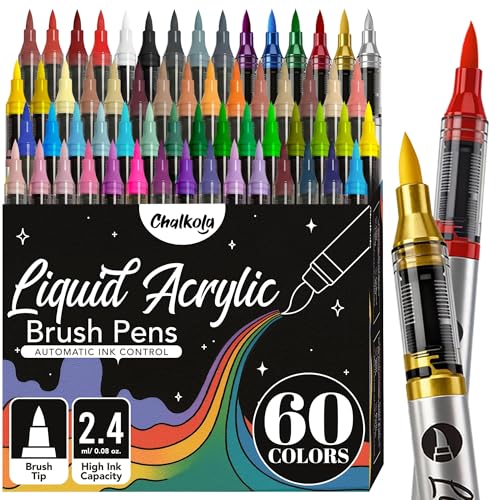
Chalkola Acrylic Brush Markers
What We Like
- 60 colors including 6 metallics
- Instant ink flow, no priming needed
- Waterproof and permanent when dry
- Flexible brush tip for varied strokes
Trade-offs
- Lighter shades need two coats for full opacity
- No dual-tip option for fine line work
- Sealant required on glass or ceramic for permanence
Sixty colors straight out of the box, that’s the headline here. Chalkola’s set gives you 54 bright shades plus 6 metallics, spanning the full spectrum, with cap colors that match the actual ink and a numbered swatch sheet for planning. For someone painting 3D prints who wants to match a specific filament tone or create gradients across a model’s surface, that breadth means fewer trips to buy a separate color. The flexible brush tip handles fine detail lines, medium strokes, and broad fills, and the water-based ink flows instantly without shaking or pumping, so you’re not fighting the tool while you work. It’s a generous palette for mixed-media projects that include 3D prints alongside canvas, wood, or rock.
The 60-color set includes 54 bright shades plus 6 metallics, but lighter colors need two coats for full opacity on dark surfaces, so plan accordingly if you’re working on black paper or dark 3D prints. The brush tip delivers fine lines, medium strokes, and broad fill without fraying on rough surfaces like rock or canvas, though there’s no separate fine liner for tiny crevices or crisp edges. Once dry, the water-based ink is waterproof and permanent, resisting water and handling on porous surfaces.
Product photos
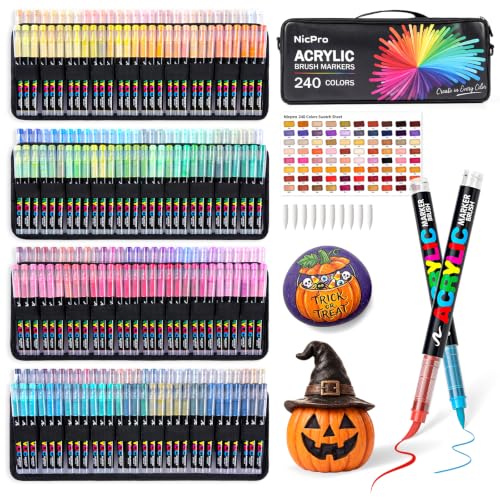
Nicpro Acrylic Paint Markers
What We Like
- 240 numbered shades with swatch sheet
- Works on 3D prints and many surfaces
- Flexible brush tip varies stroke width
Trade-offs
- 2.5 ml per marker limits large-scale projects
Two hundred and forty ready-to-use shades mean you can reach for the exact color you need instead of stopping to mix. The numbered caps and included swatch sheet turn the set into a true library, so finding and sorting colors stays straightforward even when you’re deep into a detailed miniature or multi-color project. The brush tip moves from fine outlines and precise details to lettering, shading and broad fills simply by changing pressure and angle, which keeps your workspace simple and your focus on the piece itself.
The trade-off comes down to capacity: each marker holds 2.5 ml of ink, so if you’re covering large 3D prints or broad backgrounds, you may run through a favorite shade faster than you’d like. Compared to the Coogert Dual Tip set’s 30 colors, Nicpro’s 240 offers far more precision in color selection, but the smaller individual ink volume means this library suits detail work and small-to-medium projects best. Owners report that storing the markers horizontally after use helps maintain smooth ink flow, keeping the palette ready for the next build.
Product photos
How We Evaluated Paint Markers For 3D Prints
Our evaluation began with a close look at each marker’s ink chemistry and tip design. We compared manufacturer claims about surface adhesion for common 3D printing materials like PLA, ABS, and resin, and cross-referenced these with patterns in owner feedback about real-world performance on layer lines and textured finishes.
The three most important criteria were adhesion to common print materials, opacity over dark or colored filament, and tip versatility for the range of detail work 3D prints demand, from tiny crevices to broad surfaces. We also considered dry time, permanence, and whether a sealant is needed.
Our goal is to narrow the field to markers that consistently meet the technical requirements of 3D print painting, so you can make a confident choice based on your specific project needs.
What To Look For In Paint Markers For 3D Prints
Choosing a paint marker for 3D prints means balancing adhesion, tip control, and color range. Here are the key criteria to consider.
Choose a marker with ink that bonds to your print material (PLA, ABS, or resin), a tip that matches your detail needs, and a finish that requires no extra sealant unless you want it.
Adhesion and Surface Compatibility
Not all paint markers stick to 3D print surfaces. PLA and ABS are smooth and slightly waxy, while resin prints can be porous. Look for markers that specifically list these materials in their compatible surfaces list. Acrylic-based markers generally adhere well, but some require a primer or a light sanding of the print before application. Water-resistant and permanent markers are best for durability.
Tip Types: Brush, Fine, and Dual Tips
3D prints often need both broad fills, fine details, and small accent marks. A dual-tip marker like the Coogert or ZSCM offers both a fine point for precision and a broader tip for coverage. Brush tips are flexible for varied stroke width, while bullet tips give consistent lines. For intricate models, a fine tip is essential for reaching deep layer lines.
Opacity and Layering
Dark or black filament requires high-opacity ink to cover in one coat. Many acrylic markers, especially lighter shades, need two coats for full coverage. Check owner feedback about opacity on dark surfaces. The MemOffice markers are noted for high opacity on dark backgrounds, while Chalkola’s lighter shades may need a second pass.
- Check the manufacturer’s list of compatible surfaces for your print material.
- Decide if you need a fine tip, brush tip, or both for your project’s detail level.
- Consider the number of coats needed for full opacity, especially on dark filament.
- Look for markers that are waterproof and permanent once dry to avoid smudging.
- Note the cure time if you need to handle the print soon after painting.
A marker that needs a sealant on glass or ceramic may still be fine on 3D prints, but check the finish durability for your specific use case.
Paint Markers For 3D Prints Compared
The table below compares the five best paint markers for 3D prints across key features, including color count, tip type, and surface compatibility.
| Product | Colors | Tip Type | Surfaces | Ink Base |
|---|---|---|---|---|
| ZSCM Liquid Gloss Shimmer Markers | 6 | 1mm fine & 2-3mm broad | PLA, ABS, resin, metal, glass, ceramic, plastic, sealed wood | N/A |
| Coogert Dual Tip Acrylic Paint Markers | 30 | Brush & Fine (1mm) | 3D prints, rock, wood, glass, plastic, canvas | Water-based acrylic |
| MemOffice Acrylic Paint Markers | 24 | Brush Tip | Rock, Fabric, Wood, Glass, 3D Prints | Water-Based, Acrylic |
| Chalkola Acrylic Brush Markers | 60 | Flexible brush tip | Canvas, rock, wood, glass, ceramic, plastic, 3D prints, fabric, paper | Water-based acrylic |
| Nicpro Acrylic Paint Markers | 240 | Brush tip (1-8 mm) | rock, wood, glass, ceramic, canvas, fabric, plastic, metal, models, 3D prints | Water-based acrylic |
Frequently Asked Questions
Do paint markers work on PLA 3D prints?
Yes, many acrylic paint markers work on PLA, but adhesion varies. Markers like the ZSCM Liquid Gloss Shimmer Markers are formulated to bond to PLA, ABS, and resin. For best results, lightly sand the print surface first to help the paint grip the smooth plastic.
What kind of paint marker is best for 3D prints?
Acrylic paint markers are generally the best choice for 3D prints because they offer good adhesion, opacity, and durability once dry. Look for markers that are waterproof and permanent, with a tip style that matches your detail work, dual-tip markers are especially useful for both broad coverage and fine lines.
How do I keep paint from bleeding on 3D prints?
Use a bleed-resistant marker like the MemOffice Acrylic Paint Markers, which are designed for clean lines. Also, ensure the print surface is clean and free of oils. Applying a thin layer of primer or sanding the surface can reduce bleeding by giving the paint a more absorbent base.
Can I use alcohol markers on 3D prints?
Alcohol markers are not recommended for 3D prints. They tend to bleed on layer lines, offer poor adhesion, and can dissolve the print material. Acrylic-based paint markers are the safer and more durable choice for painting PLA, ABS, and resin models.
How long do paint markers take to dry on 3D prints?
Dry time varies by marker. Some acrylic markers are dry to the touch in minutes, but the ZSCM markers require a 12-hour cure before handling. Always check the manufacturer’s instructions for full curing time to avoid smudging or scratching the finish.
The Bottom Line
For most 3D printing hobbyists, the ZSCM Liquid Gloss Shimmer Markers are the best overall choice. They deliver a durable, scratch-resistant gloss finish that bonds to the most common print materials, and the dual tips handle both detail work and broad coverage. Just plan around the 12-hour cure time.
If you need a huge color palette for complex models, the Chalkola Acrylic Brush Markers offer 60 colors, while the Nicpro Acrylic Paint Markers give you a 240-color numbered library with a swatch sheet. For those who prioritize clean, no-bleed lines above all else, the MemOffice markers are a strong pick.
The single most important factor is matching the marker’s adhesion to your print material. Choose a marker that is specifically compatible with PLA, ABS, or resin, and you will save yourself the frustration of paint that flakes off or refuses to stick.
