4 Best Printers For Art Prints And Stickers in 2026
This post contains affiliate links. As an Amazon Associate, we earn from qualifying purchases.
For artists and sticker makers, the Canon imagePROGRAF PRO-310 Professional Photo Printer takes the top spot with its 9-color pigment ink system that delivers gallery-quality prints and a Chroma Optimizer for smooth gloss uniformity. The Epson Expression Photo HD XP-15000 offers wide-format printing for art reproductions, while the RAINBOWDGT A3 UV Printer brings 3D embossing to sticker production.
The challenge with printing art and stickers is balancing color accuracy, ink longevity, and the ability to handle different media types. A printer that excels at fine-art photo paper may struggle with sticker vinyl, and vice versa. You need a machine that matches your specific output goals without compromising on detail or durability.
This guide is built from manufacturer specifications, expert round-ups, and patterns in owner feedback. We evaluated each printer on print quality, media versatility, ink system, and workspace requirements so you can match the right machine to your creative workflow.
Top 4 Printers For Art Prints And Stickers in the Market

Certain content that appears on this site comes from Amazon. This content is provided "as is" and is subject to change or removal at any time.
The Best Printers For Art Prints And Stickers, Reviewed
Canon imagePROGRAF PRO-310 Professional Photo Printer

What We Like
- 9-color pigment ink for gallery-quality prints
- Chroma Optimizer improves gloss uniformity
- Matte black ink boosts black density
- Anti-clogging system for reliable use
Trade-offs
- At 31.6 lb, it needs a sturdy dedicated table
- Large footprint requires significant desk space
- No built-in scanner or copy functions
A nine-color pigment ink system with a Chroma Optimizer means this printer delivers prints that rival gallery work. The matte black ink gives deep, rich blacks and wide dark-area reproduction, which matters a lot for art prints with shadow detail or high-contrast sticker designs. The anti-clogging system and skew correction keep things running smoothly, so you can focus on your art rather than troubleshooting. With a 13-inch print width, it handles a range of photo sizes, making it a natural fit for artists who want professional results without leaving their studio.
If you want gallery-quality prints, you have to give up some desk space. This printer weighs 31.6 pounds and sits 28.7 inches wide, so it needs a sturdy, dedicated workspace. Compared to the 18.7-pound Epson Expression Photo HD XP-15000, the Canon is a commitment to permanence. But for artists who value archival-grade output, the trade-off is worth it.
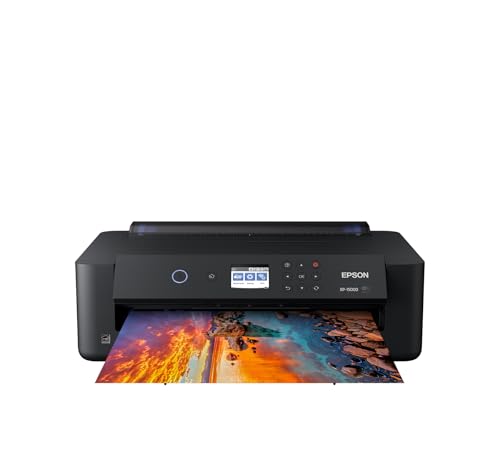
Epson Expression Photo HD XP-15000 Wide-Format Printer
What We Like
- Borderless prints up to 13×19 inches
- 6-color ink with red and gray
- Auto 2-sided document printing
- Dash Replenishment auto-orders ink
Trade-offs
- Designed only for Epson Genuine cartridges
- Rear tray holds only 50 sheets
- At 18.7 lb, not truly portable
A 13×19-inch print area means you can produce borderless prints up to that size without needing to tile or trim, which is exactly what a wide-format printer should deliver. The six-color Claria Photo HD ink set includes dedicated red and gray cartridges, so your color gamut stretches wider and your black-and-white prints gain enhanced depth. That makes this a natural fit for photographers and home studio owners who want vibrant, gallery-quality prints straight from their desktop.
The trade-off is that you are locked into Epson Genuine cartridges, and the rear specialty-media tray holds only 50 sheets, so heavy runs of thick paper require frequent reloading. Compared to the Epson EcoTank ET-15000, the XP-15000 offers a wider color gamut with its red and gray inks, but the EcoTank provides cartridge-free refilling for potentially lower ongoing ink costs. If your priority is print quality over volume, this wide-format printer gives you the color range and size you need.
Epson EcoTank ET-15000 Wide-Format Supertank Printer
What We Like
- Wide-format 13 x 19 in. printing
- Supertank eliminates cartridge replacements
- All-in-one scan, copy, and fax
- High 4800 x 2400 dpi resolution
Trade-offs
- 9 ppm color is slow for large sticker runs
- At 26.5 lb, it's heavy to move often
A 13 x 19 inch print area means you can produce full-bleed art prints and sticker sheets without tiling or trimming, which is a rare convenience in an all-in-one. The supertank system keeps ink costs low over time, and the 4800 x 2400 dpi resolution delivers crisp linework and smooth gradients for detailed illustrations. This printer suits artists who need a single machine that handles scanning, copying, and faxing alongside wide-format output, especially those working from a home office or small studio.
The trade-off is speed: at 9 pages per minute in color, it won’t keep pace with high-volume sticker production. For the artist who values versatility over raw speed and wants a wide-format workhorse without cartridge hassles, this is a practical fit.
Product photos
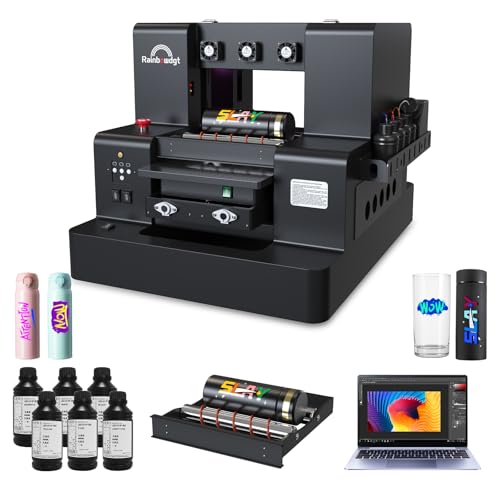
RAINBOWDGT A3 UV Printer
What We Like
- 3D embossing for textured stickers
- White ink circulation prevents nozzle clogs
- Vacuum platform holds materials steady
Trade-offs
- At 121.3 lb, needs a sturdy dedicated table
- Large footprint: 32 x 24.8 x 20 inches
- Setup requires WhatsApp contact for support
The 5760×2880 DPI resolution and 3D embossing capability let you print stickers with raised texture and vivid color that feel professional to the touch. This machine is built for creators who want to sell durable, waterproof, UV-resistant stickers, phone cases, or acrylic items straight from their workspace.
The real trade-off is size and weight: at 121.3 pounds and nearly three feet wide, this printer demands a permanent, sturdy spot, not something you tuck on a desk. If portability matters more than 3D texture, the Canon imagePROGRAF PRO-310 weighs 31.6 pounds and fits a smaller footprint, but it is designed for photo printing on paper. For sticker makers ready to commit to a workshop setup, the RAINBOWDGT offers capabilities that desktop photo printers are not designed for.
Product photos
How We Evaluated Printers For Art Prints And Stickers
Our evaluation combines detailed spec analysis, manufacturer documentation, expert round-ups, and common themes from owner reviews. We focused on the factors that directly affect the quality and practicality of art and sticker printing.
The four criteria that mattered most were print resolution and color accuracy, media handling and size limits, ink type and cost profile, and physical footprint. A printer with exceptional color gamut is useless if it cannot handle sticker paper, and a wide-format machine that prints beautifully may be too large for a home studio.
A research-led evaluation has limits: we cannot speak to long-term reliability or customer support responsiveness. We recommend reading recent owner feedback and checking warranty terms before purchasing, especially for specialized machines like UV printers.
What To Look For In Printers For Art Prints And Stickers
Choosing the right printer means matching its capabilities to the specific media you plan to use and the volume you intend to produce.
Look for a printer with wide color gamut, pigment-based ink for longevity, and the ability to handle your preferred media sizes from standard letter up to 13×19 inches or larger.
Print Quality And Color Accuracy
The number of ink colors and their formulation directly determines print quality. A six-color system with dedicated red and gray inks produces smoother gradients and more accurate skin tones than a standard four-color CMYK setup. For fine-art prints, pigment inks resist fading longer than dye-based inks. Look for a printer with at least 2400 dpi resolution for sharp detail reproduction.
Media Handling And Size
Consider the media types you will use most: glossy photo paper, matte fine-art paper, sticker vinyl, or rigid substrates. Some printers handle borderless printing up to 13×19 inches, while others are limited to letter size. If you plan to print stickers on adhesive sheets, check that the printer supports that media weight and finish. The paper tray capacity matters for production runs.
Ink System And Cost
Pigment ink offers better longevity and water resistance than dye ink but typically costs more per milliliter. Supertank systems eliminate cartridge replacements and reduce per-page costs significantly, though they require a larger upfront investment. Proprietary ink systems limit your options, while some printers accept third-party refillable cartridges. For UV printing, consider white ink circulation systems that prevent nozzle clogs.
Physical Footprint And Setup
Printers for art prints range from compact desktop models weighing under twenty pounds to industrial units over one hundred twenty pounds. Measure your available workspace before buying, including clearance for paper feed and output trays. Heavier printers need sturdy dedicated tables. Consider whether you need integrated scanning, copying, or faxing, which adds size and cost.
The best printer is the one that fits your workspace, handles your preferred media, and produces colors you trust for your artwork.
Printers For Art Prints And Stickers Compared
The table below compares the key specifications and strengths of each printer to help you narrow your options.
| Product | Print Width | Ink System | Weight | Dimensions |
|---|---|---|---|---|
| Canon imagePROGRAF PRO-310 Professional Photo Printer | 13 inches | 9 color + Chroma Optimizer pigment | 31.6 pounds | 28.7 x 18.6 x 14.0 inches |
| Epson Expression Photo HD XP-15000 Wide-Format Printer | 13 x 19 inches | 6-color Claria Photo HD | 18.7 pounds | 18.7 x 30.9 x 16.2 inches |
| Epson EcoTank ET-15000 Wide-Format Supertank Printer | 13 x 19 in. | N/A | 26.5 pounds | 29.6 x 19.6 x 14.3 inches |
| RAINBOWDGT A3 UV Printer | N/A | CMYK+W+V (6 bottles) | 121.3 pounds | 32.0 x 24.8 x 20.0 inches |
Frequently Asked Questions
What is the best printer for art prints and stickers?
The Canon imagePROGRAF PRO-310 is the best overall choice for artists who want gallery-quality pigment prints and stickers and have a permanent workspace for a larger printer. Its 9-color ink system and Chroma Optimizer deliver outstanding gloss uniformity and black density.
Can a regular printer print stickers?
Yes, many inkjet printers can print on adhesive sticker paper, but results vary. A printer with pigment ink and high resolution produces more durable, water-resistant stickers. For 3D embossed stickers with texture, a dedicated UV printer like the RAINBOWDGT A3 is required.
What is the difference between dye ink and pigment ink for art prints?
Pigment ink uses solid particles suspended in liquid, producing prints that resist fading and water damage for decades. Dye ink dissolves completely in liquid, offering vibrant colors but much shorter longevity. For art prints and stickers meant to last, pigment ink is the better choice.
How large can printers for art prints print?
Standard desktop printers print up to letter or legal size. Wide-format printers like the Epson XP-15000 and EcoTank ET-15000 can print borderless up to 13 x 19 inches. The RAINBOWDGT A3 UV printer handles media up to A3 size and can print on rigid surfaces.
Do I need a wide-format printer for art prints?
If you plan to sell prints in standard sizes like 8×10 or 11×14 inches, a wide-format printer that handles 13×19 inch paper lets you print with full-bleed borders and trim to size. It also accommodates larger art reproductions and sticker sheets.
The Bottom Line
The Canon imagePROGRAF PRO-310 is the best overall choice for artists who demand gallery-quality pigment prints and have a dedicated workspace. Its 9-color ink system and Chroma Optimizer deliver exceptional color accuracy and gloss uniformity for fine-art prints and stickers alike.
If you need wide-format printing for art reproductions on a tighter budget, the Epson Expression Photo HD XP-15000 offers borderless 13×19 inch prints with a 6-color ink system. For artists who also need scanning and copying, the Epson EcoTank ET-15000 combines wide-format printing with a supertank ink system that eliminates cartridge replacements.
The single most important factor is matching the printer to your specific media and output goals. A printer that excels at fine-art photo paper may not handle sticker vinyl well, so choose based on what you will actually print most often.
