
10 Best Stylus For Digital Artists Convertible Laptops 2026
This post contains affiliate links. As an Amazon Associate, we earn from qualifying purchases.
For digital artists working on convertible laptops, the Microsoft Surface Pen Model 1776 is the best overall choice thanks to its 4,096 pressure points and low latency that make fine shading feel fluid. If haptic feedback matters more for a paper-like feel, the Microsoft Surface Slim Pen 2 is a strong alternative, while the Dell Premier Active Pen PN7522W delivers exceptional battery life for long sessions.
A convertible laptop’s screen is both your canvas and your interface, so the stylus you choose directly affects every line you draw. Pressure sensitivity, latency, and compatibility with your specific device determine whether your strokes feel natural or frustrating.
This guide is based on a thorough review of manufacturer specifications, expert round-ups, and patterns in owner feedback. We break down the ten best styluses by their strengths so you can match one to your device and your drawing style.
Top 10 Styluses For Digital Artists Convertible Laptops in the Market
Certain content that appears on this site comes from Amazon. This content is provided "as is" and is subject to change or removal at any time.
The Best Styluses For Digital Artists Convertible Laptops, Reviewed
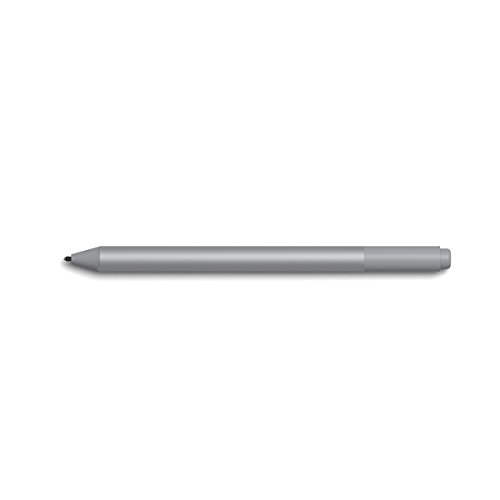
Microsoft Surface Pen Model 1776
What We Like
- 4,096 pressure points for fine shading
- Low latency for real-time ink flow
- Broad Surface device compatibility
Trade-offs
- Bluetooth 4.0 instead of newer 5.0
- Requires separate tip kit for replacements
With 4,096 pressure points that respond to the lightest touch, this pen gives you the control to sketch fine lines and shade softly without fighting the tool. The low latency means your strokes appear on screen as you make them, so the rhythm of drawing stays natural. It pairs via Bluetooth 4.0 and works across a long list of Surface devices, from the Pro 3 to the Studio 2. That makes it the most versatile pick for anyone who already owns or plans to buy a convertible laptop from Microsoft’s lineup.
The decisive fact here is that this pen uses Bluetooth 4.0, which is a generation behind the Slim Pen 2’s 5.0 connection. For everyday sketching and note-taking, that older standard still works reliably across multiple Surface generations without fuss. Artists who want a responsive, pressure-sensitive stylus will find this the most straightforward choice.
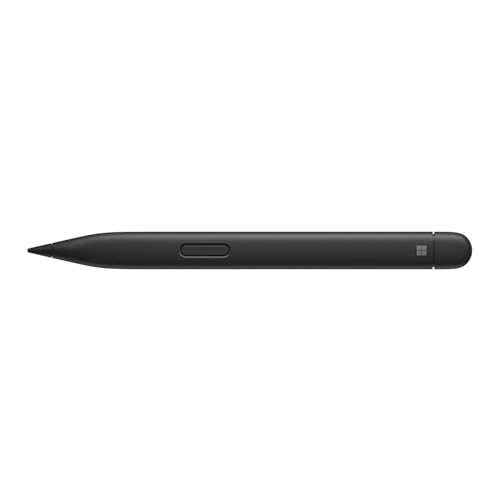
Microsoft Surface Slim Pen 2
What We Like
- Haptic motor mimics paper feel
- Zero force inking for instant response
- Ultra-precise tilting and shading
- Slim carpenter-inspired design
Trade-offs
- Only works with Surface devices
- Requires Bluetooth for haptic feedback
The haptic motor in this pen is designed to mimic the feel of writing on paper, so strokes on the screen can feel more natural than with a standard stylus. With 4,096 pressure levels and zero force inking, ink flows as soon as the tip touches the screen, which helps reduce the need for extra pressure. This combination can be useful for anyone who wants a more tactile writing or drawing experience on a compatible Surface device.
This pen is built for Microsoft Surface devices, so it may not work with other brands. Compared to the Dell Premier Active Pen PN7522W, which also offers 4,096 pressure levels, the Surface Slim Pen 2 focuses on a paper-like feel through its haptic motor rather than broad compatibility. If you use a Surface and want that feedback, this pen provides it in a way that other styluses may not.
Dell Premier Active Pen PN7522W

What We Like
- 40-day battery on single charge
- 4096 pressure levels for fine control
- 3-year Advanced Exchange Service
Trade-offs
- Only compatible with Windows devices
- Replaceable nibs but only two spares included
For digital artists working on convertible laptops, the battery life here is a standout. Owners report getting up to 40 days on a single charge, which means far fewer interruptions during long creative sessions. The 4,096 levels of pressure sensitivity allow for fine control over stroke weight, from the lightest sketch to a bold line. A cone-shaped nib provides a responsive feel with virtually no lag, so the pen keeps up with quick hand movements. Customizable top and side buttons give quick access to shortcuts, saving time switching tools. It’s a practical, low-fuss tool for anyone who values endurance over frills.
The trade-off is that this pen is Windows-only, so if you use a Chromebook or iPad convertible, you’re out of luck. Compared to the Lenovo Yoga Pen Rechargeable, which also supports tilt and pressure sensitivity but lacks a locator, the Dell adds that extra help for finding a lost pen. The two spare nibs are included to get you started. For a rechargeable stylus that rarely needs a top-up, this is a practical choice when your workflow can’t stop for a dead battery.
Metapen Stylus Pen M2

What We Like
- USB-C fast charging, 1 hour to full
- 100 hours of use per charge
- Tail eraser for quick edits
Trade-offs
- Only compatible with MPP 2.0 devices
- No Bluetooth pairing for extra features
- Magnetic attachment limited to Surface models
A one-hour full charge that delivers 100 hours of use means you can sketch through a week of studio sessions without hunting for a cable. The 4096 pressure levels and ±55° tilt give you fine control for shading and line weight, while the tail eraser works like a pencil’s eraser, flip it over and fix mistakes fast. This pen suits digital artists who work on convertible laptops and need a stylus that stays ready when inspiration hits, especially if you often forget to charge overnight.
Compatibility is the main trade-off here: it relies on the MPP 2.0 protocol, so it won’t pair with older or non-compatible devices, and it lacks Bluetooth for extra shortcut buttons. If your device supports MPP 2.0 and you want a stylus that keeps up with long creative sessions, this pen meets those needs.
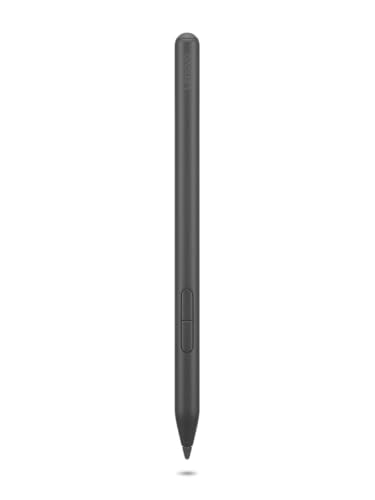
Lenovo Yoga Pen Rechargeable
What We Like
- Six supported protocols for wide compatibility
- USB-C rechargeable, no disposable batteries
- Replaceable nib for long-term use
- Magnetic attachment keeps pen secure
Trade-offs
- No Bluetooth pairing for extra shortcut buttons
- Side buttons toggle sleep/off, not customizable
The pen supports five protocols. WGP, MPP 2.0, USI 2.0, AES 2.0, and AES 1.0, which cover most Lenovo Yoga, ThinkPad, ThinkBook, and Chrome devices, so you can use it across multiple laptops without checking compatibility. USB-C charging and magnetic attachment keep it ready and stowed without fuss. That kind of flexibility makes it a natural fit for artists who switch between devices or work in a mixed-brand studio where one pen needs to cover several laptops.
If you don’t need Bluetooth for extra shortcut buttons or a remote finder, this rechargeable stylus gives you broad compatibility across Lenovo, ThinkPad, ThinkBook, and Chrome devices. It handles note-taking and drawing without juggling multiple pens.
Product photos
Lenovo Digital Pen 3

What We Like
- Advanced tilt recognition for natural shading
- 4,096 pressure levels capture fine detail
- Supports six pen protocols for wide compatibility
- Two side buttons for shortcut controls
Trade-offs
- Works only with Lenovo laptops, not tablets
- No built-in battery or rechargeable design listed
The catch is that this pen is strictly for Lenovo laptops; it won’t work with Lenovo tablets or any non-Lenovo device, so you’re locked into that ecosystem. Compared to the Dell Premier Active Pen PN7522W, which has a rechargeable design, the Digital Pen 3 does not list a battery, so you’ll need to check if your specific model powers it through the device. It also only pairs with a specific list of models, so double-check your model before buying. If you’re using a supported Lenovo laptop and want tilt response for your art, this stylus fits the bill.
HP Active Rechargeable Tilt Pen MPP 2

What We Like
- MPP 2.0 for smooth, low-lag strokes
- 9g activation for light, precise marks
- USB-C charging with charge indicator
- Magnetic barrel for easy storage
Trade-offs
- No Bluetooth pairing like some competitors
- No Bluetooth pairing for shortcut customization
The MPP 2.0 protocol cuts delay and color transition lag, so your strokes follow your hand with the kind of responsiveness that matters when you’re building up layers or switching between fine lines and broad washes. With only 9 grams of pressure needed to register a mark, this pen lets you sketch lightly without forcing the tip, which helps keep your wrist relaxed during long drawing sessions. It’s built specifically for HP convertibles, and the magnetic barrel snaps neatly to the side of your device. That way you won’t hunt for it between ideas. The USB-C charging and blinking low-battery indicator mean you can top it off quickly and get back to work without surprises.
The HP Active Rechargeable Tilt Pen MPP 2 skips Bluetooth pairing, which means you won’t get shortcut buttons or palm rejection calibration that some other pens offer, like the Microsoft Surface Pen Model 1776. Instead, it gives you two customizable side buttons for your own shortcuts, and it relies on MPP 2.0 technology for a smooth, low-lag writing experience. For HP convertible owners who want a straightforward stylus that charges via USB-C and stays put with its magnetic barrel, this pen is a clean fit.
Product photos
Milikilo Stylus Pen F97

What We Like
- USB-C fast charge in 40 minutes
- 80-hour battery life per charge
- Magnetic attachment for secure storage
- Palm rejection and tilt sensitivity
Trade-offs
- Only 1024 pressure levels (lower than 4096 alternatives)
- No Bluetooth pairing or programmable buttons
The 80-hour battery life on a 40-minute USB-C charge means this pen can go for long stretches between charges, which is handy for daily sketching and note-taking. Palm rejection and tilt sensitivity add practical control for drawing on a Surface convertible. The magnetic design lets it attach securely to the tablet for storage, and the aluminum-alloy body gives it a solid feel. For someone who wants reliable core features without extras that drive up cost, this delivers the essentials cleanly.
Pressure sensitivity is where this pen makes a compromise: at 1024 levels, the Milikilo F97 doesn’t offer the fine gradation of the Microsoft Surface Slim Pen 2’s 4096 points. You’ll still get smooth line variation, but subtle brush transitions in demanding digital painting apps won’t be as nuanced. If your work demands the finest control and you don’t mind shorter battery life, the Slim Pen 2 is worth the extra spend. For everyone else focused on solid performance at a friendlier price, the F97 is a smart, honest tool.
Product photos
Hacey Active Stylus Pen

What We Like
- 2-year battery on one AAAA cell
- Two quick-access shortcut buttons
- No Bluetooth or drivers needed
Trade-offs
- 1024 pressure levels vs 4096 on many rivals
- Requires checking model for 10-touch-point support
A two-year battery life on a single AAAA cell means this stylus is ready when you are, no hunting for a charger mid-sketch. Designed specifically for HP convertible laptops like the OmniBook X Flip and Spectre x360, it pairs instantly without Bluetooth or drivers, just pop in the battery and start drawing. The 1024 pressure sensitivity levels handle light shading and bold strokes well, and palm rejection lets you rest your hand on the screen without smudging. For HP OmniBook owners who want a fuss-free, long-lasting tool for note-taking and casual sketching, this is a natural fit.
The Hacey Active Stylus Pen offers 1024 pressure sensitivity levels, which is fewer than the 4096 levels found on the Dell Premier Active Pen PN7522W. So if you do fine line work or detailed digital painting, you may notice less nuance in stroke variation. For a dedicated HP stylus that prioritizes battery endurance and simplicity over max precision, it delivers dependable value without the hassle of recharging.
Product photos
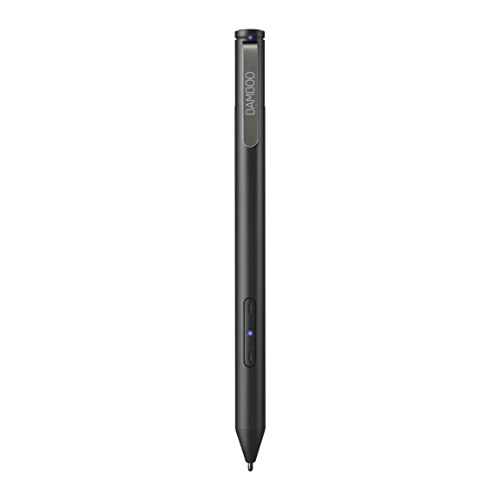
Wacom Bamboo Ink Smart Stylus
What We Like
- Triangular ergonomic design with soft-touch surface
- Three nib types for personal writing style
- Windows Ink workspace shortcut button
- Simultaneous pen and touch support
Trade-offs
- Heavier and bulkier than typical pen styluses
- Requires Windows 10 device with pen support
The Wacom Bamboo Ink Smart Stylus puts two pen protocols (MPP and AES) in one body, so it works across a broad range of Windows 10 devices without hunting for compatibility. That triangular shape and soft-touch surface make long note-taking or sketching sessions more comfortable than a round stick, and the dedicated Windows Ink shortcut button lets you jump straight into your workspace with one tap. It suits artists who split their time between different convertible laptops and want a single stylus that stays reliable on all of them, especially if you prefer a pen that feels substantial in hand rather than pencil-thin.
At 7.1 inches long and nearly three inches wide, the Bamboo Ink is noticeably chunkier than the Microsoft Surface Pen Model 1776, which is slimmer and lighter. That extra bulk is the trade-off for its multi-device flexibility and ergonomic triangular design with a soft-touch surface, which makes it comfortable to hold for long note-taking sessions. If you switch between devices and want instant access to the Windows Ink workspace, this pen delivers that convenience, but digital artists who work on one primary laptop might prefer a slimmer alternative.
Product photos
How We Evaluated Styluses For Digital Artists Convertible Laptops
We researched specifications from manufacturers, studied expert round-ups from art and tech publications, and analyzed patterns in owner feedback to build this guide. Because stylus performance is deeply tied to hardware compatibility, we prioritized picks that match specific device ecosystems.
Our evaluation focused on four criteria. Pressure sensitivity levels (from 1,024 to 4,096) determine how naturally you can shade and vary line weight. Latency and tilt recognition affect how responsive and organic your strokes feel. Compatibility with your laptop’s protocol. MPP 2.0, AES, or proprietary Surface standards, is non-negotiable. Finally, battery life and charging convenience matter for uninterrupted studio time.
We present the facts so you can weigh what matters most for your workflow.
What To Look For In Styluses For Digital Artists Convertible Laptops
Choosing a stylus for a convertible laptop means matching the pen’s protocol to your device and prioritizing the features that affect your drawing experience most.
Match the stylus protocol to your laptop (MPP 2.0, AES, or Surface-specific). Look for at least 4,096 pressure levels for nuanced shading. Consider tilt sensitivity, battery life, and physical comfort for long drawing sessions.
Protocol Compatibility
The stylus must speak the same language as your laptop’s digitizer. Microsoft Surface devices use a proprietary N-Trig protocol, while most other Windows convertibles support MPP (Microsoft Pen Protocol) 2.0 or Wacom AES. A stylus that supports multiple protocols, like the Lenovo Yoga Pen Rechargeable with six protocols, offers flexibility across different devices. Check your laptop model’s specification before buying.
Pressure Sensitivity and Tilt
Pressure levels range from 1,024 to 4,096. For detailed sketching and shading, 4,096 levels provide the finest control over line weight. Tilt recognition, found on the Lenovo Digital Pen 3, allows you to shade naturally by angling the pen, much like a real pencil. If you work with expressive strokes, both features are worth prioritizing.
Battery Life and Charging
- Check whether the stylus uses a disposable battery (like the Hacey Active Stylus Pen‘s 2-year AAAA cell) or a rechargeable battery (like the Metapen Stylus Pen M2‘s USB-C fast charging).
- Consider how long a full charge lasts, the Dell Premier Active Pen PN7522W claims up to 40 days.
- Decide if a magnetic attachment for storage on your laptop is important for keeping the pen nearby.
A stylus that matches your laptop’s protocol and offers at least 4,096 pressure levels will serve most digital artists well.
Styluses For Digital Artists Convertible Laptops Compared
The table below compares the ten styluses side by side on their key specs, compatibility, and standout features so you can see at a glance which one fits your convertible laptop and drawing style.
| Product | Pressure Levels | Connectivity | Dimensions |
|---|---|---|---|
| Microsoft Surface Pen Model 1776 | 4,096 | Bluetooth 4.0 | 5.8 x 0.4 x 0.4 inches |
| Microsoft Surface Slim Pen 2 | 4,096 points | Bluetooth 5.0 | 8.0 x 2.1 x 0.8 inches |
| Dell Premier Active Pen PN7522W | 4096 | Bluetooth Pairing | 6.1 x 0.4 x 6.1 inches |
| Metapen Stylus Pen M2 | 4096 levels | MPP 2.0 | N/A |
| Lenovo Yoga Pen Rechargeable | N/A | WGP/MPP2.0/MPP2.6/USI2.0/AES2.0/AES1.0 | 0.4 x 0.4 x 6.0 inches |
| Lenovo Digital Pen 3 | 4,096 | WGP, MPP2.0, AIT, USI1.0, AES2.0, AES1.0 | 0.4 x 5.5 x 0.4 inches |
| HP Active Rechargeable Tilt Pen MPP 2 | 9g activation | MPP 2.0 | 5.9 x 0.4 x 0.4 inches |
| Milikilo Stylus Pen F97 | 1024 | N/A | 6.2 x 0.4 x 0.4 inches |
| Hacey Active Stylus Pen | 1024 | MPP 1.51 | N/A |
| Wacom Bamboo Ink Smart Stylus | N/A | MPP / AES | 7.1 x 2.8 x 0.9 inches |
Frequently Asked Questions
What stylus works with most convertible laptops?
The Lenovo Yoga Pen Rechargeable supports six pen protocols, making it the most versatile pick for artists who switch between multiple Lenovo or Chrome convertible laptops. For broader Windows compatibility, the Wacom Bamboo Ink Smart Stylus works across Windows 10 devices with pen support.
Do I need 4096 pressure levels for digital art?
4,096 pressure levels give you the finest control over line weight and shading, which professional illustrators and serious sketchers will appreciate. If you do mostly note-taking or light drawing, a stylus with 1,024 levels, like the Milikilo Stylus Pen F97, can still serve well at a lower cost.
Is tilt sensitivity important for drawing?
Tilt sensitivity lets you shade by angling the stylus, mimicking the behavior of a real pencil or charcoal stick. Artists who rely on expressive shading techniques will find it essential, while those who work with clean line art may not miss it.
Can I use a Surface Pen on a non-Surface laptop?
Microsoft Surface Pens use a proprietary N-Trig protocol and are designed specifically for Surface devices. They will not work with most non-Surface convertible laptops, which typically use MPP 2.0 or Wacom AES protocols.
What is the difference between MPP 2.0 and Wacom AES?
MPP 2.0 is Microsoft’s open protocol supported by many Windows laptops, while Wacom AES is a licensed protocol found on select devices. Styluses built for one protocol generally do not work with the other, so matching your laptop’s digitizer is critical.
The Bottom Line
For Surface users who need a responsive, pressure-sensitive stylus for sketching and note-taking, the Microsoft Surface Pen Model 1776 is the best overall choice. Its 4,096 pressure points and low latency make fine shading feel natural across multiple Surface device generations.
If you use a Windows convertible from Dell, HP, Lenovo, or another brand, look to the award that matches your device. The Dell Premier Active Pen PN7522W offers exceptional battery life, while the Lenovo Digital Pen 3 provides advanced tilt recognition for Lenovo laptops. Budget-conscious artists will find solid value in the Milikilo Stylus Pen F97.
The single most important buying factor is protocol compatibility. Confirm your laptop’s digitizer standard before choosing a stylus, and the rest of your decision will fall into place.
