
8 Best Scanners For Artists in 2026
This post contains affiliate links. As an Amazon Associate, we earn from qualifying purchases.
The Epson Perfection V850 Pro Scanner leads our guide with its 6400 dpi resolution and 4.0 Dmax for smooth tonal gradations, making it the best overall pick for artists who need to digitize their work faithfully. The Best Fast A3 Scanner is the VIISAN VF3240 A3 Scanner, which is our pick for rapid large-format work. The Canon CanoScan LiDE 400 offers a slim design for tight spaces.
The challenge with scanning art is capturing the true texture, color depth, and fine lines of your original piece. A flatbed scanner built for documents can crush shadows or miss pencil strokes entirely. The right scanner for an artist handles high resolution, wide tonal range, and often larger formats.
This guide is based on specifications, manufacturer documentation, and patterns we found in owner feedback from expert round-ups. We focus on the features that matter most to painters, illustrators, and sketchbook artists, helping you choose confidently without needing to test each model yourself.
Top 8 Scanners For Artists in the Market
Certain content that appears on this site comes from Amazon. This content is provided "as is" and is subject to change or removal at any time.
The Best Scanners For Artists, Reviewed
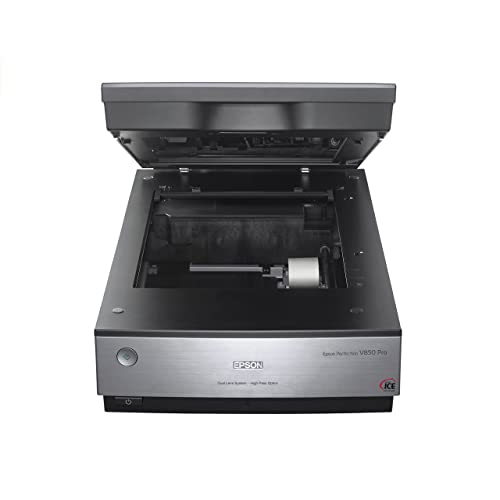
Epson Perfection V850 Pro Scanner
What We Like
- 6400 dpi resolution for fine detail
- 4.0 Dmax delivers smooth tonal gradations
- Dual lens system optimizes for each scan
- Digital ICE removes dust and scratches
Trade-offs
- At 20.9 pounds, it is heavy to move
- Large footprint needs dedicated desk space
A 6400 dpi optical resolution paired with a dual lens system means this flatbed can capture the finest pencil strokes and watercolor washes with exceptional clarity. The 4.0 Dmax gives you smooth shadow transitions and rich tonal range, so a charcoal sketch or a faded photograph retains its full depth. For artists who digitize original work for prints, portfolios, or archival purposes, the Epson Perfection V850 Pro delivers the kind of detail that makes a scanned file feel like a true reproduction. It suits anyone who values precision over portability and is willing to invest in a tool that handles everything from delicate line art to dense ink washes.
The trade-off is size and weight: at 20.9 pounds and nearly 20 inches wide, this scanner requires a permanent spot on your desk or a sturdy table. It is not something you stash in a drawer like the slim Canon CanoScan LiDE 400. But if your priority is uncompromising scan quality for your art, the V850 Pro gives you the optical tools to get it right from the start.
VIISAN VF3240 A3 Scanner

What We Like
- 4-second A3 scans at 200 DPI
- 2400 DPI optical resolution
- Frameless edge-to-edge scanning
- Auto-Scan starts when lid closes
Trade-offs
- CIS sensor cannot scan 3D objects
- Large footprint: 24.8" × 21.7"
Four seconds to capture a full A3 document at 200 DPI makes this the fastest flatbed in this guide for bulk digitization. That speed, paired with a frameless glass that lets you scan right to the edge, means you can plow through stacks of blueprints, oversized sketchbook spreads, or reference sheets without repositioning or cropping later. This scanner is built for artists, architects, and CAD users who need to move large-format originals into digital files quickly, day after day.
The CIS sensor delivers crisp, consistent scans of flat paper, perfect for drawings, prints, and documents, but it won’t handle thick books, 3D objects, or anything with a curved surface. If you regularly scan textured paintings or embossed work, a CCD-based model like the Epson Expression 12000XL-GA will give you better depth of field. For the artist whose workflow is dominated by flat, large-format originals and who values throughput above all else, this is the speed champion.
Canon CanoScan LiDE 400 Scanner

What We Like
- Ultra-slim 1.7-inch profile
- 4800 dpi resolution preserves fine detail
- 8-second scans with USB Type-C
- Auto scan mode detects document type
Trade-offs
- Max paper size is letter (8.5 x 11.7 inches)
- Max paper size is letter (8.50 x 11.69 inches)
The 4800 x 4800 dpi optical resolution captures fine detail in documents and photos, which is useful for enlarging or printing later. That resolution comes in a case just 1.7 inches thick, so it fits easily on a shelf or in a drawer. The USB Type-C cable handles both data and power, eliminating the need for a separate power adapter.
The trade-off shows up the moment you need to scan a full spread from a large art book or a 12 x 18 inch drawing.
Product photos
Epson Expression 12000XL-GA Scanner

What We Like
- 2400 x 4800 dpi resolution
- One-touch color restoration
Trade-offs
- At 31.5 lbs, it is very heavy
- Large footprint needs dedicated desk space
- No transparency or film scanning capability
The real trade-off is the weight and size. For large-format reflective art, the 12000XL-GA gives you the space and quality that smaller flatbeds simply cannot match.
Plustek OpticPro A320E Scanner
What We Like
- CCD sensor for accurate color scanning
- Large A3 scan area (12" x 17")
- Batch scanning to multiple PDFs
- TWAIN and WIA driver support
Trade-offs
- At 16.5 lb, it's heavy to move
- Large footprint: 31.2" long, 23" wide
- Linux support requires checking with seller
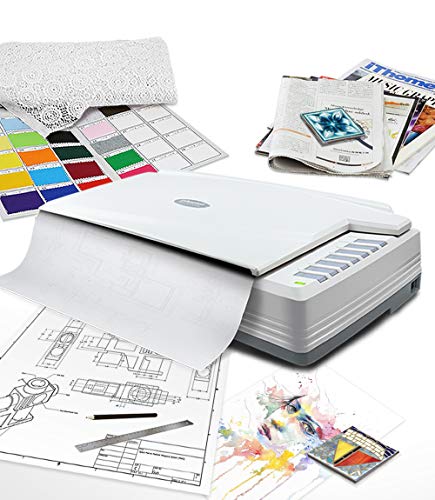
The Plustek OpticPro A320E uses a CCD sensor, which is well-suited for color scanning tasks. Its 12″ x 17″ scan area handles A3-sized originals, and at 7.8 seconds per scan, it offers a reasonable pace for large-format work. This scanner is designed for users who need to digitize documents, maps, drawings, or bound books up to that size, with support for batch scanning to multiple PDFs.
CZUR Shine Ultra Pro Scanner
What We Like
- Folds 90° for easy portability
- Auto-flatten and deskew curved pages
- A3 large format in a lightweight body
- Adjustable height for different documents
Trade-offs
- 440 DPI max limits fine art reproduction
- Requires computer connection to scan
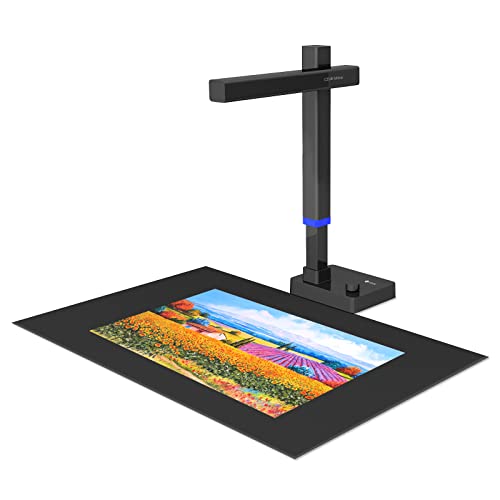
A 24-megapixel document scanner that folds 90° and weighs 2 pounds lets you digitize A3 books, maps, or oversized sketches wherever you can set up a laptop. The auto-flatten and deskew features handle curved book pages without pressing the spine flat, which saves time when archiving bound materials. This scanner suits anyone who needs to digitize large documents quickly and portably, especially if you work outside a fixed studio.
Its 440 DPI max resolution won’t match the optical detail of a flatbed like the Epson Perfection V850 Pro at 6400 DPI. For high-resolution reproduction, you would want that extra optical detail. But for quick digitizing of books or documents, the CZUR Shine Ultra Pro gets the job done in a compact, lightweight package.
Product photos
Plustek OS1180 A3 Flatbed Scanner
What We Like
- A3 scan in about 9 seconds
- LED light source saves energy
- One-touch button for quick use
- Includes ABBYY OCR and DocAction software
Trade-offs
- At 9.5 lb, it's light but still bulky for small desks
- Only flatbed scanning, no automatic document feeder
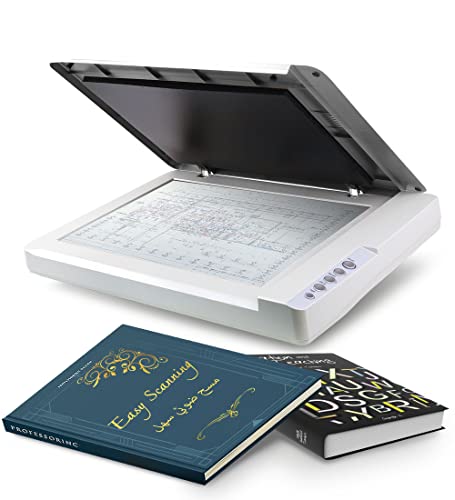
An A3 scan in roughly nine seconds means you can digitize large sketches, reference sheets, or archival documents without the usual wait. That speed, paired with a 48-bit color depth for rich tonal range, makes this flatbed a natural fit for libraries and schools where multiple users need quick, reliable results. The LED light source also skips warm-up time, so you can power it on and scan immediately. It’s built for shared environments: the one-touch preset button simplifies operation, and the bundled ABBYY OCR software helps turn scanned text into editable files for cataloging or lesson plans.
This is a pure flatbed, no automatic document feeder, so scanning a stack of pages means lifting the lid for each one. At 9.5 pounds, it’s far easier to move between rooms or store on a cart than heavier A3 scanners. For a school or library that needs consistent, fuss-free scanning of oversized art and documents without a dedicated workstation, this is a practical, energy-efficient choice.
Product photos
VIISAN 3120 A3 Flatbed Scanner

What We Like
- Frameless design for thick books
- Auto-Scan when lid closes
- 8-second A3 color scans
- Works with Windows and Mac
Trade-offs
- 1200 dpi requires ViiScan software
- Bulky footprint for small desks
A scan bed that handles documents up to 11.98 by 16.8 inches means you can digitize full A3 artwork, book spreads, and CAD drawings without folding or cutting. That large, frameless edge also lets you lay thick albums or magazines flat, so the spine doesn’t fight the lid. For school projects, small-office archiving, or digitizing oversized prints, this scanner delivers a clean 1200 dpi image in about eight seconds per page. The auto-scan function, which triggers when you close the lid, enhances efficiency for continuous scanning.
The CIS sensor captures flat paper beautifully but blurs anything with depth, so scanning a textured canvas, a CD, or a fabric swatch will disappoint. Also, to reach the full 1200 dpi resolution, you must use the included ViiScan software rather than standard Windows or Mac drivers, which cap at 600 dpi. That’s fine for most document and photo work, but it adds a small step if you prefer your usual scanning app.
Product photos
How We Evaluated Scanners For Artists
Our evaluation method is research-based. We analyzed manufacturer specifications and documentation for each model, then cross-referenced those specs with patterns reported by owners and experts in art-focused round-ups. The goal was to understand how each scanner performs in real studio conditions, not just on paper.
We prioritized four criteria. Optical resolution determines how much fine detail a scanner can capture from pencil work, ink lines, and brush strokes. Dynamic range (Dmax) tells us how well the sensor preserves shadow and highlight detail in paintings and photographs. Scan area matters because many artists work larger than letter size, especially with sketchbook spreads or canvases. Build and footprint affects whether the scanner fits comfortably in a studio or home workspace.
An evaluation based on research has honest limits. We rely on what the specifications promise and what consistent owner feedback confirms. This approach helps you narrow the field to models worth your attention, but we always recommend checking return policies and compatibility with your operating system before buying.
What To Look For In Scanners For Artists
Choosing the right scanner starts with understanding your art. A watercolor painter needs different specs than a graphite illustrator. Focus on the sensor type, resolution, and scan area that match your typical work.
Look for optical resolution of at least 2400 dpi for fine art, a Dmax of 4.0 or higher for good shadow detail, and a scan area that fits your largest original without cropping.
Sensor Type: CCD vs. CIS
The sensor is the heart of the scanner. CCD (Charge-Coupled Device) sensors use a lens and mirror system to capture light, producing deeper color accuracy and better focus across the entire scan bed. They can also scan textured surfaces and thick books. CIS (Contact Image Sensor) scanners are thinner, lighter, and faster, but they have a shallow depth of field. CIS models struggle with textured paintings, curled book pages, or any original that isn’t perfectly flat against the glass. For fine art reproduction, CCD is almost always the better choice.
Optical Resolution and Dmax
Optical resolution is the true measure of detail, not interpolated numbers. For capturing pencil hatching, fine ink lines, or watercolor paper texture, look for at least 2400 dpi. The Epson Perfection V850 Pro offers 6400 dpi, which is overkill for most prints but valuable for scanning small originals that need enlargement.
Dmax (dynamic range) measures how well the scanner distinguishes subtle tonal steps from pure black to pure white. A Dmax of 4.0 or higher is good for most art; 4.0 or higher is excellent for paintings with deep shadows and bright highlights.
Scan Area and Form Factor
Standard letter-size scanners (8.5 x 11.7 inches) work for many sketches and prints. Artists who work in sketchbooks, on A3 paper, or on canvas panels need a larger scan bed. A3 scanners (11.7 x 16.5 inches or larger) accommodate spreads and oversized work. Consider the physical footprint too. Large-format scanners like the Epson Expression 12000XL-GA weigh over 30 pounds and need dedicated desk space. If your studio is tight, a slim model like the Canon CanoScan LiDE 400 may be a better fit.
Software and Connectivity
Good scanning software can save hours of post-processing. Look for features like Digital ICE for automatic dust and scratch removal, auto-flatten for curved book pages, and batch scanning to PDF. TWAIN and WIA driver support ensures compatibility with Adobe Photoshop, Lightroom, and other creative software. USB Type-C connectivity offers faster transfer speeds and simpler cable management. Avoid scanners that require proprietary software for basic functions unless you are comfortable with the workflow.
- Measure your largest original artwork before choosing a scan area.
- Check your computer’s operating system version for driver compatibility.
- Consider a frameless design if you scan thick books or bound sketchbooks.
- Look for one-touch buttons if you scan frequently and want to speed up your workflow.
A good rule: match the scanner’s resolution to the smallest detail you want to capture, then double it for safety.
Scanners For Artists Compared
The table below compares the key specs of our eight recommended scanners. It covers resolution, scan area, weight, and sensor type. This way you can see at a glance which model fits your studio and your art.
| Product | Resolution | Max Scan Size | Weight |
|---|---|---|---|
| Epson Perfection V850 Pro Scanner | 6400 dpi | N/A | 20.9 pounds |
| VIISAN VF3240 A3 Scanner | 2400 × 2400 DPI | A3 / 12" × 17" | N/A |
| Canon CanoScan LiDE 400 Scanner | 4800 x 4800 dpi | 8.27 x 11.69, 8.50 x 11.69 | 3.6 pounds |
| Epson Expression 12000XL-GA Scanner | 2400 x 4800 dpi | N/A | 31.5 lbs |
| Plustek OpticPro A320E Scanner | N/A | 12" x 17" / A3 | 16.5 pounds |
| CZUR Shine Ultra Pro Scanner | 24 megapixels | A3 | 2.0 pounds |
| Plustek OS1180 A3 Flatbed Scanner | N/A | 11.7" x 17" (A3) | 9.5 pounds |
| VIISAN 3120 A3 Flatbed Scanner | 1200 x 1200 dpi | 11.98" x 16.8" | N/A |
Frequently Asked Questions
What is the best scanner resolution for scanning artwork?
For most artwork, an optical resolution of 2400 dpi is sufficient to capture fine pencil lines, ink details, and brush textures. Higher resolutions like 4800 or 6400 dpi are useful for scanning very small originals that you plan to enlarge significantly, but they also produce very large file sizes.
Can I scan thick or bound sketchbooks with a flatbed scanner?
Yes, but you need a scanner with a frameless or hinged lid design that can accommodate the thickness of a book. The VIISAN 3120 A3 Flatbed Scanner and the Plustek OpticPro A320E are good options for this, as they allow the lid to sit flat over thick originals without damaging the binding.
What is the difference between a CCD and CIS scanner for art?
CCD scanners use a lens system that captures light from a greater depth of field, making them ideal for scanning textured paintings, 3D objects, and thick books. CIS scanners are thinner and faster but have a shallow depth of field, which means they cannot focus properly on textured or uneven surfaces, making them less suitable for fine art reproduction.
How do I clean a scanner glass without damaging it?
Use a soft, lint-free microfiber cloth slightly dampened with distilled water or a dedicated electronics cleaning solution. Never spray liquid directly onto the glass. Wipe gently in a straight line, not circles, to avoid smearing. Avoid ammonia-based cleaners, which can damage the glass coating over time.
Do I need a separate film or transparency adapter for scanning slides?
Not all flatbed scanners include film scanning capability. The Epson Perfection V850 Pro includes a transparency unit for scanning slides and film. The Epson Expression 12000XL-GA, by contrast, has no transparency scanning capability. Check the product specifications carefully if you need to scan negatives or slides.
The Bottom Line
The Epson Perfection V850 Pro Scanner is our best overall pick for artists who demand archival-quality scans of detailed originals. Its 6400 dpi resolution and 4.0 Dmax handle everything from delicate graphite to oil paintings, and the Dual Lens system optimizes for each scan type. If you have the desk space and need the best, this is the one.
For artists who need to digitize large work quickly, the VIISAN VF3240 A3 Scanner delivers four-second A3 scans with edge-to-edge coverage. Budget-conscious users or those with limited space should look at the Canon CanoScan LiDE 400 for its ultra-slim profile. Another option is the VIISAN 3120 A3 Flatbed Scanner for fast A3 scanning in a school or small office setting.
The single most important factor is matching the scanner to your art. A painter of large canvases needs a large scan bed. A detailed illustrator needs high optical resolution. A sketchbook artist needs a frameless lid. Pick the spec that matches your most common original, and you will be happy with the results.
